When inspecting features, particularly identifying point geometries, I find myself wanting to visualise the Identifier attribute for alot of points, sometimes along lines and centre of polygons. Obviously desktop GIS have this functionality…. but
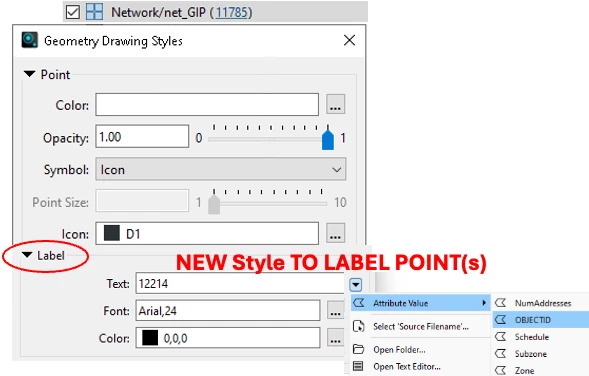
I’m asking to build on the Mark location option which already has a Label option. Can this same code be added under the Display Control, where users edit the styling of each dataset/layer
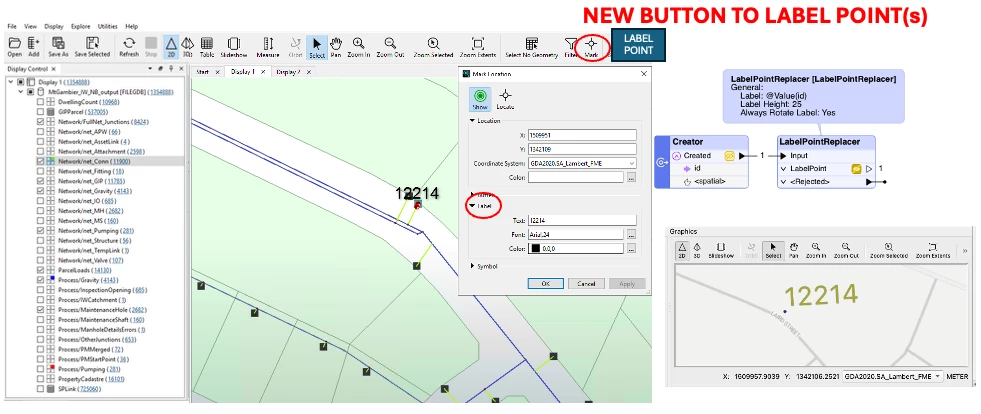
A workaround in workbench is to use LabelPointReplacer transformer to create text geom
So the updated UI will need Label section in the drawing style… and as pictured below
- ability to select the Attribute Value column and make this the label text
- the font and colour would be nice
- label size (replacing font size?) may also be of assistance, though projected coordinates are likely needed to display in metres