Solved

SQLExcutor results now a row not columns

  • August 27, 2020
  • 8 replies
  • 34 views

rudy_v
Contributor
Forum|alt.badge.img+6

Hi,


I have upgraded my sqlexcutor transformer - now the result ashow as single, row , delimited and shows missing.

is this the way it should work - or a bug?

before (version 8)
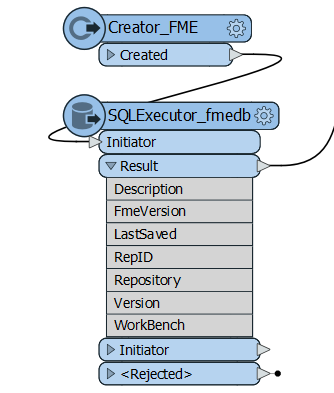
Capture

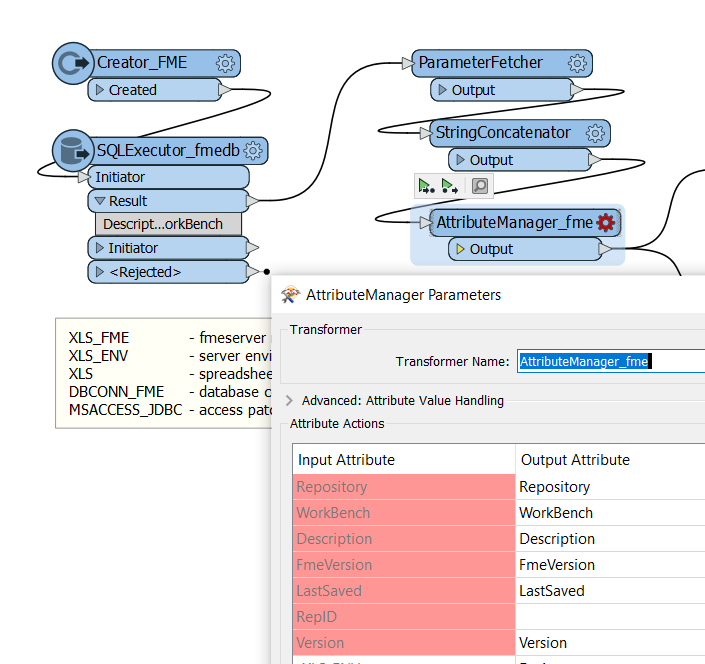
after upgrade (version 9)

Capture2


Best answer by hollyatsafe

Hi @rudy_v​ ,


I'm sorry that you have encountered this issue. I was able to reproduce it so I have filed a ticket (FMEDESKTOP-10650) to request this fix.


In the meantime I'd recommend either stick to working with Version 8 for now, or alternatively with Version 9 rather than exposing attributes within the SQLExecutor you can use the AttributeExposer after the 'Result' output.


In this particular workflow, since you are using Creator > SQLExecutor, swapping this out with the SQLCreator might be a third option. I have confirmed this does not have the same issue.


UPDATE: This issue has been fixed for FME 2020.1.2.

This post is closed to further activity.
It may be an old question, an answered question, an implemented idea, or a notification-only post.
Please check post dates before relying on any information in a question or answer.
For follow-up or related questions, please post a new question or idea.
If there is a genuine update to be made, please contact us and request that the post is reopened.

8 replies

ebygomm
Influencer
Forum|alt.badge.img+46
  • Influencer
  • August 27, 2020

What happens if you go into the SQLExecutor and go to Attributes to Expose and choose Populate from SQL Query?


rudy_v
Contributor
Forum|alt.badge.img+6
  • Author
  • Contributor
  • August 27, 2020

What happens if you go into the SQLExecutor and go to Attributes to Expose and choose Populate from SQL Query?

@ebygomm​ 

it shows 6 columns, but when you click ok, it changes to one row of attributes, separated by comma.

It works perfect - if you leave it at version(8) of sqlexcutor, but as soon as you upgrade it or use a new one , it makes all the columns, as 1 row of columns, with comma seprated, and shows values as missing


david_r
Celebrity
  • August 27, 2020

That's weird, I've never seen that before.

Can you show us the SQL, or at the very least the SELECT part?


virtualcitymatt
Celebrity
Forum|alt.badge.img+47

Yuck, that's not fun at all. Maybe it's better to delete the transformer and re add a fresh one. Sounds nasty


Forum|alt.badge.img+2
  • Best Answer
  • August 27, 2020

Hi @rudy_v​ ,


I'm sorry that you have encountered this issue. I was able to reproduce it so I have filed a ticket (FMEDESKTOP-10650) to request this fix.


In the meantime I'd recommend either stick to working with Version 8 for now, or alternatively with Version 9 rather than exposing attributes within the SQLExecutor you can use the AttributeExposer after the 'Result' output.


In this particular workflow, since you are using Creator > SQLExecutor, swapping this out with the SQLCreator might be a third option. I have confirmed this does not have the same issue.


UPDATE: This issue has been fixed for FME 2020.1.2.


rudy_v
Contributor
Forum|alt.badge.img+6
  • Author
  • Contributor
  • August 28, 2020

Hi @rudy_v​ ,


I'm sorry that you have encountered this issue. I was able to reproduce it so I have filed a ticket (FMEDESKTOP-10650) to request this fix.


In the meantime I'd recommend either stick to working with Version 8 for now, or alternatively with Version 9 rather than exposing attributes within the SQLExecutor you can use the AttributeExposer after the 'Result' output.


In this particular workflow, since you are using Creator > SQLExecutor, swapping this out with the SQLCreator might be a third option. I have confirmed this does not have the same issue.


UPDATE: This issue has been fixed for FME 2020.1.2.

@hollyatsafe​ 


Thanks - i thought it was an issue, but you cannot use it with new work benches, as it only has version 9, but i have used FME 2019, created it with version 8, and then open with 2020 to continue

My example is just one of many we have - probably over a 100+

So i have send to all developers to not upgrade the sqlexcutor to version 9


Regards

Rudy


david_r
Celebrity
  • August 28, 2020

@hollyatsafe​ 


Thanks - i thought it was an issue, but you cannot use it with new work benches, as it only has version 9, but i have used FME 2019, created it with version 8, and then open with 2020 to continue

My example is just one of many we have - probably over a 100+

So i have send to all developers to not upgrade the sqlexcutor to version 9


Regards

Rudy

Another possibility is to simply copy/paste the transformer between FME versions.


rudy_v
Contributor
Forum|alt.badge.img+6
  • Author
  • Contributor
  • September 12, 2020

Good Day,


Thanks - SQLExecutor are working correctly now with the updated release of 2020.1.2


Rudy