Question

FME 2020.1.2 Why has the button to enable/disable parameter prompting suddenly vanished ? It was still there in FME 2020.1 !! I don't appreciate such changes with a minor version update !!!


  • September 8, 2020
  • 3 replies
  • 84 views

mhab
Contributor
Forum|alt.badge.img+10
FME 2020.1.2 Why has the button to enable/disable parameter prompting suddenly vanished ? It was still there in FME 2020.1 !! I don't appreciate such changes with a minor version update !!!

This post is closed to further activity.
It may be an old question, an answered question, an implemented idea, or a notification-only post.
Please check post dates before relying on any information in a question or answer.
For follow-up or related questions, please post a new question or idea.
If there is a genuine update to be made, please contact us and request that the post is reopened.


3 replies

andreaatsafe
Safer
Forum|alt.badge.img+15

Hi @mhab​ ,


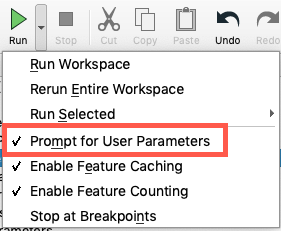
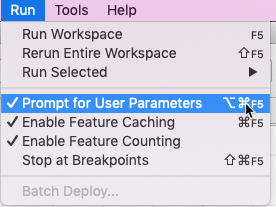
I'm not quite sure if the issue you are experiencing is with the "Prompt for User Parameters", but there are a couple of places to look to find it:

1. From the toolbar, you can use the drop down next to "Run" and enable/disable the "Prompt for User Parameters:

Run_Toolbar

2. From the top menu, under "Run" you can also find the "Prompt for User Parameters":

Run_Menu

If this isn't quite what you're looking for, would you mind sharing a screenshot so I can have a better understanding.

- Andrea


mhab
Contributor
Forum|alt.badge.img+10
  • Author
  • Contributor
  • September 8, 2020

Hi @mhab​ ,


I'm not quite sure if the issue you are experiencing is with the "Prompt for User Parameters", but there are a couple of places to look to find it:

1. From the toolbar, you can use the drop down next to "Run" and enable/disable the "Prompt for User Parameters:

Run_Toolbar

2. From the top menu, under "Run" you can also find the "Prompt for User Parameters":

Run_Menu

If this isn't quite what you're looking for, would you mind sharing a screenshot so I can have a better understanding.

- Andrea

I am sorry, I got confused and mixed up things. The button is still there, or is possible to use (icon is a Question mark). What confirmed me in my confusion is, that some menu items have the icon in the menu on left side before the text (at least on Windows) and some don't.


Sorry for the confusion and thanks for the fast reply


andreaatsafe
Safer
Forum|alt.badge.img+15

I am sorry, I got confused and mixed up things. The button is still there, or is possible to use (icon is a Question mark). What confirmed me in my confusion is, that some menu items have the icon in the menu on left side before the text (at least on Windows) and some don't.


Sorry for the confusion and thanks for the fast reply

Hi @mhab​ ,

Not a problem, if you're wanting to have the icon on the toolbar you can customize your tool bar and add the icon to it from FME Options>Toolbar under the "Run" section you can drag the "Prompt for User Parameters" to where you would like it in the toolbar

Hope this help you!

-Andrea