
For local MCP use try Goose


oliver.morris
Supporter
Forum|alt.badge.img+14

I tried to use an FME MCP service using the FME Flow beta release, it works nicely with Claude and Copilot Studio but wanted to try locally. I opted to try with Ollama but the setup was too long then came across Goose - https://goose-docs.ai/

I added the MCP url and it just works, worth having a go if you have a Mac Air M1 or above, the performance isnt that bad at all - actually with the latest Gemma model, better than some of the Copilot outputs I have had.

Have fun!

 

4 replies

salvaleonrp
Enthusiast
Forum|alt.badge.img+23

I tried to use an FME MCP service using the FME Flow beta release, it works nicely with Claude and Copilot Studio but wanted to try locally. I opted to try with Ollama but the setup was too long then came across Goose - https://goose-docs.ai/

I added the MCP url and it just works, worth having a go if you have a Mac Air M1 or above, the performance isnt that bad at all - actually with the latest Gemma model, better than some of the Copilot outputs I have had.

Have fun!

 

Hi Oliver!  I need your notes. :)


redgeographics
VIP
Forum|alt.badge.img+63

Thanks for sharing!


raghavendrans
Enthusiast
Forum|alt.badge.img+28

​@oliver.morris Have you tried connecting FME Flow MCP with Goose?

Especially for Using Data Virtualization With Generative AI – FME Support Center

If yes, can you throw some light?

Thanks

SRG


raghavendrans
Enthusiast
Forum|alt.badge.img+28

Hi FME Community,

To add to this thread on how to configure Goose Desktop to talk to FME Flow MCP Server:

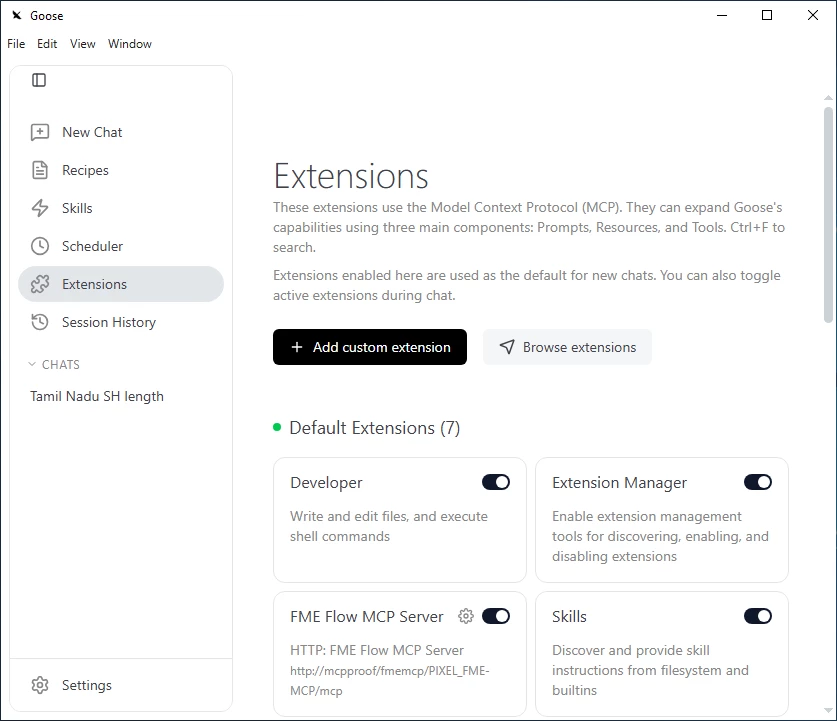
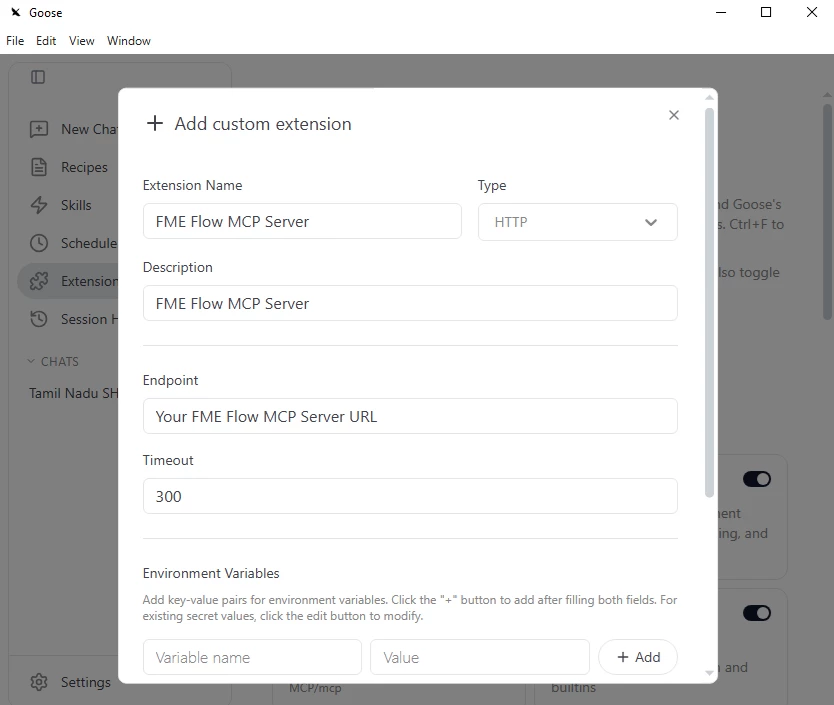
In Goose Desktop, go to the Extensions menu on the left and click Add custom extension.

Then copy the FME Flow MCP Server URL from your FME Flow MCP Server web interface and paste it in the Endpoint field.

Make sure your FME Flow MCP Server is running and then restart your Goose Desktop.

Enable the FME Flow MCP Server extension in your new chat and you are all set to call your FME Flow Server MCP tools available.

Happy FME :-) ing

Cheers

SRG