


Solved

FME Flow MCP and Geospatial Capabilities

  • September 22, 2026
  • 4 replies
  • 181 views

raghavendrans
Enthusiast
Forum|alt.badge.img+28

Hello FME AI members,

I have been using FME Flow MCP Server and MCP tools with Goose Desktop for PoC on Generative AI capabilities using Geospatial Data.

  • The FME Workspaces I have authored now have a single SHP file being read with few attributes exposed as User Parameters (used in the FME Flow MCP Tool as well) and a MCP Writer. Can I have multiple FME Features read in a single workspace?
  • Can I perform any GIS functions in the FME Workflow (using FME transformers) for example to check Point feature within an Area feature and use this workspace as a FME MCP tool for use by GPT to validate a query like for example  a new utility service customer/ subscriber wants to know if his/her house falls can be serviced by an utility service company. The prospective customer provides his/her house address (a parameter in my FME Workspace), which is geocoded using FME to create a point, which is then overlaid using PointOnAreaOverlayer transformer in a FME Workspace. If the _overlaps count is not zero, then the response by the GPT should be serviceable. Can this be achieved? If yes, can you guide me?

Thanks

SRG

Best answer by jglick

Hi SRG, 

Yes both are possible.  I created a basic example that demonstrates this using the attached template.  I used a spatial filter vs the PointOnAreaOverlayer, just a preference of mine, either will likely work.  

  • The template was created using 2026.3.  
  • If you want to test with the geocoder I used, a google api key with goecoding api enabled is needed.  Save the key as the default value for the parameter before publishing, and hide the published parameter. 
  • SAFE has some great resources covering MCP in FME Flow

Cheers!

-John

View original

4 replies

jglick
Contributor
Forum|alt.badge.img+8
  • Contributor
  • Best Answer
  • September 23, 2026

Hi SRG, 

Yes both are possible.  I created a basic example that demonstrates this using the attached template.  I used a spatial filter vs the PointOnAreaOverlayer, just a preference of mine, either will likely work.  

  • The template was created using 2026.3.  
  • If you want to test with the geocoder I used, a google api key with goecoding api enabled is needed.  Save the key as the default value for the parameter before publishing, and hide the published parameter. 
  • SAFE has some great resources covering MCP in FME Flow

Cheers!

-John


raghavendrans
Enthusiast
Forum|alt.badge.img+28

​@jglick Tried your FME Workspace template today after replacing the PythonCaller with a Geocoder set to OpenStreetMap (Nominatim).

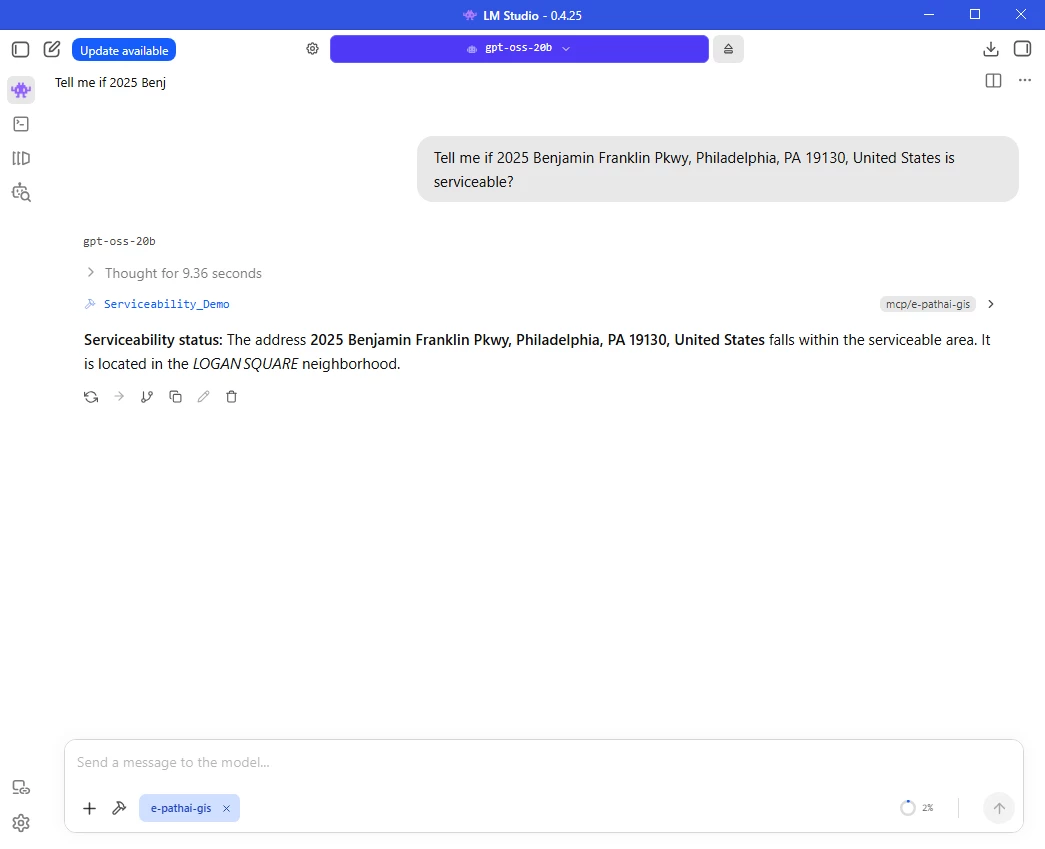
Here is a result for an address which is shown as serviceable, including the name of the neighborhood (which I believe is the LLMs capability Ggpt-OSS-20b run locally using LMStudio)

LMStudio-FME Flow MCP Server-MCP Tools-Serviceability

Thank you once again.

Happy FME :-) ing

Cheers

SRG


jglick
Contributor
Forum|alt.badge.img+8
  • Contributor
  • October 15, 2026

Great to see it working with a local LLM!


raghavendrans
Enthusiast
Forum|alt.badge.img+28

Great to see it working with a local LLM!

And most interestingly without any GPUs!