Question

How to config automation-specific job logs cleanup?

  • May 21, 2026
  • 5 replies
  • 62 views

chelseawu
Supporter
Forum|alt.badge.img+17

For automations run at different frequencies e.g. hourly, daily, monthly, how to manage logfiles cleanup to best use of space?

Is it possible to set the hourly automations logfiles clean up daily, while daily automation log files clean up biweekly. 

5 replies

j.botterill
Influencer
Forum|alt.badge.img+58
  • Influencer
  • May 25, 2026

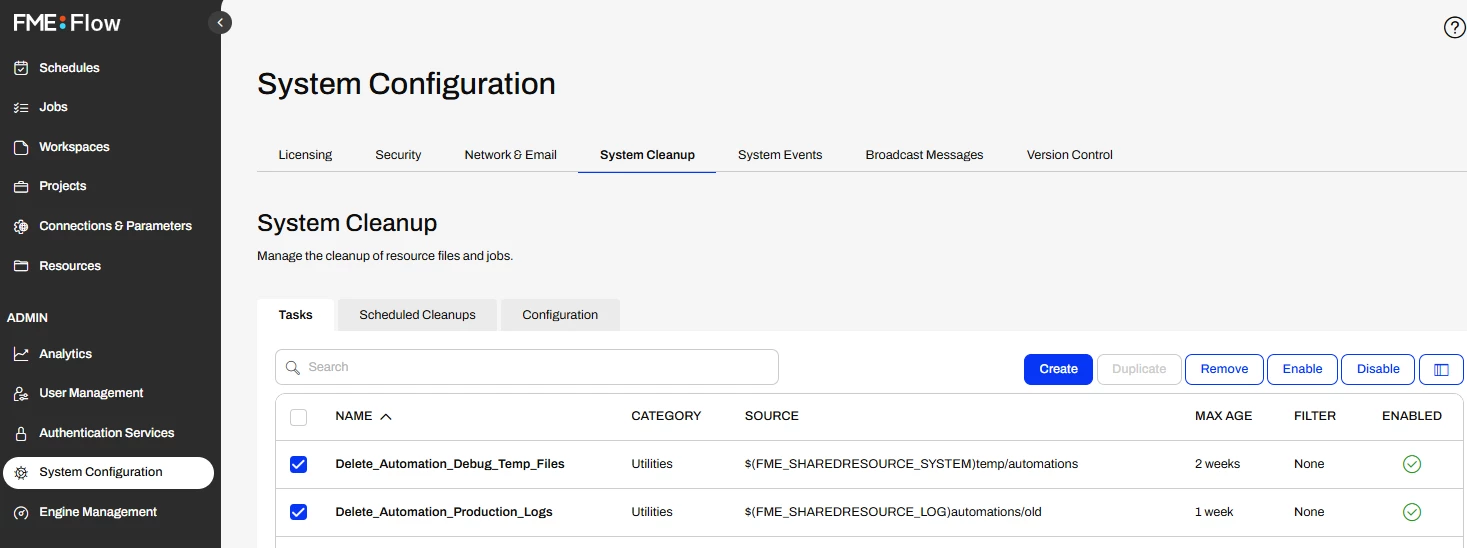
Check out under System Configuration > System Cleanup Cleaning Up FME Flow Logs and Other Files 

  • you can change max age
  • or better still, duplucate existing tasks and add a filter to met your requirements to clean up certain items more frequently


chelseawu
Supporter
Forum|alt.badge.img+17
  • Author
  • Supporter
  • May 26, 2026

@j.botterill Thanks for your reply, but unfortunately I do not think the provided filter options will work for our case.

Our job logs are stored under $(FME_SHAREDRESOURCE_LOG)engine/current/jobs with filenames such as job_<jobid>.log (for example, job_221935.log). The available filter options only appear to support filtering by whether the filename ends with, or does not end with, a specified string.

Since the log filename only contains the job ID and does not include the automation name, automation ID, or automation frequency, the filter cannot identify which logs belong to hourly, daily, or monthly automations. Therefore, it does not appear possible to apply different cleanup schedules to different automations using these filename-based filter options alone.


redgeographics
VIP
Forum|alt.badge.img+62

There’s an open idea for exactly this: 

Please vote! 😃


chelseawu
Supporter
Forum|alt.badge.img+17
  • Author
  • Supporter
  • May 28, 2026

@redgeographics I did. 😀

Just wondering if there is any workaround before that idea is implemented.


chelseawu
Supporter
Forum|alt.badge.img+17
  • Author
  • Supporter
  • May 28, 2026

It looks like there is not much we can do through the current system cleanup configuration.

I am considering creating a workflow to track log files and clean them up based on a user-defined run frequency.