




Question

FME Flow - job did not complete

  • January 23, 2026
  • 1 reply
  • 59 views

nordpil
Supporter
Forum|alt.badge.img+12

We just upgraded to FME Flow 2025.2.1 and are now seeing some odd errors in our nightly data automation. Two nights in a row we have had jobs stopping at the same spot, there is nothing in the job log, and the job just fails with the message Job did not complete. When I look in the Windows event log (SYSTEM) for the server I can see a note of a “Fail Fast Exception” in fmeengine.exe - has anyone else seen anything like that?
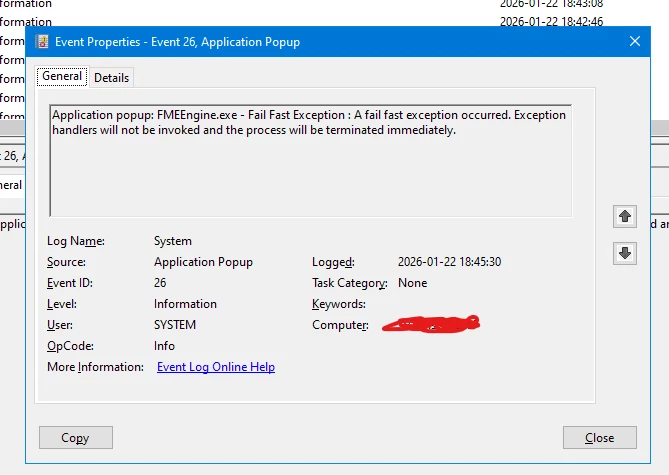

 

1 reply

shirleychan
Safer
Forum|alt.badge.img+5
  • Safer
  • January 26, 2026

Hi ​@nordpil ,

A Fail Fast Exception usually occurs when the job runs into an unexpected error. Unexpected errors may include running out of memory or a corrupt workspace component.
Because the jobs stop at the same spot, the error may be coming from a corrupt workspace component. The job log file lists the sequence of transformers and can show you the point where it stops working. This can help identify the transformer/reader causing the error.
To troubleshoot, check if the workspace successfully runs in FME Form. Upgrades in FME Form and Flow can introduce small changes in transformers/readers/writers and sometimes corrupt them when you open a legacy workbench in a new version of Flow and Form. To correct the corrupted components, delete the transformer/reader/writer and re-add them to the canvas. 
I hope this helps. If the issue still exists, please feel free to submit a support ticket.

Thank you.

-Shirley


