Question

FME Flow 2025.2.1 - Display issues

  • March 6, 2026
  • 4 replies
  • 97 views

ebygomm
Influencer
Forum|alt.badge.img+48

Has anyone else run into issues with how things are displayed in FME Flow 2025.2.1


Examples: Engine Assignment Rules - we have two hosts which differ in name by suffix only. The way engines are displayed on the Engine Assignment Rules tab means you can’t quickly tell which engines are assigned as the critical bit is displayed as … (the full names are available on mouseover)

 

The hostnames displayed in No proxy also have their urls partially replaced with …. so there appears to be no way to actually check via the user interface what values are entered here. In 2024.1 these values were displayed in full 

4 replies

shirleychan
Safer
Forum|alt.badge.img+5
  • Safer
  • April 13, 2026

Hi ​@ebygomm,

The truncation you're seeing in FME Flow 2025.2.1 was an intentional UX change to improve readability of long names in the interface.

That said, thank you for flagging the hostnames issue — I was able to reproduce this and have filed it with our development team for review. For your reference, the ticket number is: [FMEFLOW-27855].

For the broader display concerns, I encourage you to click this link and submit an idea capturing your product improvement suggestions. Other users can upvote it, and our product team reviews submissions for future consideration.

I hope this helps!


ebygomm
Influencer
Forum|alt.badge.img+48
  • Author
  • Influencer
  • April 14, 2026

The truncation you're seeing in FME Flow 2025.2.1 was an intentional UX change to improve readability of long names in the interface.

More aesthetically pleasing maybe, but not actually more readable if you can’t tell the difference between two different values!


s.jager
Influencer
Forum|alt.badge.img+24
  • Influencer
  • April 14, 2026

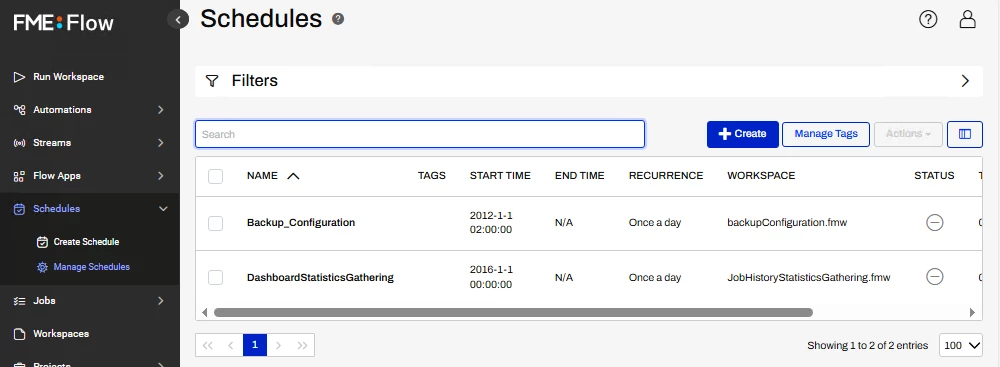
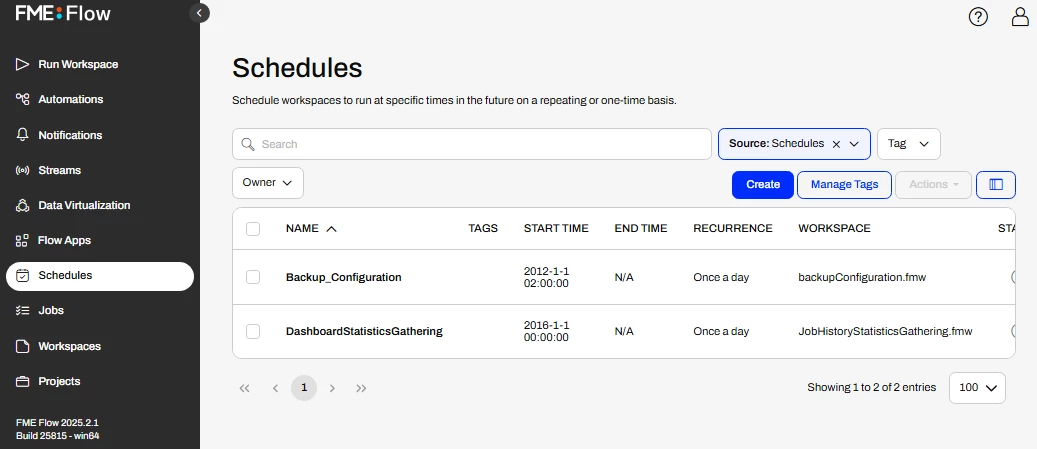
I‘ve noticed a couple of times that when your screen is not very wide (like my laptop screen...), columns in overviews disappear on the right side - but there is no scrolling horizontally, which means you have to modify the columns shown in order to se the important ones

That caught me out last week when checking scheduled jobs: because of the default columns, the Status-column was hidden in the Manage Schedules-page. Which meant that I missed that the Status of one (important) job was Stopped instead of Started. That Status is an inconsistency in itself, since when you edit a job the checkbox to change the Status has a label “Enabled” - so I would expect the label for the symbol on the overview to say Enabled or Disabled.

But the lack of horizontal scrolling is a bit inconvenient, tbh...


ebygomm
Influencer
Forum|alt.badge.img+48
  • Author
  • Influencer
  • April 14, 2026

I’d not spotted that since I’m normally working on a wide screen but can verify I see the same, top is FME Flow 2024 where a horizontal scroll bar appears if the window is too narrow to display all the columns. Bottom is FME Flow 2025.2.1 where no horizontal scroll bar appears