


Question

Writing pipe delimited data back out as pipe delimited with same exact format as original

  • August 11, 2026
  • 2 replies
  • 15 views

asep
Contributor
Forum|alt.badge.img+4

Hi, 

I am having an issue with writing out data as .txt pipe delimited in the exact same format as the original data. The original data used a CSV reader in order to work with the attributes I needed to modify. But when I try to write it out again as .txt, the format is never exactly the same. I have tried padding the fields, but it does not work. 

Example:

Original-

# gbaddr field view
 
Output

Also, in the output, it continues to add a pipe (|) to the end of each record; the original did not and I need it to not add it in the output. 


Any ideas are welcome!

2 replies

j.botterill
Evangelist
Forum|alt.badge.img+62
  • Evangelist
  • August 12, 2026

You might want to explore Dynamic writing, where the CSV schema read, is passed to the writer feature type with Dynamic schema ticked and the user attributes manual removed. This assumes you don’t do any renaming or modification of the schema in the transformation

I would use workflow transformers like FeatureReader and FeatureWriter. The safe articles mostly show how to setup a dynamic workflow using readers with schema as a resource etc.


j.botterill
Evangelist
Forum|alt.badge.img+62
  • Evangelist
  • August 12, 2026

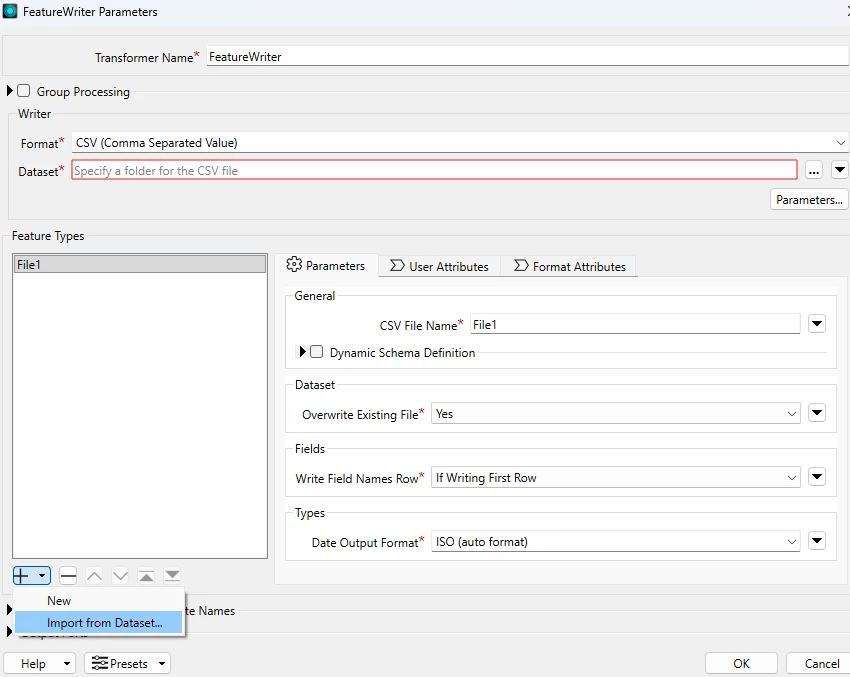
Another option, on the writer is to “Import from dataset”, where you specify csv and select the original file to define the user attributes (manual). 

Import from Dataset onto a feature writer

 Once you have the user attributes imported, then you make a connection to the data stream and check all the incoming attribute names match that of the destination (attribute mapping)

Understanding Feature Types and Attributes