



Solved

WorkbenchRunner reports success even when called workspace is terminated – how to stop execution?

  • February 5, 2026
  • 2 replies
  • 45 views

jugoslaviaa
Enthusiast
Forum|alt.badge.img+6

Hello,

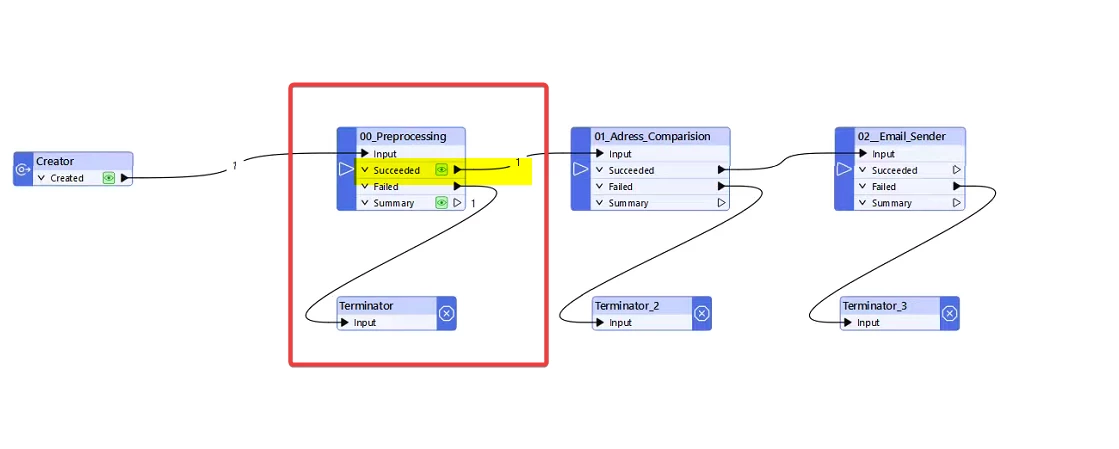
I have a main FME workspace where I call multiple child workspaces using WorkbenchRunner.

The issue is that even when one of the called workspaces is terminated, the WorkbenchRunner still reports the execution as successful.

My goal is to stop the main workflow immediately if any problem occurs in one of the child workspaces, so that the next WorkbenchRunner does not execute.


What is the correct way to ensure that: If a child workspace fails (error or termination), the main workspace stops immediately, And subsequent WorkbenchRunners do not run?


Any recommended best practice for this scenario?

Thank you.


Best answer by alexbiz

Hey !

How did you configure your WorkspaceRunner ? Did you set the “Wait for job to complete” to Yes ?

This post is closed to further activity.
It may be an old question, an answered question, an implemented idea, or a notification-only post.
Please check post dates before relying on any information in a question or answer.
For follow-up or related questions, please post a new question or idea.
If there is a genuine update to be made, please contact us and request that the post is reopened.

2 replies

alexbiz
Influencer
Forum|alt.badge.img+32
  • Influencer
  • Best Answer
  • February 5, 2026

Hey !

How did you configure your WorkspaceRunner ? Did you set the “Wait for job to complete” to Yes ?


jugoslaviaa
Enthusiast
Forum|alt.badge.img+6
  • Author
  • Enthusiast
  • February 5, 2026

Hey !

How did you configure your WorkspaceRunner ? Did you set the “Wait for job to complete” to Yes ?

No😯Thank you