I am using a Google Drive transformer for my project, but I was considering to make the URL I use to connect to my spreadsheet, public. So, there is no need to provide my credentials or any other person credentials in the process. Is it possible to do that?

Solved
Transformer for Google Drive public URL
Best answer by hollyatsafe
Hi @diogosanto,
If you are uploading a file using the GoogleDriveConnector this will output a Shareable Link attribute.
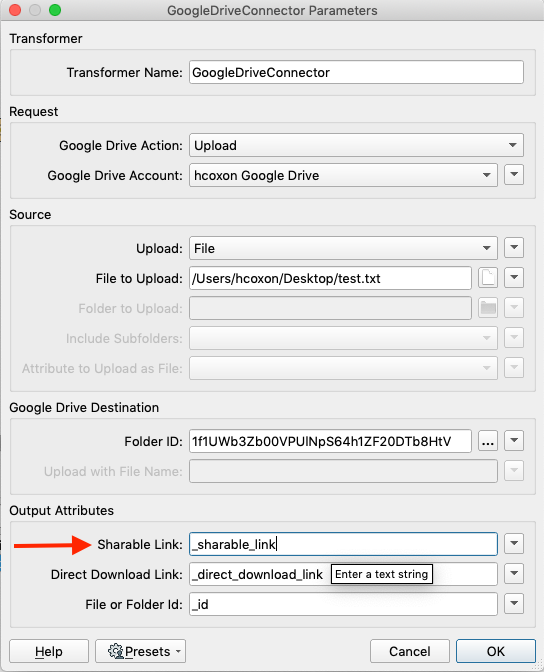
This URL is equivalent to if you were to using the sharing options directly within Google Drive. By default the URL will be accessible to anyone who has access to the Folder it is written into. For example if the specified folder is restricted to those within your organisation, so will the file be and log in is required to access the link.
Therefore in order to make the URL to the spreadsheet public you'll need to be writing to a Folder that you have shared publicly within Google Drive (Anyone on the internet with this link can view) then you should be able to share the link with anyone.
This post is closed to further activity.
It may be an old question, an answered question, an implemented idea, or a notification-only post.
Please check post dates before relying on any information in a question or answer.
For follow-up or related questions, please post a new question or idea.
If there is a genuine update to be made, please contact us and request that the post is reopened.
It may be an old question, an answered question, an implemented idea, or a notification-only post.
Please check post dates before relying on any information in a question or answer.
For follow-up or related questions, please post a new question or idea.
If there is a genuine update to be made, please contact us and request that the post is reopened.




