Solved

The current version does not support editing (base, consistent, or closed) [An open transaction was detected

  • March 13, 2019
  • 6 replies
  • 245 views

Forum|alt.badge.img

I have a ESRI Geodatabase (ArcSDE Geodb) writer which is returning:

An error occurred while attempting to start an edit session. The error number from ArcObjects is: '-2147217150'. The error message from ArcObjects is: {The current version does not support editing (base, consistent, or closed) [An open transaction was detected. All user transactions must be closed prior to StartEditing.]}

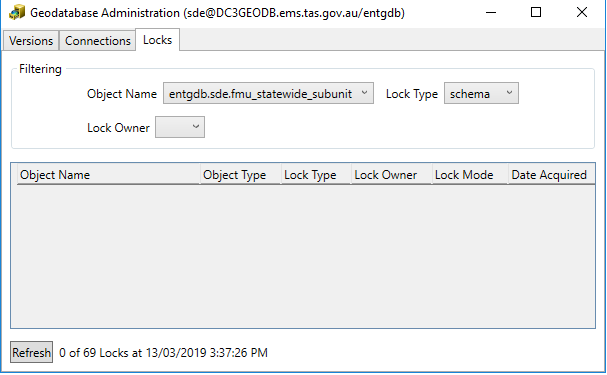
The problem is there are no locks on this feature class layer so no open transactions?
 

Best answer by gsri

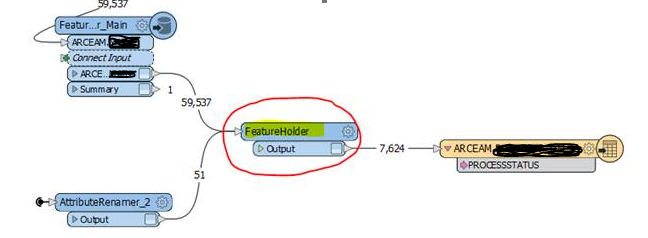
I resolved this error in my workspace. My workspace was using a featurewriter to open a versioned edit session to write to the default version while another writer was trying to write to a transaction table. I used a featureholder to hold the transactions until the featurewriter is done with the versioned writes and then routed the features for update to the transaction table. This successfully resolved the issue.

This post is closed to further activity.
It may be an old question, an answered question, an implemented idea, or a notification-only post.
Please check post dates before relying on any information in a question or answer.
For follow-up or related questions, please post a new question or idea.
If there is a genuine update to be made, please contact us and request that the post is reopened.

6 replies

trentatsafe
Safer
Forum|alt.badge.img+6
  • Safer
  • March 18, 2019

Hello @tfsrichard

This is an interesting error. Are you able to Start an Editing session in ArcMap to that versioned table, without issues?


Is the version type also set to transaction as outlined here: https://support.esri.com/en/technical-article/000009044

Forum|alt.badge.img
  • Author
  • March 19, 2019

Hello @tfsrichard

This is an interesting error. Are you able to Start an Editing session in ArcMap to that versioned table, without issues?


Is the version type also set to transaction as outlined here: https://support.esri.com/en/technical-article/000009044

Hi @trentatsafe,


Yes I can start editing in ArcMap without issues.

It's the instance default version which is transactional.


gsri
Contributor
Forum|alt.badge.img+11
  • Contributor
  • August 29, 2019

I am getting this same error too. @tfsrichard were you able to resolve this?


gsri
Contributor
Forum|alt.badge.img+11
  • Contributor
  • August 30, 2019

Hello @tfsrichard

This is an interesting error. Are you able to Start an Editing session in ArcMap to that versioned table, without issues?


Is the version type also set to transaction as outlined here: https://support.esri.com/en/technical-article/000009044

I am successfully able to start an edit session in ArcMap to that versioned table without any issues. I also ran the workspace from the FME Desktop as well as a FME Server (both in different machines) and am getting the same error, "An error occurred while attempting to start an edit session. The error number from ArcObjects is: '-2147217150'. The error message from ArcObjects is: {The current version does not support editing (base, consistent, or closed) [An open transaction was detected. All user transactions must be closed prior to StartEditing.]}"


gsri
Contributor
Forum|alt.badge.img+11
  • Contributor
  • Best Answer
  • September 12, 2019

I resolved this error in my workspace. My workspace was using a featurewriter to open a versioned edit session to write to the default version while another writer was trying to write to a transaction table. I used a featureholder to hold the transactions until the featurewriter is done with the versioned writes and then routed the features for update to the transaction table. This successfully resolved the issue.


gsri
Contributor
Forum|alt.badge.img+11
  • Contributor
  • September 16, 2019

Here is the snip from my workspace