


Question

Snowflake writer sends corrupt data when writing emoji

  • July 2, 2026
  • 3 replies
  • 27 views

mmeyers
Contributor
Forum|alt.badge.img+3

I have encountered an issue where using a Snowflake writer will either cause errors or corrupt data if the text field contains emoji characters. 

This is occurring with FME Form 2025.2.3.0 on Windows 11. 

If I am writing to a VARCHAR column in Snowflake, the emoji characters will be corrupted but the field will write. If I am writing JSON to a VARIANT column, the workspace will fail with an error. 

In the past I have just let this issue go because I have been writing to VARCHAR fields. Now that I’m writing JSON to a VARIANT, I need to find a better solution. 

Although I believe FME 2025 and Snowflake are both using UTF-8, it looks like it is getting converted to something else somewhere along the line. 

The easiest way I have to test this is to create a Snowflake table:

create table mm_temp_utf8_test (text_col varchar, json_col variant);

Then I can use a SQLExecutor.

If the SQLExecutor just populates the VARCHAR column, it will succeed but the data will be corrupted:

insert into mm_temp_utf8_test (text_col, json_col)
select column1 as text, parse_json(column2) as json
from values (
'This is a test: 😂😂: FME',
'{"item": "value"}'
) as vals

The corrupted data looks like this:

This is a test: ðð: FME

However, if I also have emoji in the JSON, the command fails:

insert into mm_temp_utf8_test (text_col, json_col)
select column1 as text, parse_json(column2) as json
from values (
'This is a test 😂😂',
'{"item": "value", "item_2": "😂😂😂😂"}') as vals

Both of these bits of SQL work when run directly in Snowflake. 

I’m using a SQLExecutor here but my main problem exists in a FeatureWriter and SnowflakeWriter. This is not a problem when reading the data as I can read the emoji in a FeatureReader, SnowflakeReader and a SQLExecutor.


3 replies

mnash
Contributor
Forum|alt.badge.img+2
  • Contributor
  • July 2, 2026

I have performed a test case and confirm the issue appears to be related to the writers, Feature and Snowflake..


My test case is:

  1. Create table in snowflake
  2. Populate with text and emojis
  3. Query table and confirm correct presentation of data
  4. In FME add SnowflakeReader to read above table
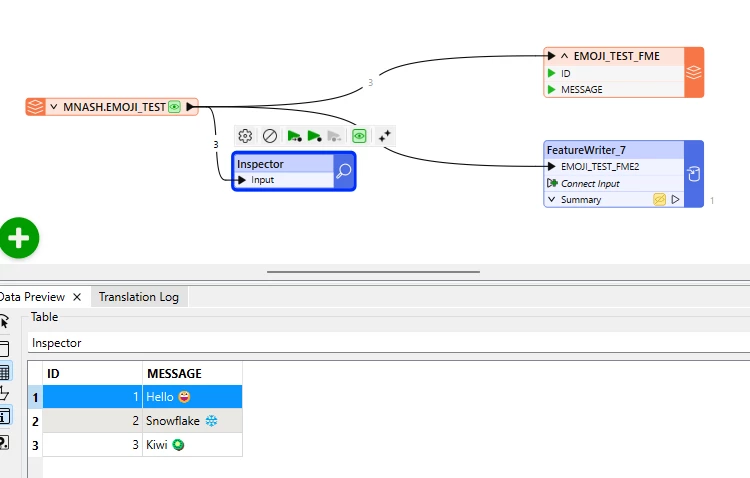
  5. Add inspector and confirm data is represented correctly in FME
  6. Add SnowflakeWriter with Drop and Create new table

Additional test scenarios performed:

  1. SnowflakeWriter Bulk load
  2. SnowflakeWriter Non-Bulk load
  3. FeatureWriter Bulk load
  4. FeatureWriter Non-Bulk load

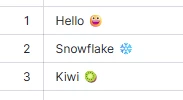
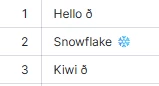
In all scenarios the Snowflake emoji is written to Snowflake but the Hello and Kiwi emojis are not.


CREATE OR REPLACE TABLE emoji_test (
    id INTEGER,
    message VARCHAR
);

INSERT INTO emoji_test VALUES
(1, 'Hello 😀'),
(2, 'Snowflake ❄️'),
(3, 'Kiwi 🥝');

select * from emoji_test;

Execute FME inspector view:


And Snowflake written results


mmeyers
Contributor
Forum|alt.badge.img+3
  • Author
  • Contributor
  • July 2, 2026

That is useful information.

It looks like the Snowflake emoji is loaded successfully because it is a two-byte Unicode code point (U+2744), which becomes 3 bytes in UTF-8 (based on my use of Wikipedia and not in-depth UTF-8 knowledge).

The other two (kiwi and grinning face) are three-byte Unicode code points or 4-byte UTF-8 (U+1F95D and U+1F600).

It doesn’t really explain the problem but does explain the difference between the characters. 

And good to see that someone else can reproduce this issue, even if it is in the same FME and Snowflake environment as I’m using!


mmeyers
Contributor
Forum|alt.badge.img+3
  • Author
  • Contributor
  • July 3, 2026

I’ve got a work-around but it is only a partial work-around. Plus it has led to more confusion about how this whole process works. 

Firstly, the work-around:

If I take the JSON column, and I run it through a TextEncoder transformer using the “Unicode Code Point - Surrogate Pairs” or “Unicode Code Point - Python”, it will be converted correctly and the Emoji characters will be visible in the Snowflake column. 

That solves the issue that I’m currently dealing with so I can do that. Re-encode the text in FME and it is magically decoded somewhere when processed into Snowflake. 

However, that only works when working with JSON and loading into a VARIANT column.

If I run a text column through the same Text encoder and write the string “😂” to a VARCHAR column, I end up with what appear to be UTF-16 codes in the column. Meaning I get “\uD83D\uDE02”, when I would possibly have expected UTF-8 codes of “\uF09F\u9882”. 

Like I said above I’m no expert UTF-8, UTF-16 or text encoding so I’m a little lost here. Whatever is happening it seems like something isn’t quite right.