


Question

Set layer default lineweight to "Default" or "ByLayer" in GIS to AutoCAD Map 3D workbench

  • May 18, 2026
  • 3 replies
  • 73 views

ct-7567
Contributor
Forum|alt.badge.img+1

Hello,

I have a workbench that converts GIS data to an AutoCAD Map 3D object data file. In this workbench, I’m creating new layers that don’t exist in the template file being used, and would like to set their default lineweight of these new layers to “Default” or “ByLayer”. 

I am able to successfully define an “autocad_lineweight” attribute in the workbench and set it equal to -3 or -1 and the GIS line features that are translated receive the correct lineweight value.

However, the layers themselves do not. The layer default lineweight appears to be controlled by the “Default Lineweight” parameter in the writer feature type. Unfortunately, there doesn’t appear to an option to select -3 or -1.
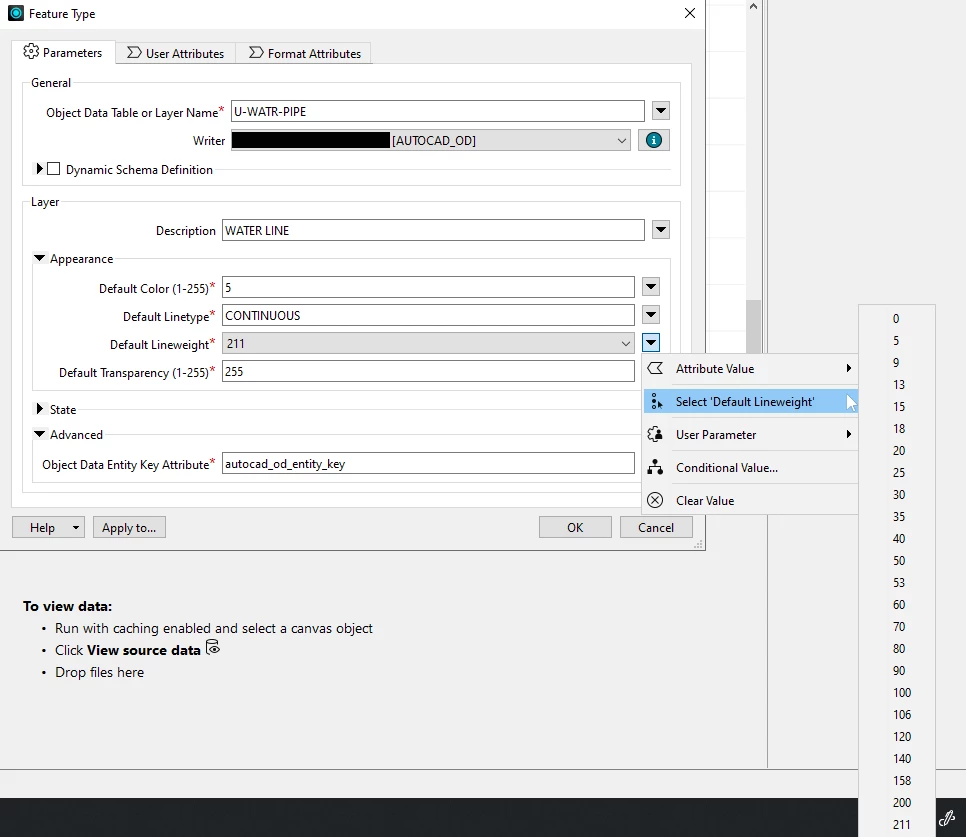


Additionally, attempting to set that parameter to the previously defined attribute leads to a failure w/the following messages (xyz is the path & file name of the output):

  • AutoCAD Writer: An error occurred for dataset ‘xyz’ in function RealDWGWriter::checkToCreateDynamicObjectDataTable. Unknown exception thrown. Aborting method
  • AutoCAD Writer: An error occurred for dataset 'xyz', in function RealDWGWriter::createDynamicLayer. Unknown exception thrown. Aborting method


Am i missing something or is there really no way to set the layer default lineweight to “Default” or “ByLayer”?


 

3 replies

donalmateer
Safer
Forum|alt.badge.img+10

Hi ​@ct-7567, thank you for the post!
I believe this could be a UI limitation of the AutoCAD OD writer feature type.

Possible workaround: Add an autocad_layer_lineweight attribute with value -3 via an AttributeCreator upstream of your writer. This is documented as a valid writer attribute and should set the layer lineweight to Default without going through the parameter UI. Note: this may not work with the OD writer specifically, so test it first.

Another possible workaround: Pre-define the layers in your template DWG with the lineweight already set to Default. Since the crash only happens during dynamic layer creation, having the layers exist in the template beforehand eliminates that code path entirely.

Reference: FME AutoCAD Feature Representation

Let me know how you get on, if neither option works for your setup let us know and we can troubleshoot further!


ct-7567
Contributor
Forum|alt.badge.img+1
  • Author
  • Contributor
  • May 28, 2026

Hello ​@donalmateer ,

Thank you for the suggestions. The first workaround you mentioned is one of the first things I tried. I also did the same with “autocad_lineweight” as well. With this workaround, the lines in the data correctly get assigned the “Default” lineweight, but the lineweight in the layer properties are not set to “Default”.

The only thing I’ve found that affects the lineweight in the layer properties is the Default Lineweight parameter in the “Appearance” section of writer feature type parameters. Unfortunately, -3 is not a option in this dropdown list and any attempts to set it to -3 via dynamic attribute cause the workbench to fail (see error messages in my original post). Do you know if there is a reason -3 is not available in this list?

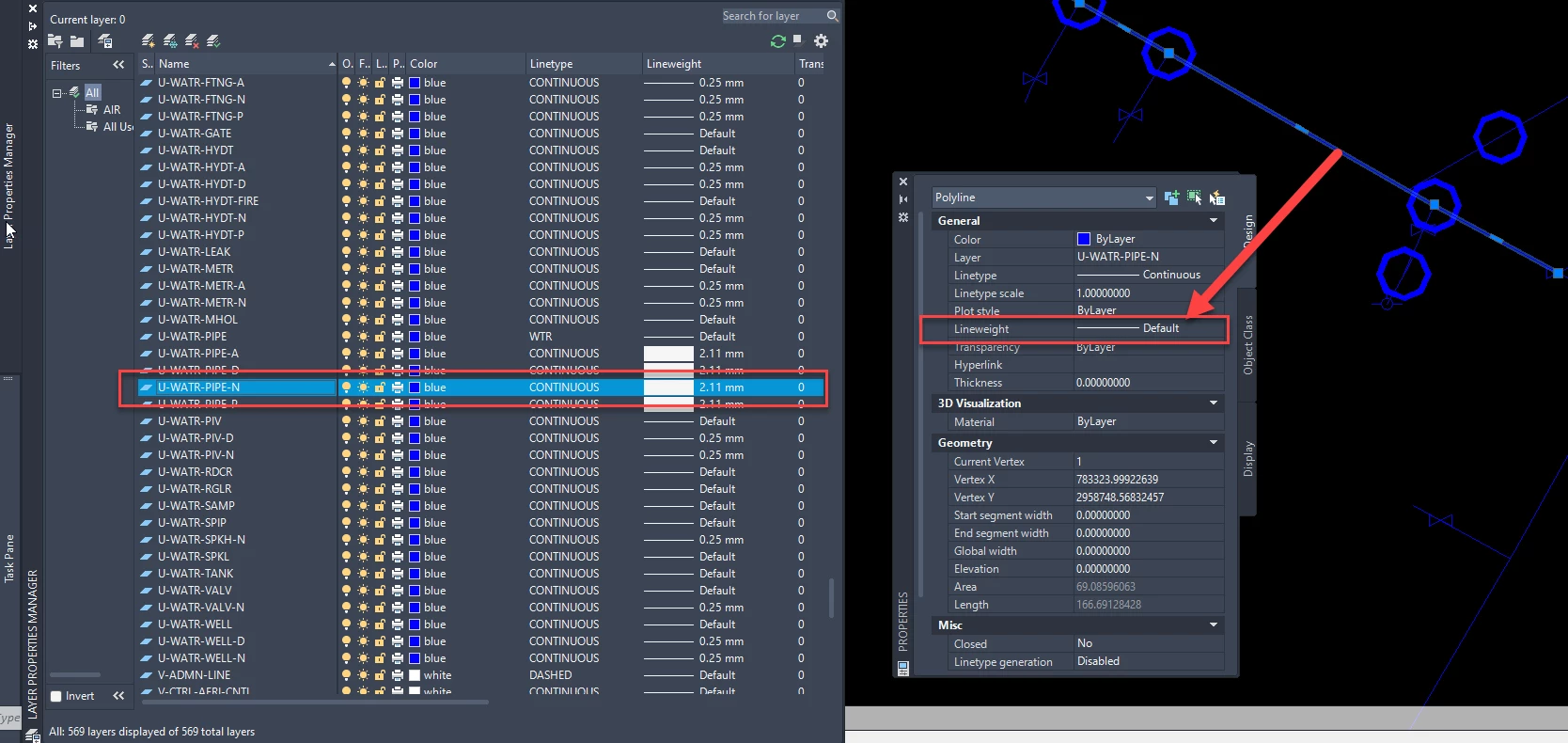
Image showing the difference between the lineweight in layer properties and the lineweight of the data:

Note: the workbench I’m using takes the original layer name from the template DWG (U-WATR-PIPE) and appends a suffix based on lifecycle status attribute values (ex. U-WATR-PIPE-N). This creates a new layer that doesn’t exist in the template DWG. Is there any way for a new layer to inherit the properties of an different, existing layer in the template, even if the names don’t match? 

I’m reasonably confident that adding the new layers to the template DWG will work, but I’m not sure altering the template DWG will be allowed by the organization I’m working with. It is a highly standardized and locked down template used for many things beyond the workflow I’m dealing with. Perhaps they’d be ok w/creating a derivative DWG that can be edited for this purpose. Although that introduces additional work anytime the original template DWG is updated. I will ponder this and discuss w/colleagues.


ct-7567
Contributor
Forum|alt.badge.img+1
  • Author
  • Contributor
  • May 28, 2026

Another thing I attempted this morning was to use a separate workbench to merge the existing template w/a new DWG that contains the new layers I’m creating. I was thinking I could run this separate workbench in a WorkspaceRunner inside the original GIS to CAD workbench.

But alas, I’m running into the same issue where the Default Lineweight parameter in the “Appearance” section of writer feature type parameters overrides what is in the new layer DWG I created.