



Question

Reading DWG Linestyle

  • February 3, 2020
  • 5 replies
  • 77 views

deanhowell
Influencer
Forum|alt.badge.img+24

Does anyone know if there is an attribute or attributes that can be read from a DWG file that will define the linestyle i.e. if it is a dashed line what are the line lengths and the space lengths?

This post is closed to further activity.
It may be an old question, an answered question, an implemented idea, or a notification-only post.
Please check post dates before relying on any information in a question or answer.
For follow-up or related questions, please post a new question or idea.
If there is a genuine update to be made, please contact us and request that the post is reopened.

5 replies

Forum|alt.badge.img

See the documentation at for the autocad_resolved_linetype attribtue: https://docs.safe.com/fme/html/FME_Desktop_Documentation/FME_ReadersWriters/acad/Feature_Representation.htm#autocad_resolved_linetype

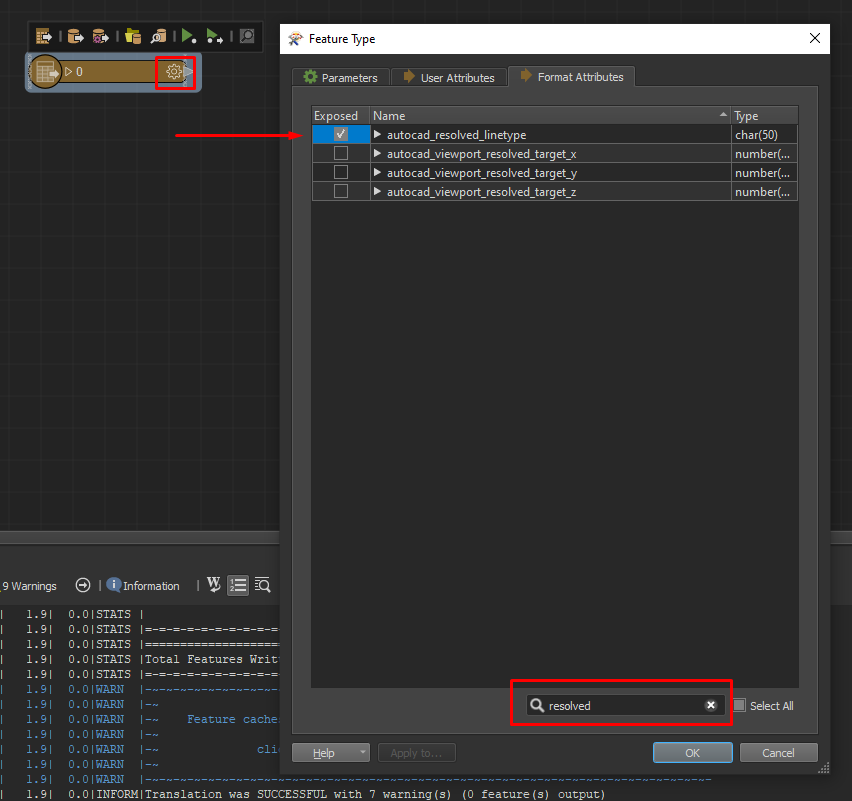
On the featuretype, click the cogwheel, format attributes, and filter on resolved. You can expose it by checking the box in front.


deanhowell
Influencer
Forum|alt.badge.img+24
  • Author
  • Influencer
  • February 3, 2020

Thanks @tomvanderputte i am already exposing that attribute but am trying to find out the actual definition of the line in more detail if it is not a solid line. For example if the line was a dash and then a dot, what are the spacing of the line, so i can try and recreate on output.


gabriel_hirsch
Contributor
Forum|alt.badge.img+12

Thanks @tomvanderputte i am already exposing that attribute but am trying to find out the actual definition of the line in more detail if it is not a solid line. For example if the line was a dash and then a dot, what are the spacing of the line, so i can try and recreate on output.

If you have AutoCAD installed on your computer you can look in the folder C:\\Users\\<user_name>\\AppData\\Roaming\\Autodesk\\<autocad_version>\\<build>\\<language>\\support

There you can find .lin files that looks like this:

ACAD_ISO02W100,ISO dash __ __ __ __ __ __ __ __ __ __ __ __ __


deanhowell
Influencer
Forum|alt.badge.img+24
  • Author
  • Influencer
  • February 3, 2020

If you have AutoCAD installed on your computer you can look in the folder C:\\Users\\<user_name>\\AppData\\Roaming\\Autodesk\\<autocad_version>\\<build>\\<language>\\support

There you can find .lin files that looks like this:

ACAD_ISO02W100,ISO dash __ __ __ __ __ __ __ __ __ __ __ __ __

Thanks @gabriel_hirsch, that is good to know but what I am trying to do is validate that a drawing supplied by an external party has the correct line definition. I can test that the line type has the correct name but can't figure out how to test that the line definition is correct.


Forum|alt.badge.img

Thanks @tomvanderputte i am already exposing that attribute but am trying to find out the actual definition of the line in more detail if it is not a solid line. For example if the line was a dash and then a dot, what are the spacing of the line, so i can try and recreate on output.

OK, can't help you there I'm afraid.