Best Answer

Raster boundary to polygon

  • October 26, 2021
  • 5 replies
  • 530 views

fikusas
Contributor
Forum|alt.badge.img+5

How can I convert raster boundary to polygon? Raster Domain is equivalent tool in ArcGIS / Pro.
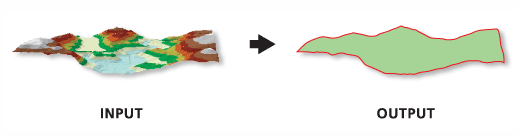

Raster Boundary to Polygon

Best answer by virtualcitymatt

Is this the only way? Because there will be a lot of small polygons made by RasterCellCoercer. It requires quiet much proccesing power and time (depends on raster obviously).

Try using the RasterExtentsCoercer. You can choose to extract the data extents. As long as teh area outside the polygon is nodata or (maybe even) masked with an alpha band this should give you what you want.

If this doesn't work you might have to preprocess the raster to make sure the are outside the polygon is set to NoData


This post is closed to further activity.
It may be an old question, an answered question, an implemented idea, or a notification-only post.
Please check post dates before relying on any information in a question or answer.
For follow-up or related questions, please post a new question or idea.
If there is a genuine update to be made, please contact us and request that the post is reopened.

5 replies

david_r
Celebrity
  • October 26, 2021

You can use a RasterCellCoercer with output set to polygons and excluding nodata, and then pass the individual cell polygon to a Dissolver. The output of the Area port should be what you're looking for.


fikusas
Contributor
Forum|alt.badge.img+5
  • Author
  • Contributor
  • October 26, 2021

You can use a RasterCellCoercer with output set to polygons and excluding nodata, and then pass the individual cell polygon to a Dissolver. The output of the Area port should be what you're looking for.

Is this the only way? Because there will be a lot of small polygons made by RasterCellCoercer. It requires quiet much proccesing power and time (depends on raster obviously).


virtualcitymatt
Celebrity
Forum|alt.badge.img+47
  • Celebrity
  • Best Answer
  • October 26, 2021

Is this the only way? Because there will be a lot of small polygons made by RasterCellCoercer. It requires quiet much proccesing power and time (depends on raster obviously).

Try using the RasterExtentsCoercer. You can choose to extract the data extents. As long as teh area outside the polygon is nodata or (maybe even) masked with an alpha band this should give you what you want.

If this doesn't work you might have to preprocess the raster to make sure the are outside the polygon is set to NoData



david_r
Celebrity
  • October 26, 2021

Is this the only way? Because there will be a lot of small polygons made by RasterCellCoercer. It requires quiet much proccesing power and time (depends on raster obviously).

If the raster is huge, I agree. The RasterCellCoercer can be painfully slow.

Looking a bit further (thanks @d_l​ !) I see there is a RasterExtentsCoercer that should do what you want. Set it to Data Extents to exclude nodata values.


virtualcitymatt
Celebrity
Forum|alt.badge.img+47

Is this the only way? Because there will be a lot of small polygons made by RasterCellCoercer. It requires quiet much proccesing power and time (depends on raster obviously).

Ok, so I did a quick test. This only works if the area outside is NoData (an alpha band is not treated as no data.

If you have an Alpha mask then you can use a RasterBandSelector (select band '3'), RasterBandKeeper (this keeps just the Alpha band), then use a RasterBandNoDataSetter and select '0' for the NoData value. The RasterExtentsCoercer will then work well. I Tested this by clipping out the middle of a PNG file.