



Question

Offset labels

  • March 27, 2026
  • 3 replies
  • 59 views

fazacasbianca
Contributor
Forum|alt.badge.img+7

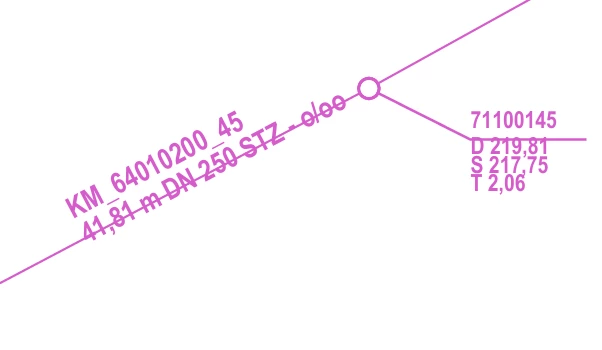
I am trying to get the labels in this map to offset so that they “print” on their lines (two different labels, one is for pipes and the other one is for manholes).

Manholes - is the label like 71100144 - the first row of this label should sit perfectly above the line there.
The pipes are the values like KM_… - this one should offset entirely to sit on top of the pipe lines.

I hope that makes sense.

Is there an attribute I can set? I am using AtributeCreator + TextAdder + PDFStyler.

Thanks a lot!
 

3 replies

hkingsbury
Celebrity
Forum|alt.badge.img+70
  • Celebrity
  • March 29, 2026

Have you explored the MapnikRasterizer?

I haven't used it much, but believe this should be able to do what you’re after


fazacasbianca
Contributor
Forum|alt.badge.img+7
  • Author
  • Contributor
  • March 30, 2026

Have you explored the MapnikRasterizer?

I haven't used it much, but believe this should be able to do what you’re after

yes, but I don’t want my export to be a raster. I need all the text to be selectable, therefore I need my data to be vector.


koulsoum
Contributor
Forum|alt.badge.img+14
  • Contributor
  • March 31, 2026

Hello ​@fazacasbianca 

I’m not sure if there’s a specific attribute you can set, but you can use a spatial join between the text and its associated line using a NeighborFinder. Then, use the distance attribute created by the NeighborFinder in an Offsetter to position the label correctly.

For pipes, this should be easy (one label per line).For manholes, since multiple lines may be connected, it’s best to restrict the spatial join to horizontal lines. Because I suppose that on the printed plan, all manhole labels are oriented horizontally.

Otherwise the Labeller transformer is also a great alternative to the TextAdder.