Solved

LineBuilder - Building a line for each group of points with the same value

  • February 11, 2026
  • 3 replies
  • 52 views

teresa_ro
Contributor
Forum|alt.badge.img+3

I have a list of points which I want to connect to lines. But one line should contain only points with a specific value in a field. At the end I want to have multiple lines in one feature class. 

How can I do that?

Best answer by ebygomm

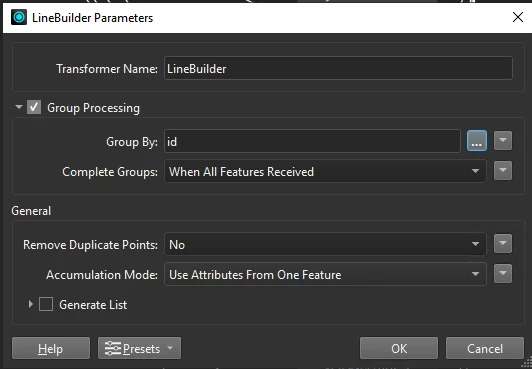
If you tick the Group Processing and then set the Group By to the field that holds the value that will only create lines from points with the same value in that field

 

This post is closed to further activity.
It may be an old question, an answered question, an implemented idea, or a notification-only post.
Please check post dates before relying on any information in a question or answer.
For follow-up or related questions, please post a new question or idea.
If there is a genuine update to be made, please contact us and request that the post is reopened.

3 replies

ebygomm
Influencer
Forum|alt.badge.img+48
  • Influencer
  • Best Answer
  • February 11, 2026

If you tick the Group Processing and then set the Group By to the field that holds the value that will only create lines from points with the same value in that field



david_r
Celebrity
  • February 11, 2026

Just be sure that the LineBuilder gets the points in the order you want them to appear in the line segment. You could e.g. use a Sorter for this, if you have an attribute that indicates the vertex order.


teresa_ro
Contributor
Forum|alt.badge.img+3
  • Author
  • Contributor
  • March 3, 2026

Thank you for your support!