


Question

Image rasterize for las files

  • April 1, 2020
  • 5 replies
  • 225 views

felipeverdu
Enthusiast
Forum|alt.badge.img+11

Hi

I am trying to convert las files into raster, for that I am using as recommended by Safe the following transformer ImageRasterizer as you can see in the attached image:
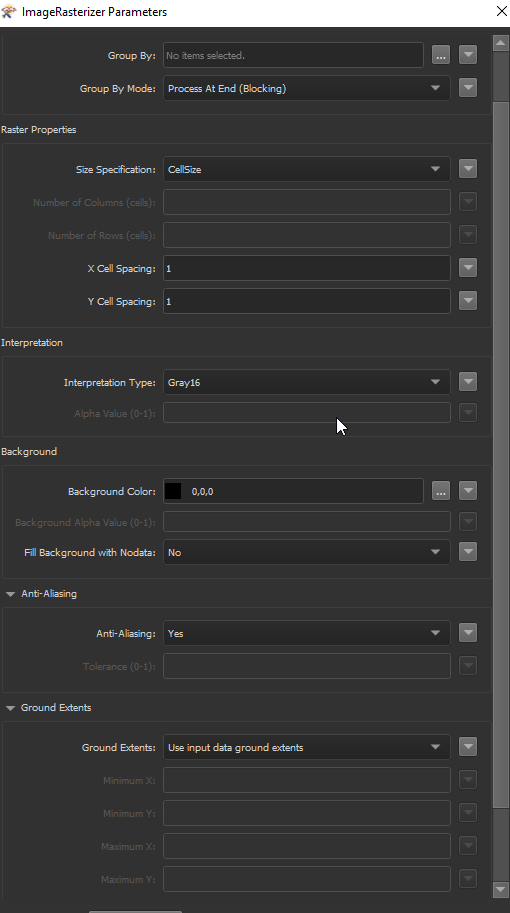
 

But I keep getting the same error:

ImageRasterizer (VectorToRasterFactory): 338432 input feature(s) were discarded because they were not compatible with any band in the raster. Bands with a color interpretation require vector input features with an 'fme_color' attribute. Bands with a numeric interpretation require vector input features that have Z coordinates

ImageRasterizer (VectorToRasterFactory): No valid input features. 338432 input feature(s) processed. 0 input feature(s) with invalid geometry discarded. 338432 input feature(s) not compatible with the raster interpretation discarded

ImageRasterizer (VectorToRasterFactory): A fatal error has occurred. Check the logfile above for details


 

This post is closed to further activity.
It may be an old question, an answered question, an implemented idea, or a notification-only post.
Please check post dates before relying on any information in a question or answer.
For follow-up or related questions, please post a new question or idea.
If there is a genuine update to be made, please contact us and request that the post is reopened.

5 replies

jdh
Contributor
Forum|alt.badge.img+40
  • Contributor
  • April 1, 2020

Easiest solution is to set the interpretation type to UINT16 instead of Gray16.


Otherwise you need to create an fme_color attribute based on the Z value of the las features.

felipeverdu
Enthusiast
Forum|alt.badge.img+11
  • Author
  • Enthusiast
  • April 1, 2020

Hi

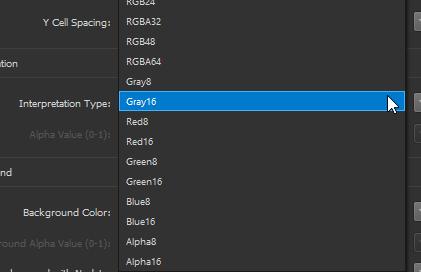
@jdh, I can only find the following: so not UINT16 (unfortunately)

On the other hand, this is weird that Safe is recommending something even in the help for the transformer but it does not work properly.

Br

Feliep Verdú


jdh
Contributor
Forum|alt.badge.img+40
  • Contributor
  • April 1, 2020

Hi

@jdh, I can only find the following: so not UINT16 (unfortunately)

On the other hand, this is weird that Safe is recommending something even in the help for the transformer but it does not work properly.

Br

Feliep Verdú

Sorry, use it in the NumericRasterizer rather than the ImageRasterizer.


Hi @felipeverdu1, sorry to hear that you were having difficulties converting las to raster. If this still hasn't worked out for you, would you be open to share your data with us, so we could take a closer look at it for you? You could either submit a case at https://www.safe.com/support/report-a-problem/ where you can upload the file, or you can email them into if that's a preferred option. Thanks!


felipeverdu
Enthusiast
Forum|alt.badge.img+11
  • Author
  • Enthusiast
  • April 2, 2020

Hi @felipeverdu1, sorry to hear that you were having difficulties converting las to raster. If this still hasn't worked out for you, would you be open to share your data with us, so we could take a closer look at it for you? You could either submit a case at https://www.safe.com/support/report-a-problem/ where you can upload the file, or you can email them into if that's a preferred option. Thanks!

Hi @alyssaatsafe

I fixed it using the input from @jdh and adjusting 2 things: NumericRasterizer with Real32 as interpretation type and and a GeoTIFF writer with 32 bits per cell.

It works pretty well now.

Thx!

Br,

Felipe Verdú