

Question

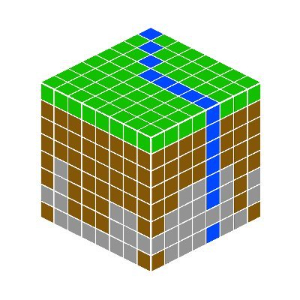
How to create underground properties in a Minecraft map?

  • January 3, 2019
  • 1 reply
  • 33 views

italosena
Forum|alt.badge.img

Hi everyone,


I'm working on a Minecraft map based on a DEM and some layers, like rivers, vegetation and underground.

I'd like to get some tips about how to associate geological layers to a DEM point cloud and then export to Minecraft. I have a .tiff and some .shp files, and I'm using Bowen Island's workbench as a basis, so I think it might be associate to the custom transformer "MinecraftRasterizer".


Thanks in advance!

 

This post is closed to further activity.
It may be an old question, an answered question, an implemented idea, or a notification-only post.
Please check post dates before relying on any information in a question or answer.
For follow-up or related questions, please post a new question or idea.
If there is a genuine update to be made, please contact us and request that the post is reopened.

1 reply

mark2atsafe
Safer
Forum|alt.badge.img+59
  • Safer
  • January 3, 2019

I think the basics are to use a SurfaceModeller transformer to drape a layer onto a DEM.

From there you could (for example) create a TINSurface. Point the TinSurface into a PointCloudCombiner and it will create a point cloud that can be written to Minecraft. But then I guess that doesn't get you much more than if you just said "write my DEM point cloud".

I guess my question is, are these geological layers just the surface layer (the bedrock that a geological map would show) or are they three dimensional (or layers with depth) that represent multiple strata?

If it's just the bedrock then maybe a different output of the SurfaceModeller would help (DrapedFeatures) or even use a Group-By to create multiple surfaces.

I hope this helps somewhat. I know that Minecraft can "model" different layers which is why I'm wondering if you want to create proper strata, or just the same bedrock all the way down.


