


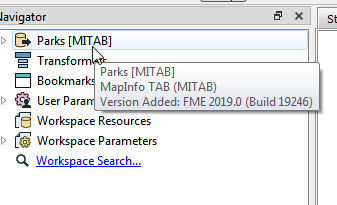
I've inherited a number of FME workbenches that I'm trying to decipher and where possible redesign to improve future decipherability. I'm noticing that for certain writers, if I add a new one that is of the same type as one already in the FMW, parameters are different. How can I tell what version (vintage) a certain writer is. Do I need to dig through release notes?

Question
How can I tell what version my writers are?
This post is closed to further activity.
It may be an old question, an answered question, an implemented idea, or a notification-only post.
Please check post dates before relying on any information in a question or answer.
For follow-up or related questions, please post a new question or idea.
If there is a genuine update to be made, please contact us and request that the post is reopened.
It may be an old question, an answered question, an implemented idea, or a notification-only post.
Please check post dates before relying on any information in a question or answer.
For follow-up or related questions, please post a new question or idea.
If there is a genuine update to be made, please contact us and request that the post is reopened.




Login to the community
No account yet? Create an account
An FME Account is required to contribute
LoginEnter your E-mail address. We'll send you an e-mail with instructions to reset your password.