Question

Global Mapper GMG Format

  • January 4, 2019
  • 4 replies
  • 101 views

Forum|alt.badge.img

Hi, having problems Reading a Global Mapper raster format: *.GMG

The *.gmg format is a grid format in binary form

Anyone know how to read it with fme?

This post is closed to further activity.
It may be an old question, an answered question, an implemented idea, or a notification-only post.
Please check post dates before relying on any information in a question or answer.
For follow-up or related questions, please post a new question or idea.
If there is a genuine update to be made, please contact us and request that the post is reopened.

4 replies

danilo_fme
Celebrity
Forum|alt.badge.img+52
  • Celebrity
  • January 4, 2019

Hello Andre,

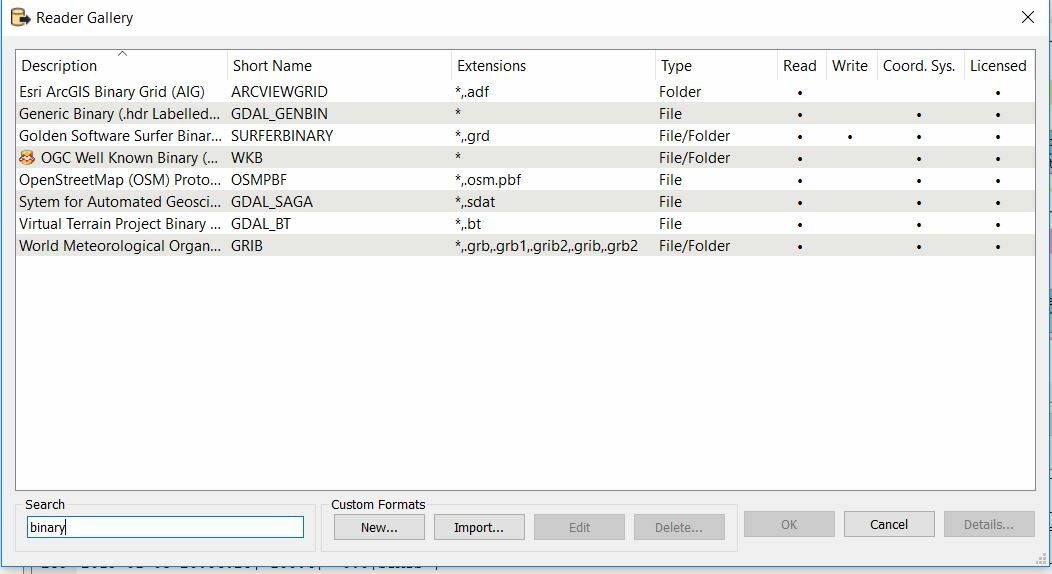
Did you try to some Reader format like binary?

Like this:


If is possible to share us your GMG file to test.


Thanks,

Danilo


Forum|alt.badge.img
  • January 5, 2019

I think you can not.. If you have a global Mapper, then go to file/export to another 3d raster format and then choose tiff, grid, esri, etc....


Forum|alt.badge.img
  • Author
  • January 7, 2019

Hi @Danilo, the fils i got are too big. But i guess the GMG format isn't readable by fme

regards

andre


Forum|alt.badge.img
  • Author
  • January 7, 2019

I think you can not.. If you have a global Mapper, then go to file/export to another 3d raster format and then choose tiff, grid, esri, etc....


Hi @miladahmad


Don't have a version of GlobalMapper where export works. The free version only allow for view, no exports.

Regards

andre