




Best Answer

FileCopy writer creating 2 destination folders

  • October 11, 2021
  • 2 replies
  • 92 views

mart
Contributor
Forum|alt.badge.img+2

I'm copying PDF files from a source folder to a destination folder. The destination folder is named with today's date (.../outgoing/October-11-2021/).

I used the AttributeCreator to create and format the date attribute called "Date_today" and set filecopy_dest_dataset to "Date_today".

This all works well, the PDF's are copied into the date folder, however, I also get another empty date folder created in the folder that the workbench is in.

Fanout is off. Any ideas how I can stop this extra folder being created?
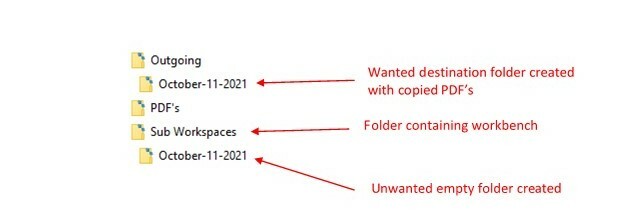
Folder error

Best answer by danilo_fme

Hi @Martin Olney​ 

I downloaded your Workspace and re-configurated with my data example. The result was fine when I wante copy files in another folder destination.


I noticed that your folder from Reader is the same location your Copy destination.


Thanks in advance,

Danilo

This post is closed to further activity.
It may be an old question, an answered question, an implemented idea, or a notification-only post.
Please check post dates before relying on any information in a question or answer.
For follow-up or related questions, please post a new question or idea.
If there is a genuine update to be made, please contact us and request that the post is reopened.

2 replies

danilo_fme
Celebrity
Forum|alt.badge.img+52
  • Celebrity
  • Best Answer
  • October 11, 2021

Hi @Martin Olney​ 

I downloaded your Workspace and re-configurated with my data example. The result was fine when I wante copy files in another folder destination.


I noticed that your folder from Reader is the same location your Copy destination.


Thanks in advance,

Danilo


mart
Contributor
Forum|alt.badge.img+2
  • Author
  • Contributor
  • October 13, 2021

Thanks Danilo

I don't know what I did, but somehow the problem has gone.



