


Question

Excel Field Names Row for multiple Excel

  • March 14, 2017
  • 2 replies
  • 5 views

bubblebeb
Contributor
Forum|alt.badge.img+6

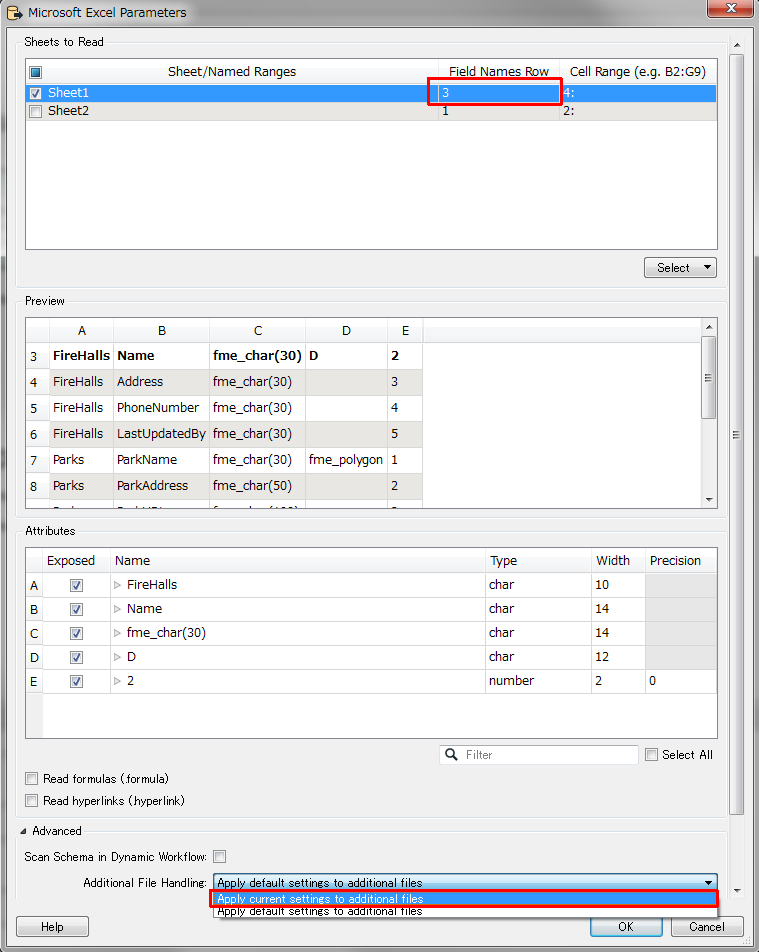
I need to be able to set the row for the field names to Row 3 for a folder of excel files.

The only way to do this I have found is to read each excel and set the row to 3 in the Parameters dialog.

This is very time consuming and I am guessing there is a way to set Row 3 for all Excel files read in from a folder.

Any ideas welcome.

This post is closed to further activity.
It may be an old question, an answered question, an implemented idea, or a notification-only post.
Please check post dates before relying on any information in a question or answer.
For follow-up or related questions, please post a new question or idea.
If there is a genuine update to be made, please contact us and request that the post is reopened.

2 replies

david_r
Celebrity
  • March 14, 2017

Would a dynamic reader help you? That way you'd only have to specify this once.


taojunabc
Participant
Forum|alt.badge.img+6
  • Participant
  • March 16, 2017

As @david_r said, you can use the dynamic reader.

But you need to set Additional File Handling to "Apply current settings to additional files". Because the default setting is "Apply default setting to additional files".