Solved

Error connecting to API

  • November 29, 2021
  • 11 replies
  • 84 views

magnus
Contributor
Forum|alt.badge.img+6

I am having trouble connecting to the API at https://developer.vasttrafik.se/portal/. I would like to get the public transport stops (https://developer.vasttrafik.se/portal/#/api/Geography/v1/admin), but I am stuck, I keep getting "HTTP/1.1 403 Forbidden" from the HTTPCaller. I have tried using "Authorization" as suggested at https://community.safe.com/s/question/0D54Q00008WImfCSAT/using-fme-to-call-power-bi-via-the-api-to-refresh-data-sets-dynamically-i-am-stuck-with-the-authentication-piece-for-the-bearer-token, but no success. Any suggestions on what I might be missing?

Best answer by takashi

The API has now been updated to https://api.vasttrafik.se/geo/v2/StopPoints and I no longer get an error message. However, the _response_body I get is about 10 MB and looks like: 7B2273746F70506F696E7473223A5B7B22676964223A2239303232303134303031303034303031222C2273746F704172656... . I was more hoping for the JSON respons that Postman produces. Any suggestions?


Tried with FME 2021.2.2.0.
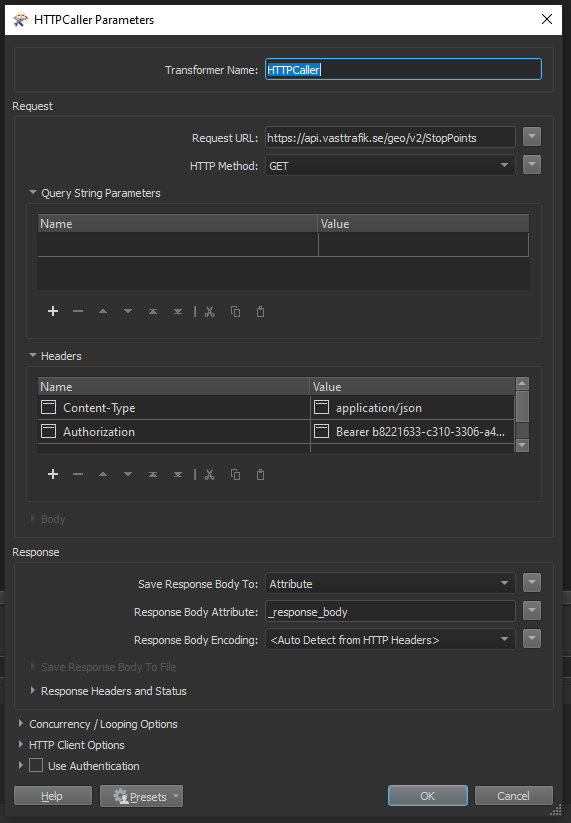
 

HTTPCaller

Hi @magnus​ , try setting the Response Body Encoding parameter explicitly to appropriate character encoding, maybe UTF-8.

This post is closed to further activity.
It may be an old question, an answered question, an implemented idea, or a notification-only post.
Please check post dates before relying on any information in a question or answer.
For follow-up or related questions, please post a new question or idea.
If there is a genuine update to be made, please contact us and request that the post is reopened.


11 replies

nielsgerrits
VIP
Forum|alt.badge.img+64

Have you been able to connect to the API using Postman?

This is the way I work through these projects:

  • Make it work in Postman. (Better geared to get this working.)
  • Transfer the steps to FME.

magnus
Contributor
Forum|alt.badge.img+6
  • Author
  • Contributor
  • November 29, 2021

Thank you for the suggestion. Yes, I am able to get the desired response using Postman. In Postman, I used the address http://api.vasttrafik.se/geo/v1/StopPoints and Authorization - Type: Bearer Token. I guess I´m not configuring this correctly in FME.


nielsgerrits
VIP
Forum|alt.badge.img+64

Thank you for the suggestion. Yes, I am able to get the desired response using Postman. In Postman, I used the address http://api.vasttrafik.se/geo/v1/StopPoints and Authorization - Type: Bearer Token. I guess I´m not configuring this correctly in FME.

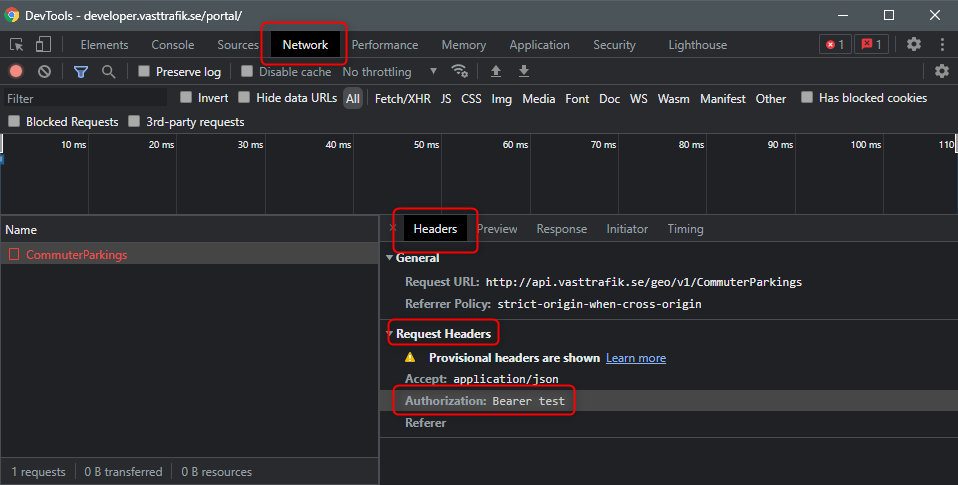
If I try some of these samples (API-konsol) and monitor DevTools (F12) I see:

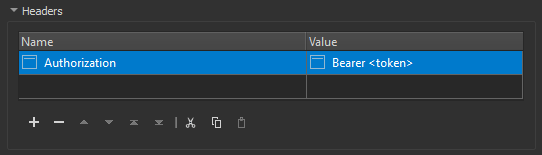
DevToolsI would try to do:

Authorization


magnus
Contributor
Forum|alt.badge.img+6
  • Author
  • Contributor
  • November 29, 2021

If I try some of these samples (API-konsol) and monitor DevTools (F12) I see:

DevToolsI would try to do:

Authorization

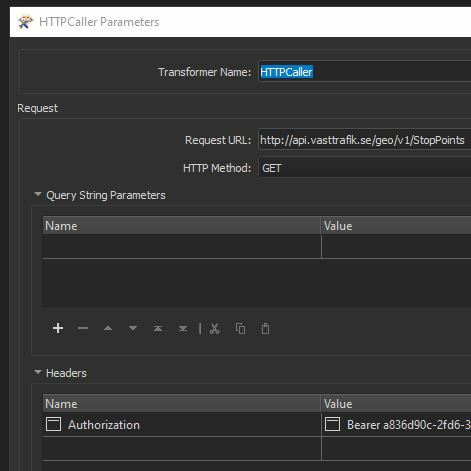
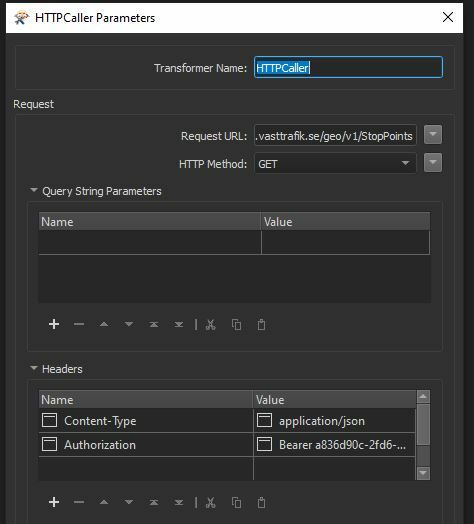
HTTPCallerI have tried Authorization and using the token, but I still get "HTTP/1.1 403 Forbidden".

nielsgerrits
VIP
Forum|alt.badge.img+64

If I try some of these samples (API-konsol) and monitor DevTools (F12) I see:

DevToolsI would try to do:

Authorization

Is your Content Type set to JSON (application/json)?


magnus
Contributor
Forum|alt.badge.img+6
  • Author
  • Contributor
  • November 29, 2021

If I try some of these samples (API-konsol) and monitor DevTools (F12) I see:

DevToolsI would try to do:

Authorization

HTTPCaller2I added Content-Type = application/json and still get "HTTP/1.1 403 Forbidden".



nielsgerrits
VIP
Forum|alt.badge.img+64

If I try some of these samples (API-konsol) and monitor DevTools (F12) I see:

DevToolsI would try to do:

Authorization

Hm, swedish is not my first language so it is difficult to reproduce, but I think I have a valid login now.


The curl command is:

curl -k -d "grant_type=client_credentials" -H "Authorization: Basic <token>" https://api.vasttrafik.se:443/token

So I think you need 2 httpcallers: 

  • get a temp token from https://api.vasttrafik.se:443/token using the key you got for the app you added.
  • get the data using the temp token you got in the first step.

nielsgerrits
VIP
Forum|alt.badge.img+64

If I try some of these samples (API-konsol) and monitor DevTools (F12) I see:

DevToolsI would try to do:

Authorization

@magnus​ I can reproduce you issue. I can get a token but then I get a forbidden on the datasets as well. Not sure why but or we are making the same mistake, or it does not work as documented.


magnus
Contributor
Forum|alt.badge.img+6
  • Author
  • Contributor
  • January 28, 2022

The API has now been updated to https://api.vasttrafik.se/geo/v2/StopPoints and I no longer get an error message. However, the _response_body I get is about 10 MB and looks like: 7B2273746F70506F696E7473223A5B7B22676964223A2239303232303134303031303034303031222C2273746F704172656... . I was more hoping for the JSON respons that Postman produces. Any suggestions?


Tried with FME 2021.2.2.0.


HTTPCaller


takashi
Celebrity
  • Best Answer
  • January 28, 2022

The API has now been updated to https://api.vasttrafik.se/geo/v2/StopPoints and I no longer get an error message. However, the _response_body I get is about 10 MB and looks like: 7B2273746F70506F696E7473223A5B7B22676964223A2239303232303134303031303034303031222C2273746F704172656... . I was more hoping for the JSON respons that Postman produces. Any suggestions?


Tried with FME 2021.2.2.0.


HTTPCaller

Hi @magnus​ , try setting the Response Body Encoding parameter explicitly to appropriate character encoding, maybe UTF-8.


magnus
Contributor
Forum|alt.badge.img+6
  • Author
  • Contributor
  • January 31, 2022

Hi @magnus​ , try setting the Response Body Encoding parameter explicitly to appropriate character encoding, maybe UTF-8.

Yes, that helped. I now get a proper JSON response. Thanks!