


Question

Dynamic Writer using OpenFile Geodb only outputs ZM features

  • June 11, 2026
  • 2 replies
  • 13 views

tkruithof
Contributor
Forum|alt.badge.img+1

Hello,


I’m updating a number of workspaces from FME 2021 to FME 2026, and some of them have a dynamic writer outputting to a file geodatabase. As part of the update, we had to change the format of the writers away from File Geodb Open API due to it becoming deprecated. We’re trying to use the OpenFile Geodb format, but we’re running into a problem regarding the geometry of the resulting features.


Before, our dynamic writers would output features with 2D geometry such as Polygon. However, with the new format, it’s only outputting features with 3D geometry such as Polygon ZM. This doesn’t occur with our static writers, those output 2D geometry just fine, and it doesn’t occur if we use a different format such as File Geodb. It’s only with a dynamic writer with the OpenFile Geodb format that this issue occurs.


I’ve tried adding a 2DForcer and MeasureRemover transformer to the workspace just before the writer, but the features are still being written as Polygon ZM. I can’t manually set the geometry as some of these writers are also outputting line and point features (which are also having this problem).


Is there any way I might be able to force the dynamic writer to output regular Polygon features?

2 replies

j.botterill
Influencer
Forum|alt.badge.img+58
  • Influencer
  • June 12, 2026

Due to changes in FME 2026.1, with improved spatial discovery through the Spatial Definition Table , you will notice the following:

  • Readers and Writers have been updated, with geometry and coordinate system parameters now located under the User Attributes tab.
  • Reader geometry definitions cannot be modified, as they reflect the source data.
  • Traditional Writing - To control Writer geometry output, use a GeometryFilter (or equivalent) upstream of the Writer feature types, and route the outputs to the appropriate feature type(s), or consolidate multiple inputs into a single Writer as required.
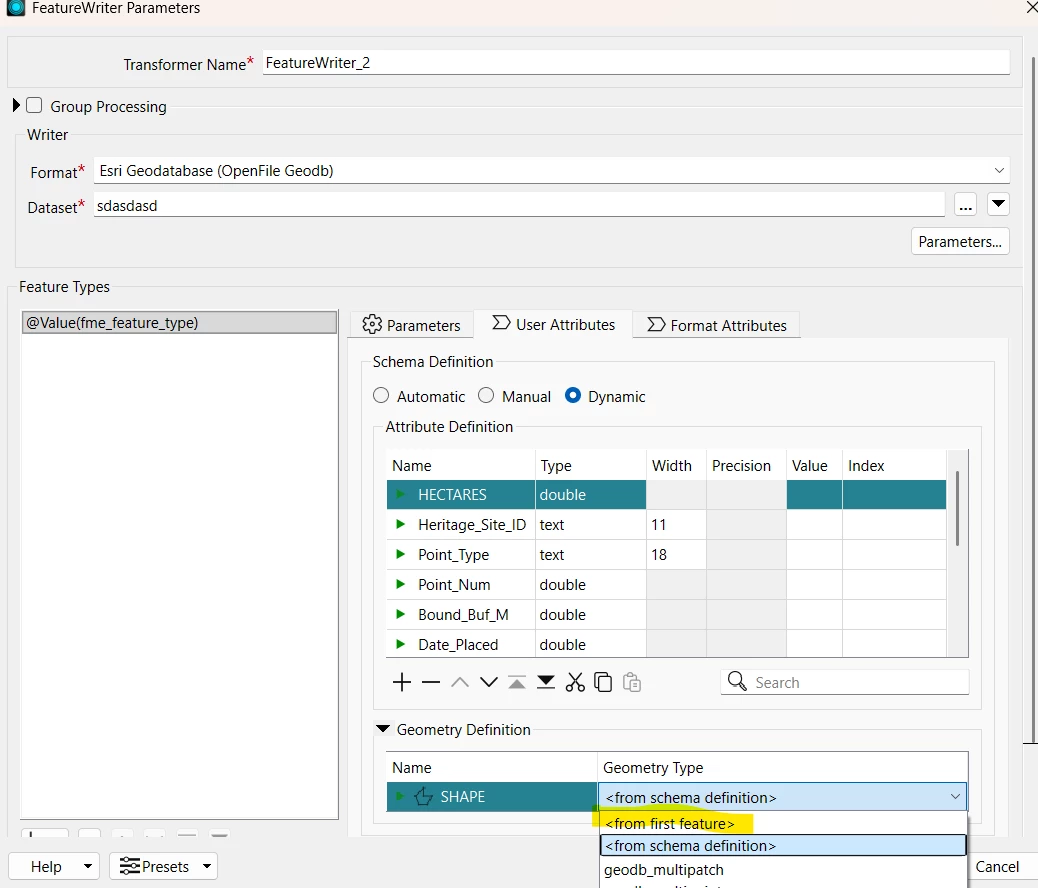
  •  Dynamic Schema Writing - you specify Dynamic Schema on the writer parameters then under the user attributes tab, you will find two options 1.) from First Features 2.) from schema definition
Geometry Definition now under User Attribute tab

Regarding the deprecating of the older File Geodb Open API, this new Esri Geodatabase Open API option for non‑licensed environments running GDAL is far better long term but yes a drag to swap over to in latest version. 

The ARCGISFEATURESERVICES format has welcomed new functionality over the deprecated PORTALFEATURESERVICES, but some the safe.esri.agol package needs to support Deployment Parameters in the reader and writer 


tkruithof
Contributor
Forum|alt.badge.img+1
  • Author
  • Contributor
  • June 12, 2026

Hello, thank you for the reply. I tried changing the Geometry Type in the writer like you suggested, but it’s still resulting in ZM features. Is there any other way I could try forcing the writer to output 2D features, or will the combination of a dynamic writer with the OpenFile Geodb format always result in 3D features?