Question

Dynamic Source file - zipped / not-zipped

  • August 21, 2017
  • 10 replies
  • 44 views

Forum|alt.badge.img

Hi

I have a simple workbench that converts ASC > XYZ as below:

fme ASC_to_XYZ.fmw --SourceDataset NT26SW.asc  --DestDataset NT26SW.xyz

How can I make the workbench deal with a dynamic "SourceDataset" as sometimes I need to pass a gzipped version of the sourcefile. The example below with the ".asc.gz" sourcefile will not work.

 fme ASC_to_XYZ.fmw --SourceDataset NT26SW.asc.gz  --DestDataset NT26SW.xyz


I am trying to resist re-writing code that pre extracts the "asc.gz" file before passing to FME.

Thanks,

Mike

This post is closed to further activity.
It may be an old question, an answered question, an implemented idea, or a notification-only post.
Please check post dates before relying on any information in a question or answer.
For follow-up or related questions, please post a new question or idea.
If there is a genuine update to be made, please contact us and request that the post is reopened.

10 replies

danilo_fme
Celebrity
Forum|alt.badge.img+52
  • Celebrity
  • August 21, 2017

Hi @mike_gale,

Could you share us your Workspace Template?

Thanks,


Forum|alt.badge.img
  • Author
  • August 21, 2017

Forum|alt.badge.img
  • Author
  • August 21, 2017

@danilo_inovacao I have uploaded the workspace


danilo_fme
Celebrity
Forum|alt.badge.img+52
  • Celebrity
  • August 21, 2017

@danilo_inovacao I have uploaded the workspace

Thanks. Could you send a example with .gz?

Forum|alt.badge.img
  • Author
  • August 21, 2017

@danilo_inovacao - unfortunately I can't as this is licensed data


danilo_fme
Celebrity
Forum|alt.badge.img+52
  • Celebrity
  • August 21, 2017
No problem. If you use the custom transformer GzipDecompressor . The link is Gzip

danilo_fme
Celebrity
Forum|alt.badge.img+52
  • Celebrity
  • August 21, 2017

@danilo_inovacao - unfortunately I can't as this is licensed data

No problem. If you use the custom transformer GzipDecompressor . The link is Gzip

danilo_fme
Celebrity
Forum|alt.badge.img+52
  • Celebrity
  • August 21, 2017
No problem. If you use the custom transformer GzipDecompressor . The link is Gzip

@mike_gale, i believe it'll work for you.

takashi
Celebrity
  • August 22, 2017

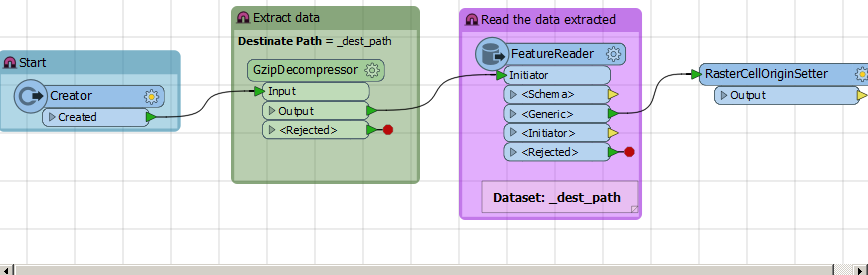
In the latest version of FME, I think it's possible to create a single workspace to read either *.asc or *.asc.gz using a FeatureReader.

Summary: Determine whether the source file path ends with ".asc.gz", decompress the source file if it was *.asc.gz, then read the dataset with a FeatureReader. The source file path (decompressed file path if it was *.asc.gz) can be set to the FeatureReader through a feature attribute at run time.

However, looks like you are using FME 2014 SP1. In FME 2014, you cannot specify source file path in the FeatureReader through a feature attribute at run time. I therefore think it's difficult to create a single workspace that can read both *.asc and *.asc.gz. If you will continue to use FME 2014, probably you will have to create two workspaces.
  • The 1st workspace reads *.asc dataset with a regular ASCII Grid reader.
  • The 2nd workspace runs the 1st workspace through a WorkspaceRunner. Here, if the source file was *.asc.gz, the 2nd workspace should decompress the file, then passes the resulting *.asc file path to the 2nd workspace. You have to write a Python script to decompress a *.asc.gz file.

If you can upgrade your FME version to FME 2015.0 - FME 2016.0, it would be possible to create a single workspace to do that, since the Dataset for the FeatureReader in the new versions can be specified with a feature attribute. However, you still have to write a Python script to decompress a *.asc.gz file.

In FME 2016.1 or later, you can use the GzipDecompressor transformer from Hub to decompress *.asc.gz file.


takashi
Celebrity
  • August 22, 2017

In the latest version of FME, I think it's possible to create a single workspace to read either *.asc or *.asc.gz using a FeatureReader.

Summary: Determine whether the source file path ends with ".asc.gz", decompress the source file if it was *.asc.gz, then read the dataset with a FeatureReader. The source file path (decompressed file path if it was *.asc.gz) can be set to the FeatureReader through a feature attribute at run time.

However, looks like you are using FME 2014 SP1. In FME 2014, you cannot specify source file path in the FeatureReader through a feature attribute at run time. I therefore think it's difficult to create a single workspace that can read both *.asc and *.asc.gz. If you will continue to use FME 2014, probably you will have to create two workspaces.
  • The 1st workspace reads *.asc dataset with a regular ASCII Grid reader.
  • The 2nd workspace runs the 1st workspace through a WorkspaceRunner. Here, if the source file was *.asc.gz, the 2nd workspace should decompress the file, then passes the resulting *.asc file path to the 2nd workspace. You have to write a Python script to decompress a *.asc.gz file.

If you can upgrade your FME version to FME 2015.0 - FME 2016.0, it would be possible to create a single workspace to do that, since the Dataset for the FeatureReader in the new versions can be specified with a feature attribute. However, you still have to write a Python script to decompress a *.asc.gz file.

In FME 2016.1 or later, you can use the GzipDecompressor transformer from Hub to decompress *.asc.gz file.


The attachment contains two workspaces that demonstrate the approach with a WorkspaceRunner. Created with FME 2014 build 14235.


fme2014-asc-to-xyz.zip