


Solved

Define Geometry Type in PostGIS-Writer

  • May 29, 2026
  • 3 replies
  • 54 views

philip
Contributor
Forum|alt.badge.img+3

Hi all

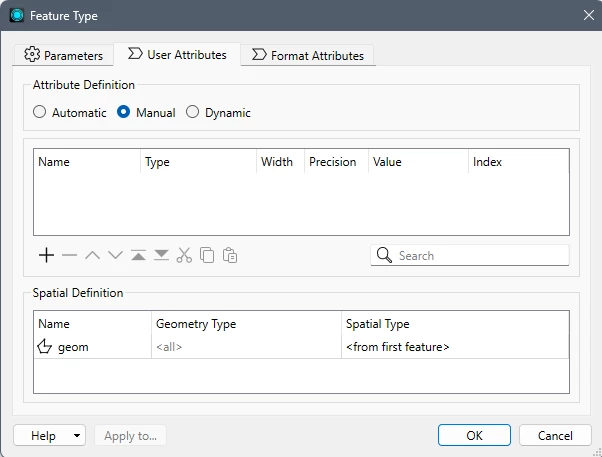
I want to define the Geometry Type in PostGIS-Writer. I recently changed from an old version of FME to version 2025.2 In the user dialog of the writer there ist still a field for the definition (feature type/user attributes/spatial definition/geometry type, but the field is de-activated (grayed out).

Is there a way to “manually” define the geometry type for postgis tables? 


Thank you for any help.
Best answer by andreaatsafe

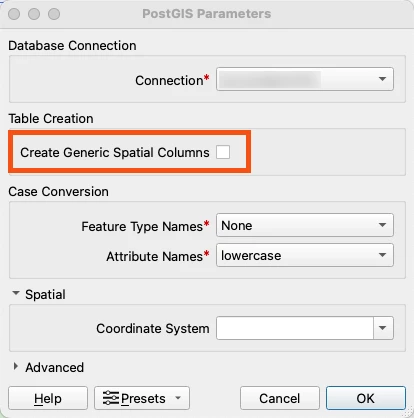
For PostGIS, you’ll need to uncheck the “Create Generic Spatial Columns” in the writers parameters when you first add the writer:


Then you’ll be able to configure the Geometry(previously Spatial) Definition table to set the geometry type as ​@hkingsbury mentioned.

3 replies

hkingsbury
Celebrity
Forum|alt.badge.img+71
  • Celebrity
  • June 2, 2026

By default the writer will be set to Automtaic Spatial (and Schema) definition. This uses the incoming geometry on the feature to write the specific geometry type. In the writer parameters, User Attributes, change the Attribute Definition to Manual and that will allow you to manually define the Geometry Type


andreaatsafe
Safer
Forum|alt.badge.img+15
  • Safer
  • Best Answer
  • June 2, 2026

For PostGIS, you’ll need to uncheck the “Create Generic Spatial Columns” in the writers parameters when you first add the writer:


Then you’ll be able to configure the Geometry(previously Spatial) Definition table to set the geometry type as ​@hkingsbury mentioned.


philip
Contributor
Forum|alt.badge.img+3
  • Author
  • Contributor
  • June 3, 2026

Thank you very much, that option was exactly what i was looking for! 👍