


Question

Convert OS Topography layer to a series of DWG tiles

  • January 15, 2026
  • 2 replies
  • 76 views

johnd
Contributor
Forum|alt.badge.img+3

Hi there

I’d like to convert the whole OS MasterMap Topography layer for our district in to individual 1km DWG tiles which are to be accessed in a variety of CAD packages.

I have had some success in converting a Geopackage of the above layer, through a MultiClipper to create the individual grid squares and finally written as a DWGs with the output ‘fanned out’ by each 1km grid reference number.

When one of the resulting files was opened in CAD, the geometry was present, but none of the attributes. However, I will try the UK OS MasterMap Topography Layer (GML) Reader, once my GML download is available from the OS Data Hub site.

Would anyone who has had some experience with this type of conversion kindly forward me some tips or advice on how best to achieve populating a DWG, or series of DWG exports with the attributes from the file which is being converted, please?

Many thanks :)

2 replies

daveatsafe
Safer
Forum|alt.badge.img+21
  • Safer
  • January 19, 2026

Hi ​@johnd,

There are a number of different ways to store attributes in a DWG file. Which would be your preference, or what tools do you want to use to interact with the attributes?


johnd
Contributor
Forum|alt.badge.img+3
  • Author
  • Contributor
  • January 19, 2026

Hi ​@daveatsafe

Thanks for replying.

We have several different CAD platforms that the DWG files need to be compatible with:

  • AutoCAD LT 2020
  • AutoCAD LT 2025
  • AutoCAD Lite 2026
  • AutoCAD 2015
  • AutoCAD Architecture 2015

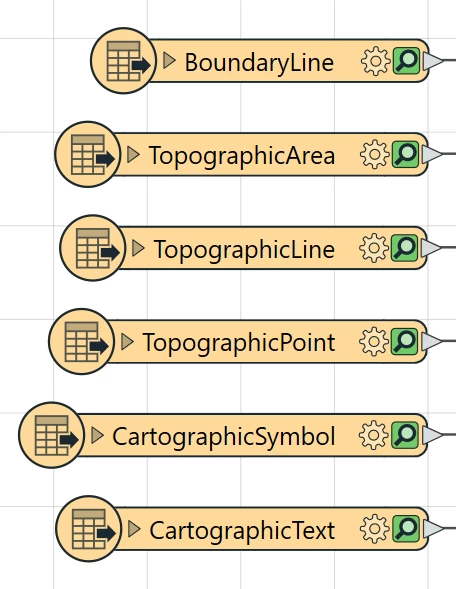
However, the main requirement is that our CAD users have the ability to toggle layers on and off. The following are the Feature Types, from the Ordnance Survey Topography GML download, which are required as layers:


GML Feature Types which are required as CAD layers

and are the ones which our CAD users will want to toggle on and off.

Hope this is OK, but please let me know if you require any more information.

Regards.

FME(R) 2023.1.1.0 (20230928 - Build 23631 - WIN64)