


Solved

Build URL from a token service web connection.

  • August 18, 2026
  • 4 replies
  • 80 views

mickbreen
Contributor
Forum|alt.badge.img+2

Hi community.

The managed web services are fantastic, especially for sharing connections and data sources through FME Flow.

I have a question about how we can recreate a URL call from a token service from an Oauth enabled end point.

The web connection I have works as intended in Form and occasionally falls over in Flow (maybe 1 in 10) and I am attempting to troubleshoot.

To do so I am trying to connect to the web service endpoint by building the URL that the token service creates through the Web services in FME.

Does anyone have a template that can show me where each of the fields are built into a URL call so I can substitute in the values I have in the request URL, request Data, Token Object Key and Header fields?

I am assuming I’ll have to strip out some fields that aren’t needed and maybe use some additional fields that form populates automatically but I just need somewhere to start from.

This is how I have it set-up but not all of the details are in the request data field.

Thank you.

Michael.
Best answer by todd_davis

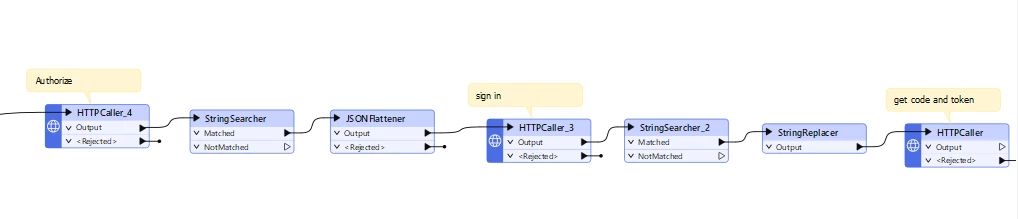
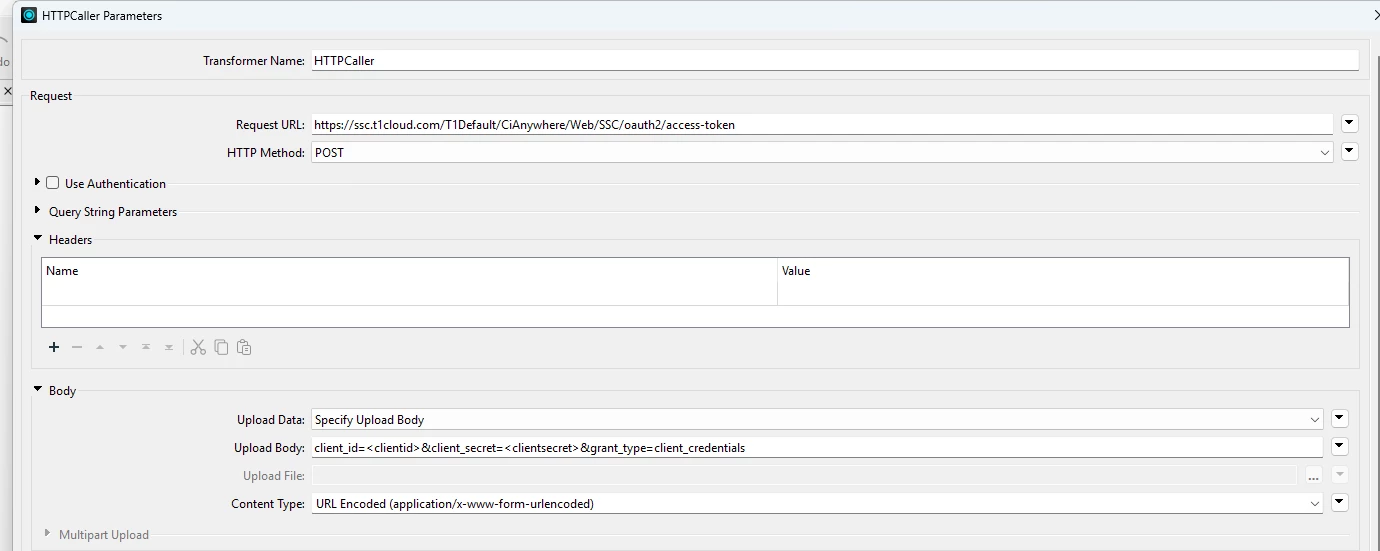
I am not completely sure if I am answering your question, but I read it as you are trying to understand what this looks like as a http call. Since it just a token call to get client credentials, and not a oauth2 flow, then it just a simple http call. 


If it was a Ouath2 flow getting a refresh and access token, it does get into multiple calls (but this is not required for your example):


4 replies

todd_davis
Influencer
Forum|alt.badge.img+23
  • Influencer
  • Best Answer
  • August 23, 2026

I am not completely sure if I am answering your question, but I read it as you are trying to understand what this looks like as a http call. Since it just a token call to get client credentials, and not a oauth2 flow, then it just a simple http call. 


If it was a Ouath2 flow getting a refresh and access token, it does get into multiple calls (but this is not required for your example):


desiree_at_safe
Safer
Forum|alt.badge.img+24

Hi ​@mickbreen!

⚠️ Quick Security Note: Your screenshot shows visible client details in the request field. Even if these are test credentials, I'd recommend rotating/regenerating that secret with your provider as soon as possible and updating or blurring the image in your post.


The workflow Todd shared above is a great template for reconstructing what FME's token web service does under the hood. Web connections send a request to the endpoint with the required payload and scopes, then parse the JSON response to extract the access token for use in downstream POST requests. Keeping the provider's API documentation handy is usually the easiest way to ensure you send the correct payload and that all required key-value pairs are there.
 

If you want a deeper look at how FME manages Token Web Services natively, check out the Web Connections & Services in FME: Tips & Tricks webinar. There’s a really helpful walkthrough around the 13:26 mark
 

Regarding your issues with Flow, could you share a bit more detail or the log output for those 1-in-10 failures? If there is a specific HTTP status code (e.g., 401 Unauthorized, 429 Too Many Requests...), it will help determine whether it’s a token refresh timing issue, a concurrency collision, or something else.


danielleatsafe
Safer
Forum|alt.badge.img+31

Hi ​@mickbreen, I’ve deleted the image from your post, following up on ​@desiree_at_safe comment.


mickbreen
Contributor
Forum|alt.badge.img+2
  • Author
  • Contributor
  • August 30, 2026

Hi FMErs.

Thank you very much for the details on this.

I have a feeling that has answered my question and also given me something else to investigate.

@todd_davis workflow will be very useful in another project I am working on and looking to implement some external variables for token requests.


Given the conversation I don’t think I can do what I was originally trying to do as I was trying to build a single URL that I could paste into a web browser and view the endpoint.

The request/token/authorisation/login steps seem to need to be handled separately in an oauth2 workflow.


Cheers and enjoy.

Michael.