




Solved

autocad OD reader inconsistent

  • January 28, 2026
  • 2 replies
  • 29 views

gisbradokla
Enthusiast
Forum|alt.badge.img+20

I am reading a dwg with object data table in it. I set the mode to Group by Object Data. (set the workflow options to single merged feature type)

I then created a tester to distinguish which features have been attached to the table. (tester_8). Then i use an attributekeeper. The OD table attributes are not available in the keeper. Then attach the same exact tester (tester_11) and all of the features fail. If i remove the attributekeeper the features route correctly. Also after using data preview correctly and viewing cache in the attributekeeper, the data preview will never show the OD table attributes again (add the reader again)
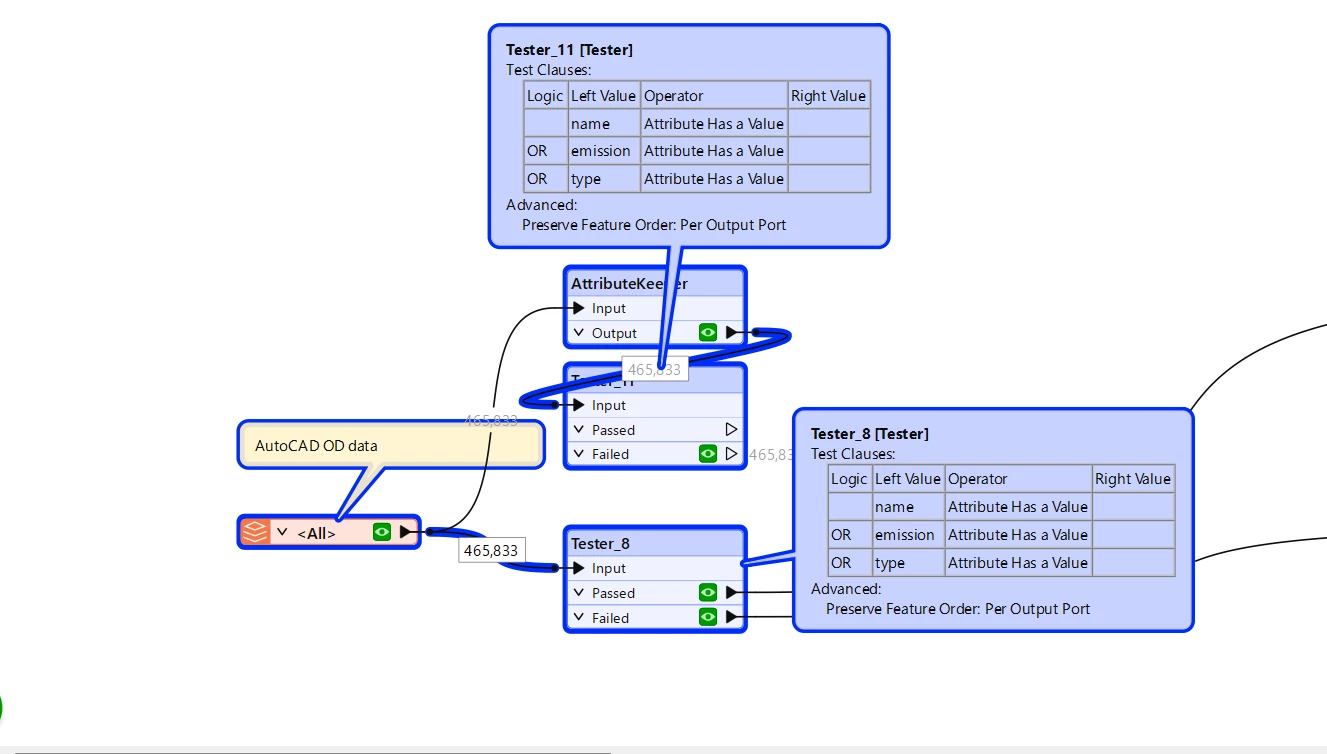

Also setting additional attributes to expose does not stick. Each time i go in to the reader and update features i must add all the attributes to expose. These two problems seem to be related to each other.


Best answer by j.botterill

You can collapse each Tester transformer to confirm which attributes are indeed exposed

I think you may want to address this one with Safe Software support. Go to FME Support Center and submit a new request

2 replies

j.botterill
Influencer
Forum|alt.badge.img+57
  • Influencer
  • Best Answer
  • January 29, 2026

You can collapse each Tester transformer to confirm which attributes are indeed exposed

I think you may want to address this one with Safe Software support. Go to FME Support Center and submit a new request


nielsgerrits
VIP
Forum|alt.badge.img+64

Have you tried what happens when FeatureCaching is off? I have had some unexpected behaviour recently which turned out to be a FeatureCaching issue.






