


Hi community,
I am working on a prototype workbench where I read spatial locations, process data, and write them out to a brand-new layer in ArcGIS Online. My primary goal is to attach local PDF documents (using a file path attribute named path_windows) to these newly created features as they are uploaded.
I am using the FeatureWriter (Esri ArcGIS Feature Service) transformer set to Create If Needed / Insert. However, I have hit a roadblock when trying to pass the written records downstream to the ArcGISAttachmentConnector:
- The individual feature type output port on the FeatureWriter does not exist (or doesn't pass the individual features downstream with the required AGOL metadata).
- The Summary port outputs a single feature containing the _dataset URL, but it drops the individual spatial features and row-level attributes like path_windows.
- Because the ArcGISAttachmentConnector requires both the individual feature stream (carrying the generated OBJECTID) and the layer's REST endpoint URL, I am struggling to combine these two pipelines effectively right after a fresh layer initialization.
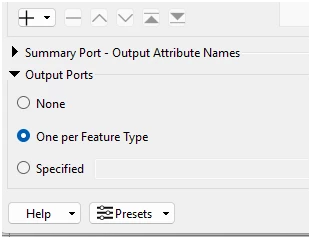
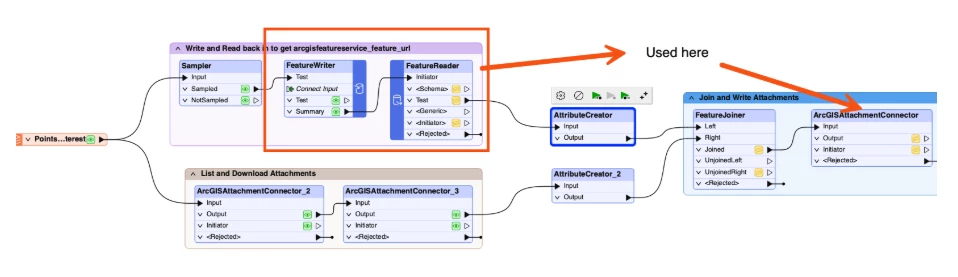
I have attached a screenshot of my current workspace layout for context as well as the configuration of my featurewriter. What is the recommended best practice for delaying the features or joining the Summary port metadata back onto the individual records so they can safely pass into the AttachmentConnector?