


Question

BC Time zone Change


navid.fotovaty
Contributor
Forum|alt.badge.img+4

Hey everyone, 

Any idea how the time zone in BC change going to affect Forms and Flow? Windows update is going to add a whole new time zone name “(UTC-07:00) Pacific Time (British Columbia)” on Nov 1 if I understand it correctly. 

I guess Flow will use server time, but what about Form? What will happen if we have done a date conversion within a Form? 

2 replies

sblazey
Contributor
Forum|alt.badge.img+1
  • Contributor
  • October 20, 2026

I came here looking for this.  I ran a Windows update on my computer this morning which added the new “(UTC-07:00) Pacific Time (British Columbia)” time zone to my computer (it is now an option for me in Outlook and our IT team announced it was coming).

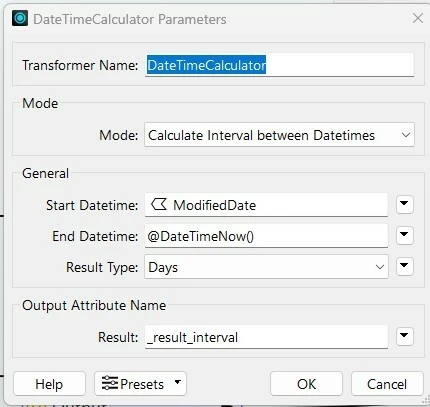
I just ran some FME on my desktop that has a DateTimeCalculator that I use to “Calculate Interval between Datetimes”.  It compares the date in my “ModifiedDate” field with the @DateTimeNow().

I am getting this error now:

DateTimeCalculator_1 (TeeFactory): DateTimeCalculator_1: DateTimeCalculator: Failed to load timezone data. current_zone() failed: A mapping from the Windows Time Zone id "British Columbia Standard Time" was not found in the time zone mapping database.. Please visit http://www.safe.com/support

DateTimeCalculator_1 (TeeFactory): DateTimeCalculator_1: DateTimeCalculator: Failed to evaluate input expression: @DateTimeDiff(@DateTimeNow(),@Value(ModifiedDate),DAYS)

I am guessing I need to add the new time zone somewhere in FME Form and Flow?


Edited to add: I am running FME 2024.2.1.0 (20241202 - Build 24801 - WIN64)


Thanks,

Stephanie 


sblazey
Contributor
Forum|alt.badge.img+1
  • Contributor
  • October 20, 2026

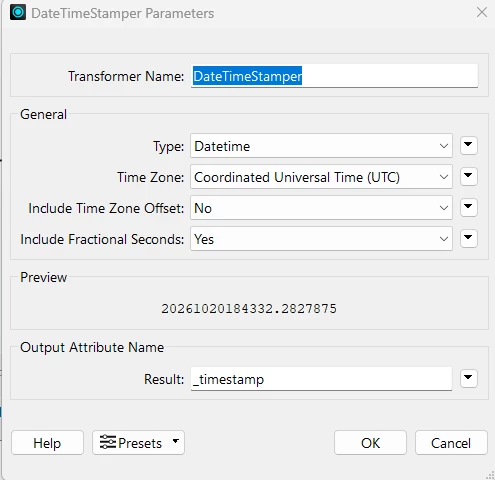
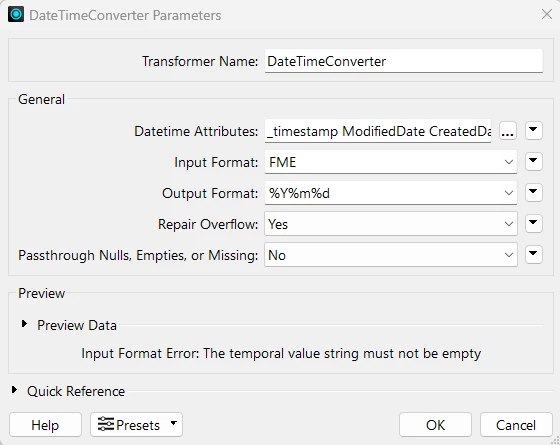
As a workaround for this particular workspace, since I am comparing my ModifiedDate with a DateTimeNow() and I only care about the rough number of days that has lapsed between them, I changed my workspace to use a DateTimeStamper and a DateTimeConverter instead.

If I cared about a more accurate time or a precise level of hours/minutes, this wouldn’t work as-is (I would have to do extra math to accommodate for time zones).  

Sharing in case it helps someone dealing with a similar issue:


Previously, I had a DateTimeCalculator, where I compared my ModifiedDate with @DateTimeNow():


This threw the error I noted above:

DateTimeCalculator_1 (TeeFactory): DateTimeCalculator_1: DateTimeCalculator: Failed to load timezone data. current_zone() failed: A mapping from the Windows Time Zone id "British Columbia Standard Time" was not found in the time zone mapping database.. Please visit http://www.safe.com/support

DateTimeCalculator_1 (TeeFactory): DateTimeCalculator_1: DateTimeCalculator: Failed to evaluate input expression: @DateTimeDiff(@DateTimeNow(),@Value(ModifiedDate),DAYS)


The changes I made are as follows:

  1.  Add a DateTimeStamper in the Coordinated Universal Time (UTC):
  2.  

  3. Add a DateTimeConverter to format those dates to YYYYMMDD:

  4.  
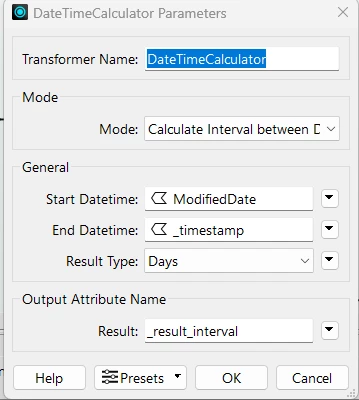
  5. Then I changed my DateTimeCalculator to use the new _timestamp field instead of DateTimeNow():
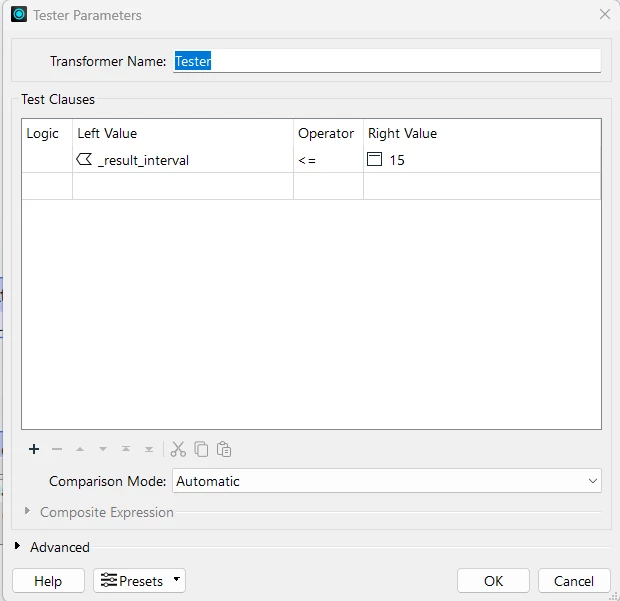
  6. And kept the same tester I had to find values within the last 15 days:

  7.  
  8. This workaround works for this particular workflow because it is simple and I don’t mind if it’s off by 8 hours.

I am still interested to know if there are some better overarching configuration solutions for the rest of my workspaces on Form (and Flow?) that are not as easy to fix.  Some kind of blanket solution for everything that I can set somewhere instead of finding all the workspaces with DateTime related things would be awesome.

Thanks!

Stephanie