


Question

ArcGIS Online Feature Service Writer – Error 409: Item already exists


anandkumargis
Contributor
Forum|alt.badge.img+5

I am working on an FME workflow to read data from SQL Server, perform some data manipulation, and then update an existing ArcGIS Online Feature Service.

I am using the ArcGIS Online Feature Service Writer in FME.

During the translation, I am getting the following error:

ArcGIS Online Feature Service Writer: Encountered an unexpected error.
The error code from the server was '409' and the message was:
'Item 'tmpf_t06kco.zip' already exists.'

Details: ''

ARCGISONLINEFEATURES writer: An error has occurred.
Check the logfile above for details.

I noticed that FME appears to be creating/uploading a temporary .zip/File Geodatabase item in ArcGIS Online.

My intended workflow is:

SQL Server
↓
FME Data Manipulation
↓
Existing ArcGIS Online Feature Service
↓
Insert / Update / Delete / Upsert

I do not want to create a new Feature Service on every run. The Feature Service already exists in ArcGIS Online, and my goal is to refresh/update the existing layer.


3 replies

desiree_at_safe
Safer
Forum|alt.badge.img+24

Hi ​@anandkumargis! Would you be willing to share a simplified workspace or a screenshot of the Writer Feature Type settings?

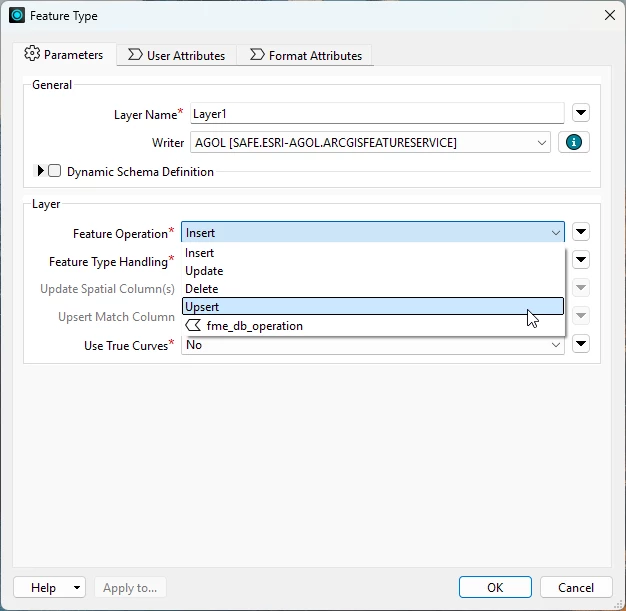
If you’re using the Feature Service package (safe.esri-agol.arcgisfeatureservice), you may be running into issues with the Writer operation. You can confirm that the operation in the Feature Type parameter’s dialog is set to something like Update or Insert.


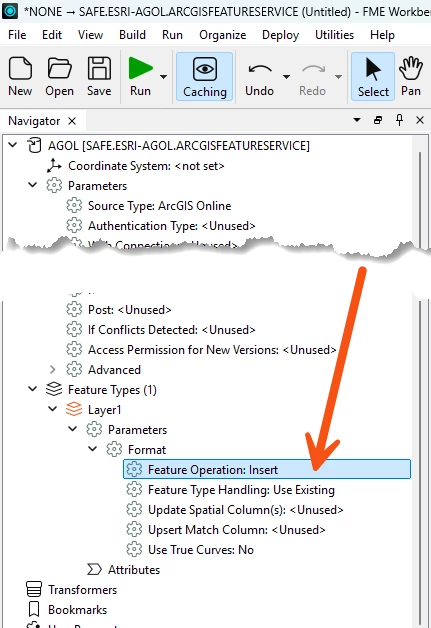
In case you didn’t know, the Writer’s Feature Type parameters dialog can be accessed from the Navigator, under Feature Types>[Your layer name]>Parameters>Format


anandkumargis
Contributor
Forum|alt.badge.img+5

Hi, I verified the Feature Type parameters, and they exactly match the suggested settings.

However, in FME 2023.2, the process was creating a GDB file in the ArcGIS Online portal, and the overlay process was terminating. I tried deleting the GDB created by FME from the AGOL portal and then re-ran the FME workbench.

After deleting the existing GDB, the workbench ran successfully, and the AGOL layer was overwritten as expected.

It looks like the existing FME-created GDB was causing the issue.


desiree_at_safe
Safer
Forum|alt.badge.img+24

Hi ​@anandkumargis! Apologies for the late reply!

I’m glad things have been resolved. It is a bit odd that you couldn’t edit your existing features. 

To dig into this further, please open a support case. It would be helpful if you could provide reproduction steps and details about your workflow, data, and environment.

You can submit that ticket using this link: Support Case