




Hello FME Community 👋🏻
Big news: I finished Form Intermediate in the FME Academy! If you've been following along since my first few posts, you know I started out with a lot of "wait, what is happening?" moments. Now I get to share two "ohhh, so THAT'S how it works" moments instead.
1. Workspace components and their relationships
The lesson Understanding Workspace Structure was the best piece of non-fiction I have read in a hot minute. It wasn't flashy, but it was the missing context I didn't know I needed.
Up until this point, I could follow the steps in the exercises, but I didn't always understand why I was taking them. This lesson shows how everything fits together:
- A workspace contains one or more readers and writers
- Each reader and writer contains one or more feature types (the layers, tables, or sheets in your data)
- Each feature type contains the features themselves, and each feature carries its attributes
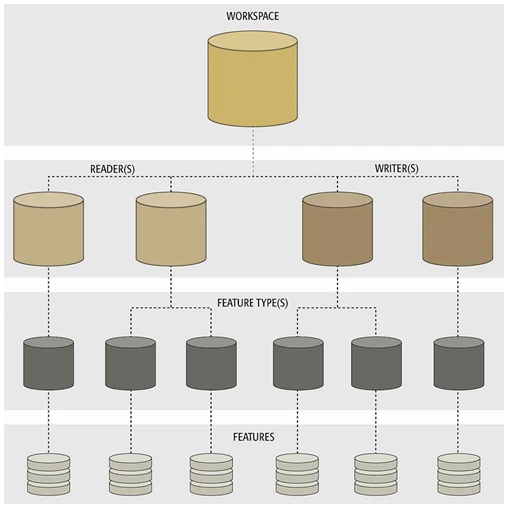
I come from a GIS background, so features and attributes weren't new to me, and I thought I had this hierarchy figured out from earlier lessons. What this lesson added was the FME context: how readers, writers, and feature types wrap around those familiar pieces. Seeing it in one diagram is what made it stick, and after that the exercises started feeling like decisions I understood instead of instructions I was following.
2. Parameters (finally!)
If you remember my first few Notes from a Newbie posts, I was so confused by parameters: what they do and where they live. Now it clicks, and knowing which ones are in the Navigator, which are on the canvas, and which are both was a life changer. Here's how I think about them now:
- User parameters are ones you create so that values can be set when the workspace runs, like the little dialogue box that asked me to enter my name in the exercises. That was oddly satisfying!
- Transformer parameters control how an individual step happens. I thought it was really neat that you can save presets, so you can configure a transformer once and reuse it.
- Reader/Writer parameters tell FME how to read or write data, and apply to everything under that reader or writer. If your data looks weird coming in or going out, check these first!
- Feature type parameters are more specific. They're set per feature type and applied on top of the reader/writer settings.
Parameters follow the same structure as the hierarchy, with settings at each level. Once I saw that, they stopped feeling random.
I'm definitely not an expert (yet), so if you have your own tips for keeping them straight, I'd love to hear them in the comments! If you want the real deep dive, our knowledge team is amazing, and their Parameters Across the FME Platform article says it way better than I can.
From "wait, what?" to "ohhh"
It's funny that my biggest takeaways from an intermediate course are such foundational ones. But these two pieces have given me a solid base for FME, and it all feels a lot less daunting! Shoutout to the exercises in the modules too. The hands-on work is what really drives the concepts home.
Catch y’all in the next one ✌️