Question

Testing ArcSDE Database connections in FME Flow

  • April 30, 2026
  • 8 replies
  • 96 views

ebygomm
Evangelist
Forum|alt.badge.img+49

Has anyone got any tried and tested methods for testing ArcSDE connections that are stored in FME Flow, en masse rather than one by one.

I thought i could use an SQL Executor but it appears FME doesn’t handle the error messages when they’ve come from a failed SDE connection so the workspace terminates if there is one bad connection.


8 replies

hkingsbury
Celebrity
Forum|alt.badge.img+70
  • Celebrity
  • April 30, 2026

Could do it in an automation so you can capture the workspaces that fail?


david_r
Celebrity
  • May 1, 2026

You could perhaps test the connections using e.g. arcpy.Describe(my_sde_connection_file) and loop over them in a PythonCaller. That way you can handle any errors yourself with try/except.

The tricky part is knowing the the names of the SDE connections, since the FMENamedConnectionManager class lacks any mechanism to discover available connections. So you’ll basically have to provide the list of SDE connections yourself.


hkingsbury
Celebrity
Forum|alt.badge.img+70
  • Celebrity
  • May 3, 2026

I don’t have a DB readily accessible to check, but I suspect you could find the db connection names from the FME Flow DB then use the FMENamedConnectionManager to pull the details


hkingsbury
Celebrity
Forum|alt.badge.img+70
  • Celebrity
  • May 3, 2026

I don’t have a DB readily accessible to check, but I suspect you could find the db connection names from the FME Flow DB then use the FMENamedConnectionManager to pull the details


Actually, you can use the REST API to get them all as well

https://<fmeflow>/fmeapiv4/connections


ebygomm
Evangelist
Forum|alt.badge.img+49
  • Author
  • Evangelist
  • May 5, 2026

Yes, I’m already using the rest api to get the named connections and then splitting them based on type and testing. This works fine for Oracle, SQL etc. any failed connections come out the rejected port and I can handle them. However, the failed ArcSDE connections cause the workspace to fail completely, even if the rejected port should handle the failure.


I’m not sure ArcPy will work for this, as i specifically want to use the connections as they are set up on flow as DB connections, including any override parameters that are set there so i can’t use describe with the sde file


On a somewhat related note, if anyone knows how to automate finding out if an SDE connection file is set to traditional or branch versioning I’d love to know. 


david_r
Celebrity
  • May 7, 2026

On a somewhat related note, if anyone knows how to automate finding out if an SDE connection file is set to traditional or branch versioning I’d love to know. 

I think you can infer it from the connectionProperties object in arcpy, e.g.

import arcpy

sde = r"C:\path\to\connection.sde"
cp = arcpy.Describe(sde).connectionProperties

def get_versioning_type(cp):
keys = set(cp.keys) if hasattr(cp, "keys") else []
if "branch" in keys and cp.branch:
return "BRANCH", cp.branch
if "historical_name" in keys and cp.historical_name:
return "HISTORICAL (named marker)", cp.historical_name
if "historical_timestamp" in keys and cp.historical_timestamp:
return "HISTORICAL (timestamp)", cp.historical_timestamp
if "version" in keys and cp.version:
return "TRANSACTIONAL", cp.version
return "UNKNOWN", None

vtype, vname = get_versioning_type(cp)
print(f"{vtype}: {vname}")

I don’t have a versioned SDE instance to test with, so I’m curious to hear if it works.


ebygomm
Evangelist
Forum|alt.badge.img+49
  • Author
  • Evangelist
  • May 7, 2026

The code doesn’t work for me as is, but I have managed to look into it more and got some working code (i.e. I read the documentation and then understood why the code sample provided doesn’t work!) 

Interestingly, FME reports this in the log file when the SDE is set up with branch versioning

Connection made to server '***' for dataset '' (historical timestamp '') using instance 'sde:oracle11g:***' and user ID '***'


ebygomm
Evangelist
Forum|alt.badge.img+49
  • Author
  • Evangelist
  • May 7, 2026

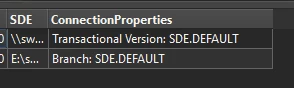
This is what I ended up with in a python caller

import fme
import fmeobjects
import arcpy


def processFeature(feature):
attrs = {
'version': 'Transactional Version',
'branch': 'Branch',
'historical_name': 'Historical Name',
'historical_timestamp': 'Historical Timestamp'
}
cp = arcpy.Describe(feature.getAttribute('SDE')).connectionProperties
for attr, label in attrs.items():
val = getattr(cp, attr, None)
if val:
feature.setAttribute("ConnectionProperties", f"{label}: {val}")