


Question

How choose filename of Datadownload output instead of a generic name

  • December 11, 2025
  • 2 replies
  • 86 views

joy
Enthusiast
Forum|alt.badge.img+15

Hello everyone,

I have a question in regards to naming the filename of the datadownload output.

I was wondering whether it's possible to change the name instead of having a name such as FME_55460769_1764252272631_14296.zip for example.

I found a post with a workaround, but he post is already 7 years old and I don't manage to use the workaround succesfully. 

Does anyone know if there is a different and easier way to change the name of the zip file?

2 replies

shirleychan
Safer
Forum|alt.badge.img+6

Hi ​@joy ,

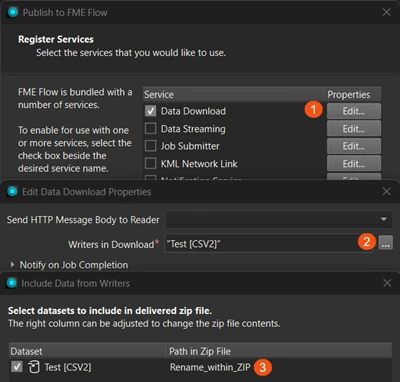
You can control the folder/file paths inside the zip file by setting it in the Data Download service settings. When you publish to FME Flow, navigate to Include Data from Writers and then rename the file under Path to Zip File.

Unfortunately at this time, the zip file name itself cannot be customized. I encourage you to upvote the Idea in the FME Community. Our product team reviews the Ideas list and will consider them for future inclusion in FME.

I hope this helps!


itsmatt
Celebrity
Forum|alt.badge.img+47
  • Celebrity
  • June 15, 2026

How are you using the Data Download link in your process? 

The Data Download service is pretty old and uses pretty fixed/rigid logic. In a nutshell it zips the outputs from selected writers and moves the data into a folder which accessible without authentication on FME Flow. It will also add a link to the summary which you can easily access in a topic or an email. 

But with a little work you can recreate this with an automation.  

Write the data out to the fme server temp folder (e.g, “FME_SHAREDRESOURCE_TEMP” data in here usually persists until restarted or a cleanup is run). 

A second workspace then zips the data with your chosen file name/path and saves it to the public folder ( “FME_SHAREDRESOURCE_SYSTEM/temp/engineresults/ ). After that you can do what you like in the automation, you now have a link/path to the data and the data sitting in an accessible location. Depending on the output you can also skip the zipping step and just provide a link to the data directly (output.pdf)

Keep in mind that the engineresults folder is unauthenticated so anything in there is accessible to anyone with access to the server. If you are working with sensitive data you will want to make sure that the output path is unguessable e.g., ...engineresults/<user>/<uuid>/zipfile.zip