



Solved

Geometry Error when Updating SDE Table

  • January 15, 2026
  • 5 replies
  • 71 views

braggken
Supporter
Forum|alt.badge.img+9

I am quite stuck on a problem with the Esri Geodatabase (ArcSDE Geodb) writer in FME 2025.1 and would appreciate any ideas.
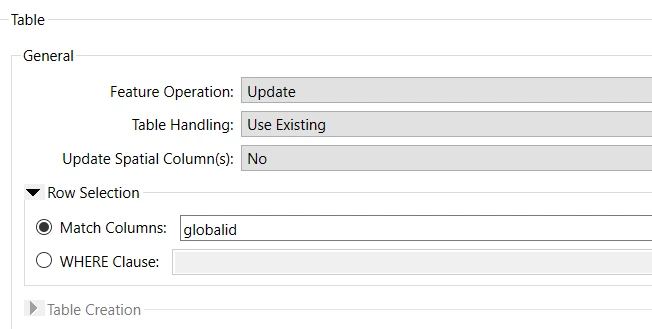
I am using the writer in update mode and not updating the spatial column.
The error is only on FME Flow and not FME Form.
 

Error updating feature for the table/feature class '<feature class name>'. Check the geometry of such feature is valid and is not too small for the resolution.

I tried removing the geomerty before the writer since no geometry is being updated - same problem.

The FME Flow Server has ArcGIS Server 11.1  installed rather than ArcGIS Pro 3.3 as on the desktop. [Edited with version numbers ]

The feature class has archiving so I am little nervous updating the records directly with SQL.

Any thoughts?


Best answer by braggken

Hi Steve,
Hope you’re doing well and thanks for answering!
The problem is resolved but will remain a mystery. 
No idea what the issue was - two points seem to have had bad geometry (found by using the failed feature to ffs pipeline on the writer) so we just deleted them and replace them. 

For some uknown reason we could not update the attributes on Flow for those  two particular points but we could on Deskstop.
To answer your quesion database is SDE on top of Postgres (postgis geometry)  on AWS - same db on desktop and flow.  I’ll mark my own reply as resolved so this problem does not continue lurking.

Cheers

Ken


5 replies

ebygomm
Influencer
Forum|alt.badge.img+46
  • Influencer
  • January 15, 2026

What versions of ArcGIS Server and ArcGIS Pro are installed? 


Are you using the new writer format (the package) or the older format?


braggken
Supporter
Forum|alt.badge.img+9
  • Author
  • Supporter
  • January 15, 2026

ArcGIS Server 11.1
ArcGIS Pro 3.3
I didn’t even know there was a new package format for that writer! 
So I guess the old one. 


ebygomm
Influencer
Forum|alt.badge.img+46
  • Influencer
  • January 15, 2026

Ignore me, i’m getting confused with the portal writer, not SDE!


steveatsafe
Safer
Forum|alt.badge.img+15
  • Safer
  • February 3, 2026

@braggken  Good to hear from you.

Did you get past this one?
 

What’s the backend database?

Are you able to update other features with the same user credentials?  Are they the same in Form and Flow?

I’m assuming the same SDE Geodatabase is in use for both Form and Flow (that this isn’t a situation where it is working in Dev, but not Prod).

Confirm the case of the Match Column but I’ll be certain you already have (camelcase vs upper/lower case) as it is working in Form.


braggken
Supporter
Forum|alt.badge.img+9
  • Author
  • Supporter
  • Best Answer
  • February 3, 2026

Hi Steve,
Hope you’re doing well and thanks for answering!
The problem is resolved but will remain a mystery. 
No idea what the issue was - two points seem to have had bad geometry (found by using the failed feature to ffs pipeline on the writer) so we just deleted them and replace them. 

For some uknown reason we could not update the attributes on Flow for those  two particular points but we could on Deskstop.
To answer your quesion database is SDE on top of Postgres (postgis geometry)  on AWS - same db on desktop and flow.  I’ll mark my own reply as resolved so this problem does not continue lurking.

Cheers

Ken