


Question

FME API 4 - get Automation schedules

  • August 4, 2026
  • 5 replies
  • 93 views

maschinensturm
Contributor
Forum|alt.badge.img+5

Hello!


We are using Flow FME 2026.1.2. I would like an overview of when most automations trigger. Unfortunately, there isn't much information about it in the documentation, so I did some research and found this post:

I tried it and now I'm experiencing some really strange behaviour. Until today, I could run all the API requests I ever needed and get results. I can even run FMEURL/fmeapiv4/schedules?limit=100&offset. What I can’t run is the solution in the thread:

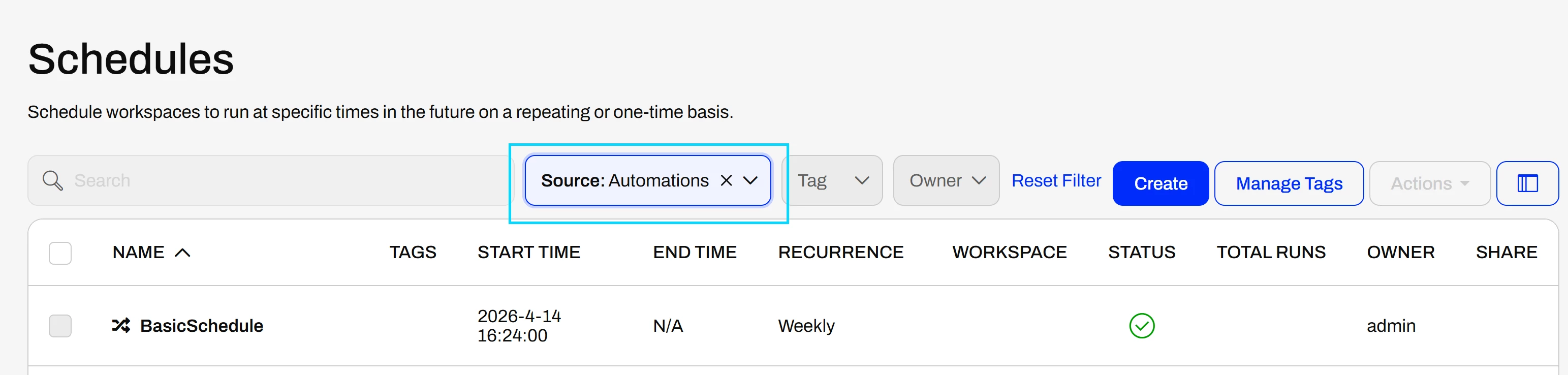
FMEURL/fmeapiv4/schedules?limit=100&offset=0&sourceType=automation

As soon as I add 'sourceType' as a parameter, I get the following result:

{"message":"Unauthorized request by user USERNAME due to lack of proper permissions or the object does not exist."}


Do I need special privileges to use this parameter? Or is it just bugged? Is there a workaround to achieve my goal of creating an overview of automation schedules?


Many thanks in advance for your help.
Kind regards,


Henning

5 replies

j.botterill
Evangelist
Forum|alt.badge.img+66
  • Evangelist
  • August 5, 2026

Based on my observation, Automation jobs appear to execute using the security context associated with the last user who saved the Automation.

This has implications for access control and resource permissions, as changing the editor can alter the privileges available to the job. I haven't seen this behavior explicitly documented, so clarification from the Safe team would be appreciated.


zoe.forbes
Safer
Forum|alt.badge.img+10
  • Safer
  • August 10, 2026

Hi ​@maschinensturm, I looked into this and see that the fmesuperuser role is required to use this query parameter, or to filter from the UI:

Use of the /schedules endpoint in this way is unsupported, as the sourceType parameter doesn’t appear in the docs. This means it’s subject to change without notice between versions, and may not conform to our usual API standards.

I submitted IDEA-3309 internally to track this, requesting that:

  • This query parameter be supported.
  • Fewer, more granular permissions be required to use this. 

zoe.forbes
Safer
Forum|alt.badge.img+10
  • Safer
  • August 10, 2026

Hi ​@j.botterill, I had a quick look and don’t believe this to be the case in 2026.1 or 2024.1 - the owner/owner ID of the automation doesn’t change when saved by another user, and I didn’t see any job errors when removing all permissions from the user who last saved.

It’s definitely possible this happened in previous versions of Flow however.


j.botterill
Evangelist
Forum|alt.badge.img+66
  • Evangelist
  • August 11, 2026

I’m fairly certain I’ve observed the behaviour in 2026,1,0 (26103) which has a number of regressions.


maschinensturm
Contributor
Forum|alt.badge.img+5
  • Author
  • Contributor
  • August 11, 2026

Hi ​@maschinensturm, I looked into this and see that the fmesuperuser role is required to use this query parameter, or to filter from the UI:

Use of the /schedules endpoint in this way is unsupported, as the sourceType parameter doesn’t appear in the docs. This means it’s subject to change without notice between versions, and may not conform to our usual API standards.

I submitted IDEA-3309 internally to track this, requesting that:

  • This query parameter be supported.
  • Fewer, more granular permissions be required to use this. 

Thanks, exactly! I also found this in the official docs (https://docs.safe.com/fme/html/FME-Flow/WebUI/schedules.htm): To list a Schedule Initiated trigger, you must belong to the fmesuperuser role, and the automation must be running. It seems there is no other official way to retrieve all Automation Schedules via the API.

Nevertheless, since only our FME Form Host has access to the femsuperuser, we have found an unofficial workaround for the issue:

  1. Get all Automations via /automations
  2. Filter out the disabled Automations
  3. Use automations/AUTOMATIONID/components (this is not officially supported, but works fine)
  4. Filter out all components that are not Triggers, Schedules, Webhooks, etc.
  5. Get all Jobs via /jobs (and a couple of iterations)
  6. Filter Jobs to those that are triggered by Automations (the necessary attribute is included in /jobs)
  7. Get the latest Job per Automation (the necessary attribute is included in /jobs)
  8. Match Jobs and Automations to get the wanted information (how often the Automation runs and when it last ran)


Thanks to your help at @all! 😁 I hope there will be a nicer way in the futur for this.