




Solved

Directory Watch in FME Flow

  • September 28, 2026
  • 3 replies
  • 65 views

vxn43
Enthusiast
Forum|alt.badge.img+20

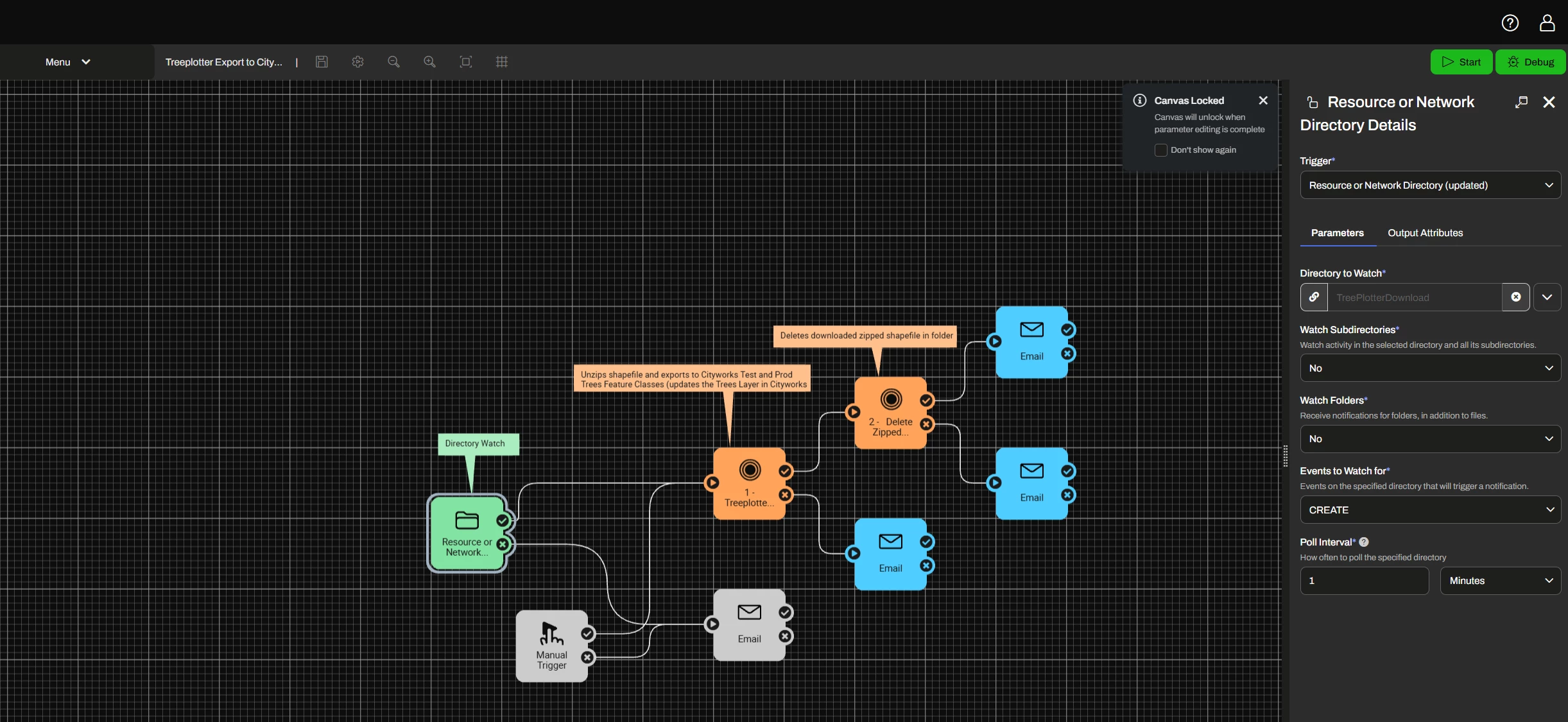
I am using FME Flow 2026.1.1. The trigger for the automation I created is Resource of Network Directory (updated). 

I have a folder that FME Flow can read/write to/from. This is the Directory to Watch. This folder is in Resources.

Events to Watch for is set to CREATE.

The Poll Interval is 1 minutes. 

The automation is supposed to trigger when a file is added to the folder. But it is not triggering. Is there something else I need to do when using this type of trigger or maybe another trigger? I tried setting the Events to Watch for to CREATE, MODIFY, DELETE and the automation still did not trigger. Any ideas on how to get a Directory Watch to trigger when a file is added to a folder?
 

Best answer by vxn43

Hi ​@vxn43, provided you’ve started the automation, there shouldn’t be anything else you need to do to get this working - sorry to hear you’re having issues!

How have you specified the directory path? When testing, I see the full path shown in the Directory to Watch field and not just the folder name, but this could just be a UI change between versions. 

Can you also please check the trigger’s log and let me know if anything errors or warnings are shown? This is at Resources/Logs/automations/current/trigger_dirwatch.log.

I found the problem. I failed to set write permissions to the folder. I had read but did not select write. It works now. 

View original

3 replies

zoe.forbes
Safer
Forum|alt.badge.img+10

Hi ​@vxn43, provided you’ve started the automation, there shouldn’t be anything else you need to do to get this working - sorry to hear you’re having issues!

How have you specified the directory path? When testing, I see the full path shown in the Directory to Watch field and not just the folder name, but this could just be a UI change between versions. 

Can you also please check the trigger’s log and let me know if anything errors or warnings are shown? This is at Resources/Logs/automations/current/trigger_dirwatch.log.


vxn43
Enthusiast
Forum|alt.badge.img+20
  • Author
  • Enthusiast
  • September 29, 2026

Hello Zoe, I found the error in the log file: 


ERROR  | main | Treeplotter Export to Cityworks (31dfe384-e4a6-4368-a543-9fa23f18fd89) | no-event | Invalid path to watch: "\\MyServer\p_drive\FME_Workspaces\Treeplotter_Export_to_Cityworks\Treeplotter_Export_Shapefile"


In the path do I need to include the file name? Each file that is dropped into the folder will have a different name but they are all zip files. Can I use a wildcard for the file name like this?

"\\MyServer\p_drive\FME_Workspaces\Treeplotter_Export_to_Cityworks\Treeplotter_Export_Shapefile\*.zip"


vxn43
Enthusiast
Forum|alt.badge.img+20
  • Author
  • Enthusiast
  • Best Answer
  • September 29, 2026

Hi ​@vxn43, provided you’ve started the automation, there shouldn’t be anything else you need to do to get this working - sorry to hear you’re having issues!

How have you specified the directory path? When testing, I see the full path shown in the Directory to Watch field and not just the folder name, but this could just be a UI change between versions. 

Can you also please check the trigger’s log and let me know if anything errors or warnings are shown? This is at Resources/Logs/automations/current/trigger_dirwatch.log.

I found the problem. I failed to set write permissions to the folder. I had read but did not select write. It works now.


