


Question

Can you use a User Parameter for an ExcelReader and connect it to an AttributeManager transformer?

  • September 2, 2026
  • 1 reply
  • 6 views

lisaonmsn
Contributor
Forum|alt.badge.img+3

I have a workflow that reads an Excel file (attached image ExistingSourceDataset_XLSXR_image.png) then uses an AttributeManager transformer to modify the data, then writes the results to a SQL server database (attached image sampleFMWimage.png). Works great.

I’ve been asked if it is possible to replace the hard coded Excel filename in the ExcelReader with a prompt for the filename. I thought it would be easy. I was wrong. My original thought was create a User Parameter (I’ll call it excelFilename) and then replace the existing source dataset with that User Parameter. Found no way to do that. Has anyone done something similar? Or know how to make that work?


1 reply

itsmatt
Celebrity
Forum|alt.badge.img+48
  • Celebrity
  • September 3, 2026

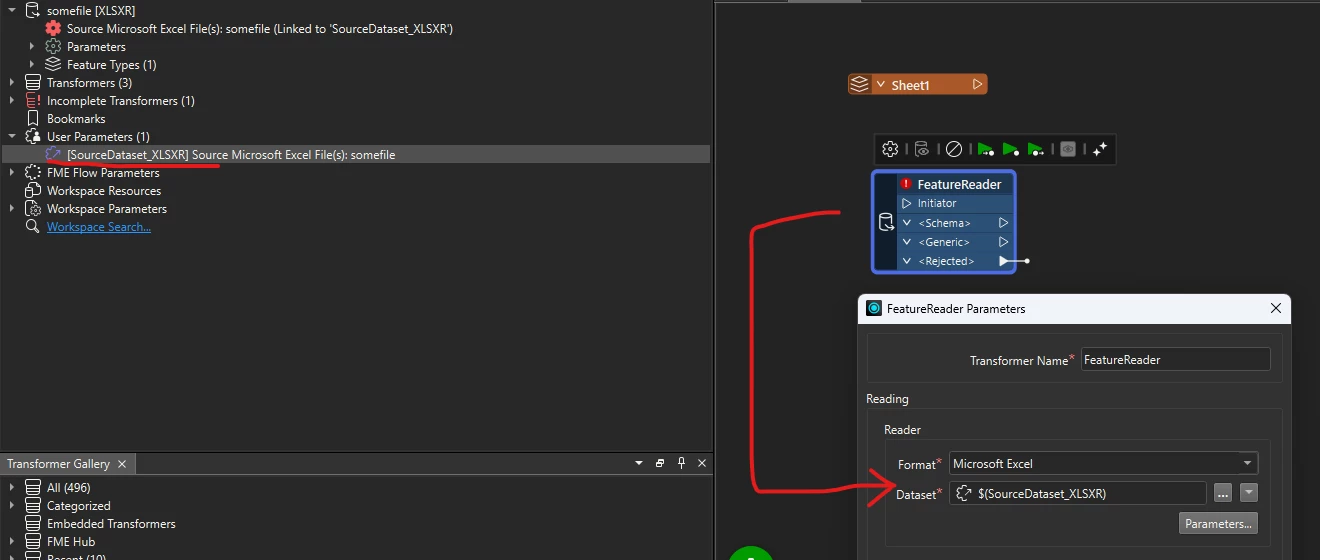
This should work. When you add a reader FME will auto generate a user parameter for the input path. 

In this case it’s “SourceDataset_XLSXR” but you can easily rename it to what ever you want.

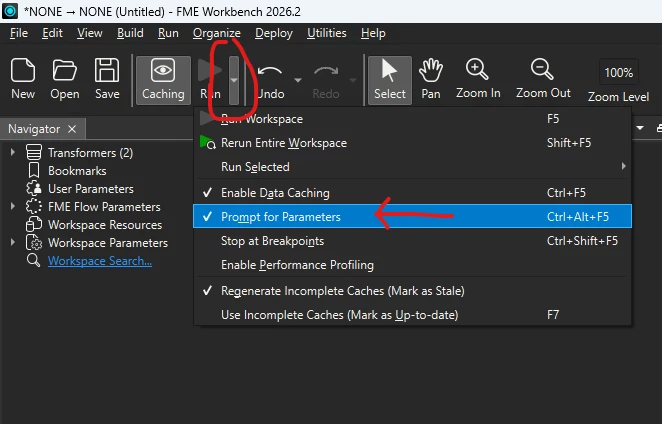
Check that you have the prompt turned on otherwise you’ll not get prompted.
 

You’ll want to be careful with the sheet names and schema of your workbook - if you are just adding a reader and then pointing the file FME will expect that the repointed file have the same sheets/named ranges and schemas for each.

If you have different columns or sheet names then FME will miss them. There is a way to handle it but it’s another level

There is a little weirdness with FME Readers in that then you look at the readers properties it will always resolves the parameter to where it’s pointing so it looks like it’s not using the parameter when it is. If you swap your Reader with a FeatureReader transformer then the parameter will show.


For example here the FeatureReader shows the parameter name but the excel reader above shows “somefile” in the path (the value of the parameter).