




Dear FME users,
Already for days we're trying to get an automation to work with a HTTPCaller using certificates.
The HTTPcaller works when we put in the HTTPCaller the option 'Verify HTTPS Certificates' to 'No’, see printscreen below.
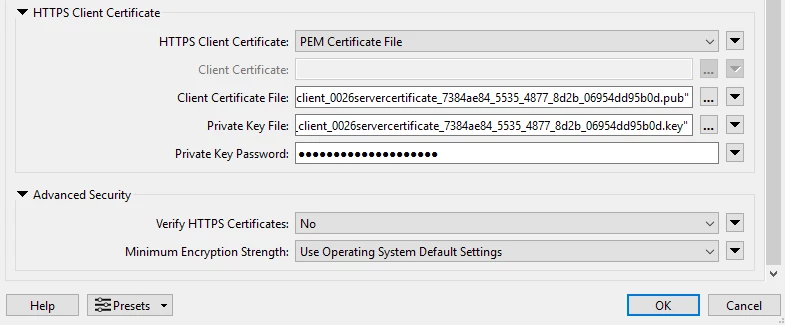
However when we publish the workbench to FME Flow and run it from an automation we are getting the following two errors:
Aanroep_gateway_lijst_ftp (HTTPFactory): [1]: HTTP transfer error: Problem with the local SSL certificate
Aanroep_gateway_lijst_ftp (HTTPFactory): An error occurred while accessing the URL 'https://tst….

We configured different things to get it work, first of all we added the server certificate (of the server to which we are trying to connect with the HTTPCaller) to the Java keystore, as described in:
SSL Certificate Handling for FME Transformers – FME Support Center
keytool -import -trustcacerts -keystore "G:\FMEServer\Utilities\jre\lib\security\cacerts" -storepass changeit -noprompt -alias aseqltst100Root -file "<location file>"
And:
keytool -import -trustcacerts -keystore "G:\FMEServer\Server\fme\jre\lib\security\cacerts" -storepass changeit -noprompt -alias aseqltst100Root -file "<location file>"
Because this didn't sort any effect we also added the certificate to the Windows truststore (Trusted Root).
Later on we also added the client certificates (both public and private to the Java keystore).
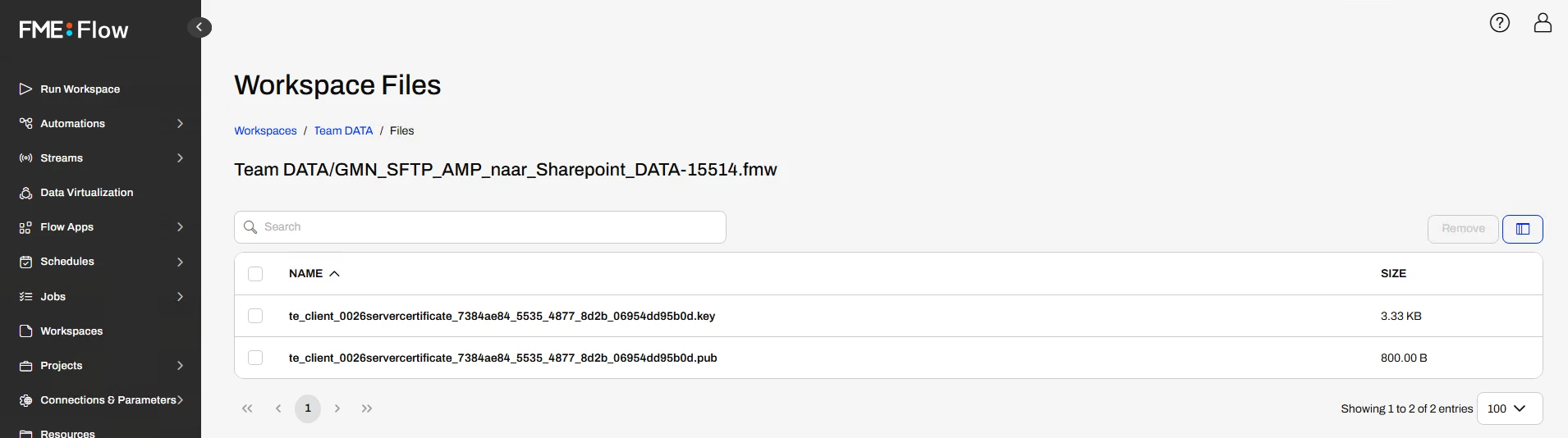
When we look in FME Flow by Workspaces we see by this particular workspace under 'files’ the two certificate files we used in the HTTPCaller, see printscreen below. This gave us confidence that the files are available. However, when it didn't work we also made this files avaible under 'Resources’ in FME Flow.
After researching in this FME community I came across the system variable 'CURL_SSL_BACKEND’ and setting it with value 'openssl’. Unfortunately this also didn't sort any effect.
At last we tried different client certificates and also tried to add the private key without password protection.
We are getting kind of desperate and hope that there is someone around to help us.
Many thanks in advance and warmest regards from The Netherlands.



