



Solved

Wrap text in Excel template not working

  • March 9, 2026
  • 7 replies
  • 119 views

kylewicks
Contributor
Forum|alt.badge.img+6

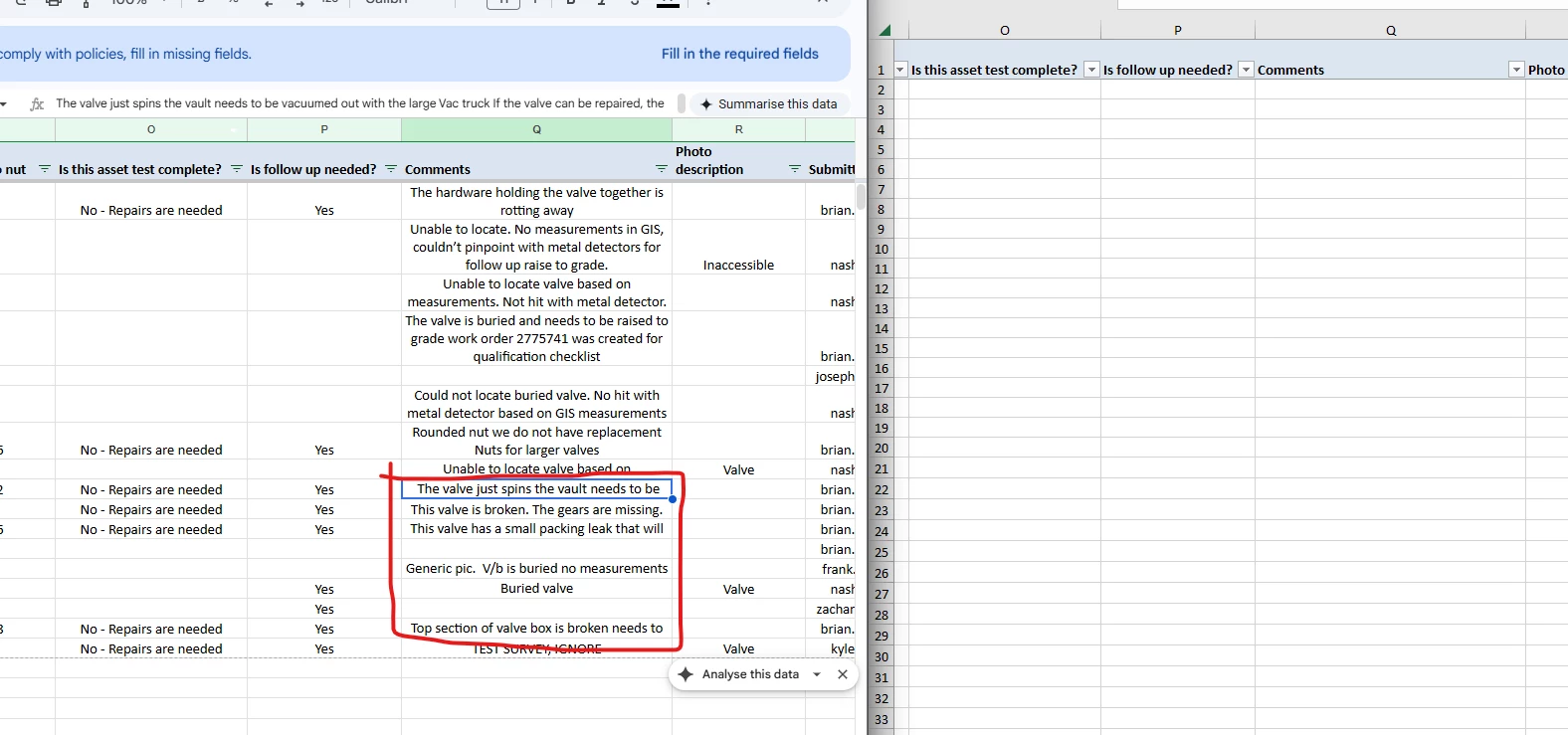
I have some columns within my Excel template that have a lot of text, so I thought to put the wrap text feature on for basically the whole spreadsheet. Thing is, only some of the cells wrap text instead of all of the cells. In the screenshot you can see what I mean - I have tried everything to try and fix this. Hoping someone in this community can assist! I tried using the ExcelStyler transformer too to no avail.

 

Best answer by kylewicks

I finally figured it out. It was an Excel issue with wrapped text and row height being set to autofit.

https://www.mrexcel.com/board/threads/cells-wrap-text-why-is-this-not-working.450883/
 

Used this keyboard shortcut to adjust the workbook: Alt+O+R+A

7 replies

jamatsafe
Safer
Forum|alt.badge.img+19
  • Safer
  • March 12, 2026

Hi ​@kylewicks, I tried to reproduce what you’re seeing in FME 2025.2 but may not be observing the same behaviour. In your output excel file, is text wrapping enabled in the Excel UI for the cells with truncated text? 

Could you also confirm the width of the columns in your template are set to a reasonable width before text wrapping is enabled (test manually) as wrap display seems to be based on the initial cell width/height when you first toggled it on so if you manually narrow the column afterwards, text may truncate after a certain extent. 

If Wrap Text is already defined in the template, using an ExcelStyler will not resolve the text truncating issue. But if you use it on it’s own, it can wrap text via the Text Control parameter to either:

  • entire row > creates unexposed attribute (xlsx_row_formatting)
  • or selected columns > creates exposed attribute for selected columns (attributename.formatting)
    • Please ensure this field is visible in User Attributes table within your writer Feature Type settings
    • eg. comments.formatting will show value of ‘version<semicolon>1<semicolon>text_control<semicolon>wrap_text’
  • Afterwards, you can explicitly set your initial cell width for the text wrapped column within the User Attribute table of your writer

Which FME version and build are you using? If you are able to share your workspace, a simple sample dataset, template file, and final output file where you are observing the issue, we can get a clearer picture of your workflow and take a closer look on our end!


kylewicks
Contributor
Forum|alt.badge.img+6
  • Author
  • Contributor
  • March 13, 2026

I’m gonna try this, but I want to add that this is an excel template I’m using that has a writer that goes to Google sheets. My company does not allow direct connections for Google drive so I have to use an excel writer, which is then uploaded to a drive folder and opened as a Google sheet. 
 

The goal is for people to access the google sheet and edit it and then for me to post new records from Survey 123 to the google sheet without overriding their edits. 


kylewicks
Contributor
Forum|alt.badge.img+6
  • Author
  • Contributor
  • March 27, 2026

@jamatsafe Sorry for the delay, but I went through your suggestions and nothing seems to work. Oddly enough, the first 8 rows are correctly showing wrapped text, but below that everything seems without wrapped text. And to make matters weirder, when I initially load the Excel sheet in Google Sheets (also does this same thing in Excel) it shows everything wrapped correctly for half of a second before it reverts back to the top 8 rows being wrapped. Attaching the video here.

As for which version and build, I’m currently in FME 2025.1. 


geomancer
Evangelist
Forum|alt.badge.img+63
  • Evangelist
  • March 30, 2026

@jamatsafe Sorry for the delay, but I went through your suggestions and nothing seems to work. Oddly enough, the first 8 rows are correctly showing wrapped text, but below that everything seems without wrapped text. And to make matters weirder, when I initially load the Excel sheet in Google Sheets (also does this same thing in Excel) it shows everything wrapped correctly for half of a second before it reverts back to the top 8 rows being wrapped. Attaching the video here.

As for which version and build, I’m currently in FME 2025.1. 

Makes me wonder: can this be an issue with your data?
Maybe there is some special character (probably in row 9) that is causing this to go wrong?


kylewicks
Contributor
Forum|alt.badge.img+6
  • Author
  • Contributor
  • March 30, 2026

@lizsanderson21 Hi Liz, I read some of your articles recently about getting started with Excel - wondering if you’re able to assist on this issue or the other issue I’m having and have a post for.

Any input or help would be appreciated!


kylewicks
Contributor
Forum|alt.badge.img+6
  • Author
  • Contributor
  • March 30, 2026

@geomancer yeah I was wondering that too, I ended up creating a new template file and through a lot of trial and error was able to get it to wrap text, but at the cost of a bunch of other needed features that I would have to fix manually.

Seems like such a simple thing that the Excel writer should be doing, which is the most frustrating part.


kylewicks
Contributor
Forum|alt.badge.img+6
  • Author
  • Contributor
  • Best Answer
  • March 30, 2026

I finally figured it out. It was an Excel issue with wrapped text and row height being set to autofit.

https://www.mrexcel.com/board/threads/cells-wrap-text-why-is-this-not-working.450883/
 

Used this keyboard shortcut to adjust the workbook: Alt+O+R+A