


Question

Running .model3 files with PostgreSQL connections

  • August 31, 2026
  • 2 replies
  • 47 views

hbrillon
Contributor
Forum|alt.badge.img+1

I have a QGIS .model3 file that uses PostgreSQL tables as its inputs and writes to other PostgreSQL tables as its outputs. I am having trouble getting this model to run as part of an FME Workbench.

What I have done so far:

  • Copied the tool parameters from the QGIS graphical interface (Advanced > Copy as qgis_process command)
  • Edited the command so that “--” only appears in front of the first parameter
  • Added “” around each PostgreSQL parameter as they contain spaces and special characters and were causing Invalid parameter errors in Windows command prompt
  • Thanks to these changes, running the tool with qgis_process in Windows command prompt no longer throws invalid parameter errors

The tool fails silently through the SystemCaller transformer in FME.

In Windows command prompt, the parameters now seem to be read properly but I am now getting “File could not be found” for PostgreSQL addresses.

Still in command prompt, dialing psql first with my database credentials makes it say \PROGRA~1 is an invalid command.


2 replies

dylan.at.safe
Safer
Forum|alt.badge.img+9

Hi ​@hbrillon


While I'm not completely familiar with using QGIS Modeller with FME, I did have some success running it with the system caller. Here is the approach I used:

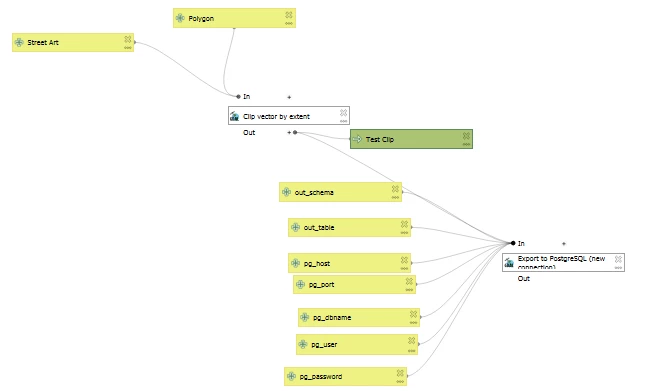
The model is simply reading in a pg point layer and clipping it with a polygon. The output is exported to another database.


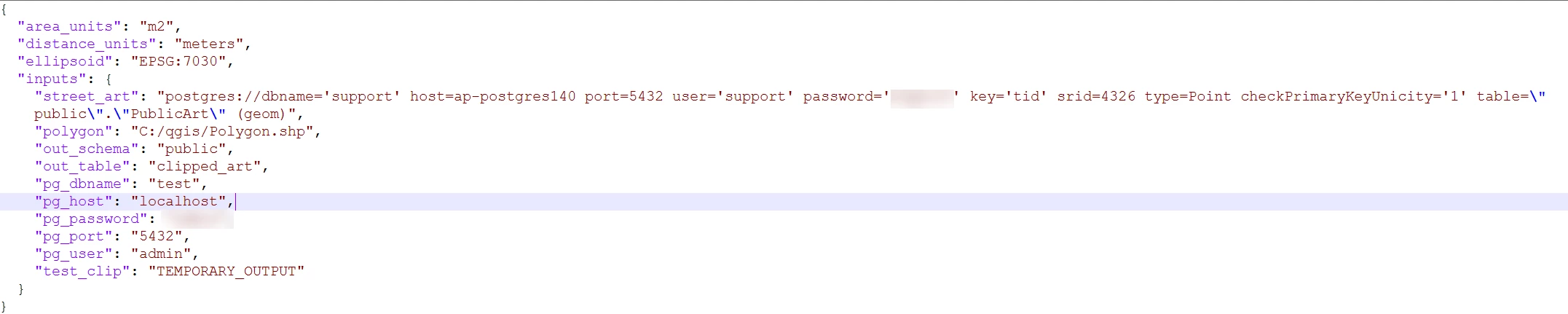
Instead of using Copy as qgis_process command, I used copy as JSON to store the parameters.

I had to make one change to the copied JSON before it would run: adding user='...' and password='...' to the postgres connection string. The copied version doesn't include them (QGIS fills them in from the saved connection when you run in the app), and without them qgis_process failed with "Incorrect parameter value" on that input. I suspect this may be related to the "File could not be found" error you're seeing, since QGIS can't resolve the connection string without credentials. I also used full paths for any file inputs, since there's no open project for QGIS to resolve relative paths against.

For the actual command, I used:

"type "C:\qgis\test1b_model_postgis.json" | "C:\OSGeo4W\bin\qgis_process-qgis.bat" run "C:\Users\dylan.paterson_safe\AppData\Roaming\QGIS\QGIS3\profiles\default\processing\models\model.model3" - --verbose > "C:\qgis\out_fme.txt" 2>&1"

which created the table in the database.


Hope that helps!

Best, 
Dylan.


hbrillon
Contributor
Forum|alt.badge.img+1
  • Author
  • Contributor
  • September 4, 2026

Hi ​@dylan.at.safe  and thank you for your reply. I am now aware that my problem likely has to do with the way Postgres is being authentified. However, embedding credentials in the script is not a good solution for me, as this flow will need to be able to run on any workstation within my team. A cleaner approach would be to have SystemCaller use the connection embedded in my workbench, as I understand those to be specific to each machine.

Your syntax for calling the variables as JSON and qgis_process from the OSGeo4W bin is interesting. I will try that next.