

Best Answer

Read WMS is reading a large fuzzy image, how to read properly with Search Envelope

  • March 15, 2018
  • 2 replies
  • 173 views

dfresh
Forum|alt.badge.img

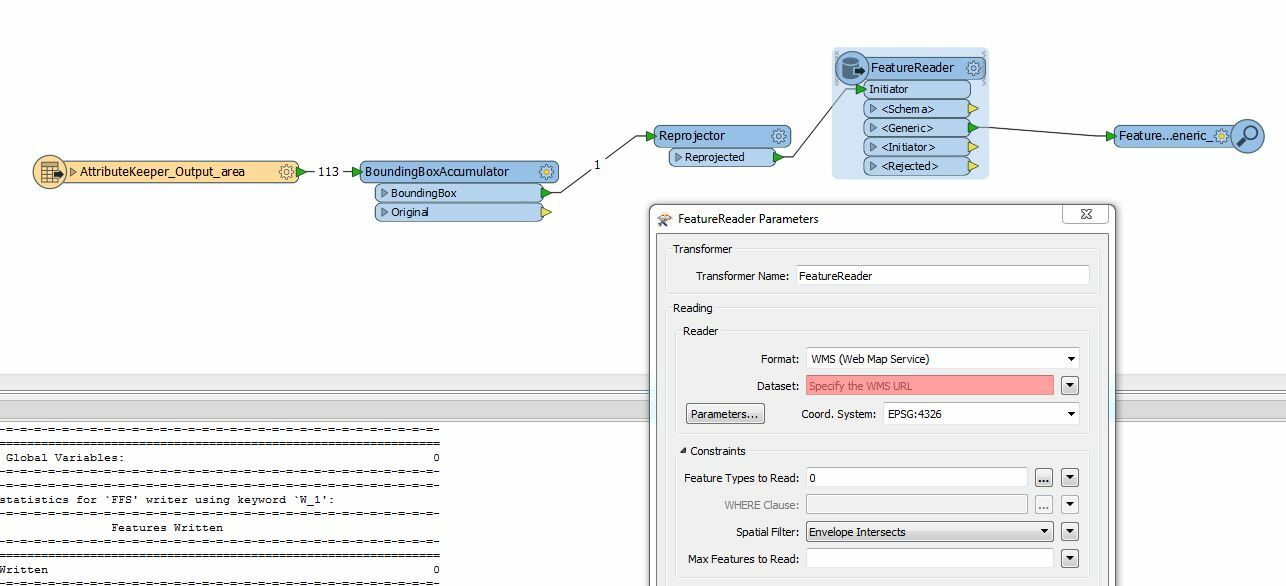
Reading a WMS using Feature Reader WMS, search envelope based on an bounding box "Envelope Intersect", however the resulting Image is just the overview image, how can I make sure i get the image clipped to the best resolution per the bounding box?

what I have tried already

  • ensured coordinate systems are the same
  • attempted to use ImageFetcher, no luck with querying based on coordinates
  • verified the WMS is ok, by viewing in OpenLayers

Any help would be great, Thank you ;)
Best answer by redgeographics

In FeatureReader parameters you can access the WMS parameters, which include map width and map height, you'll need to set those to something appropriate, they determine the output resolution.

This post is closed to further activity.
It may be an old question, an answered question, an implemented idea, or a notification-only post.
Please check post dates before relying on any information in a question or answer.
For follow-up or related questions, please post a new question or idea.
If there is a genuine update to be made, please contact us and request that the post is reopened.

2 replies

redgeographics
Celebrity
Forum|alt.badge.img+62
  • Celebrity
  • Best Answer
  • March 16, 2018

In FeatureReader parameters you can access the WMS parameters, which include map width and map height, you'll need to set those to something appropriate, they determine the output resolution.


dfresh
Forum|alt.badge.img
  • Author
  • March 16, 2018

In FeatureReader parameters you can access the WMS parameters, which include map width and map height, you'll need to set those to something appropriate, they determine the output resolution.

@redgeographics also the image is not clipping properly. I will test the height.\\



