


Question

Multiple from/to statements within one StringReplacer

  • February 20, 2026
  • 5 replies
  • 34 views

scarter
Contributor
Forum|alt.badge.img+10

Hello,


I have a dataset containing an attribute PROP_TYPE. This contains any one of the following values: HOUSE_MNGD; FLAT; DUPLEX_SHRD; MAISONETTE; FLAT_TYPE2.


I want to change these values within the FME Form workspace…


HOUSE_MNGD change to House managed

FLAT change to Flat

DUPLEX_SHRD change to Duplex shared

MAISONETTE change to Maisonette

FLAT_TYPE2 change to Flat type 2


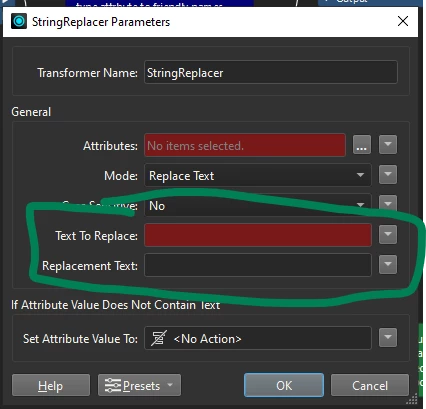
I know I can change a stated value within a StringReplacer. This works well, but it’s only on one of the possible values (e.g: Text To Replace = HOUSE_MNGD; Replacement Text =  House managed).


How can I use the StringReplacer to specify all possible values within the PROP_TYPE attribute and replace them with the values I then specify? And do that in one StringReplacer?


I’ve tried AttributeValueMapper and added in all my possible changes (line by line), but I couldn’t get that to actually change the values in the output. So, I’m hoping I can do it in one command within one StringReplacer.


Thanks,

5 replies

scarter
Contributor
Forum|alt.badge.img+10
  • Author
  • Contributor
  • February 20, 2026

I have now resolved this using the AttributeValueMapper. Thanks


ebygomm
Influencer
Forum|alt.badge.img+46
  • Influencer
  • February 20, 2026

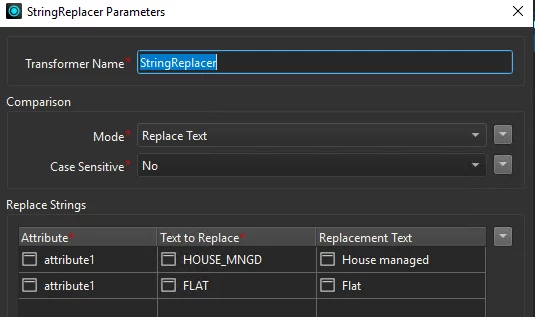
Previously you could use the string pair replacer to do this. In 2025 you can replace multiple strings in the String Replacer


scarter
Contributor
Forum|alt.badge.img+10
  • Author
  • Contributor
  • February 20, 2026

Thanks for that, ​@ebygomm . I actually got it sorted with AttributeValueMapper just 20 minutes after my original post. So, this isn’t needed now.


However, just out of interest, in your StringReplacer screenshot you have multiple ‘replace strings’ lines. How are you generating those additional lines in StringReplacer?. My StringReplacer transformer does not have an option to add additional lines. I can only use the single option presented…


The screenshot of your StringReplacer appears to be different to mine.

Thanks 


ebygomm
Influencer
Forum|alt.badge.img+46
  • Influencer
  • February 20, 2026

It’s new functionality in version 6 of the StringReplacer transformer, it’s not possible in earlier versions.

I’m on FME 2025.2.1.


scarter
Contributor
Forum|alt.badge.img+10
  • Author
  • Contributor
  • February 24, 2026

@ebygomm Ah, OK. I’m on v2024.2. It sounds like a decent improvement to the transformer.