Best Answer

Inserting a filled database table into a template table

  • February 24, 2020
  • 6 replies
  • 38 views

Hello community, I'm quite new to fme and I've been stumbling on something that might be easier than i think. Basically i have a filled access database table and I'm trying to fit these filled records into a template table. This template has less column headers/attribute names than the source. I'm trying to get the values that do no longer have a place to be put into a string. I have managed that, however I'm trying to have this long string be readable by having the attribute value be preceeded by the attribute name. I'll give an example below: (sorry I'm currently only on mobile so writing it out is a bit harder)


Old

Fruits vegetables grains soup

Apple cauliflower bread tomatosoup


New:

Fruits vegetables other

Apple cauliflower grains: bread, soup: tomatosoup


This is just an example. The real table has like 52 fields per records that has to fit into 30. I hope anyone can help me out.

Best answer by takashi

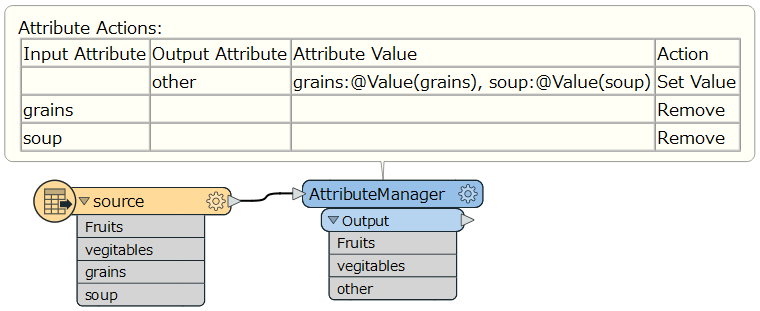
Hi @senteria, If you know which attributes should be integrated into the "other" field, you can just create desired value with AttributeManager (or AttributeCreator or StringConcatenator), as in:

This post is closed to further activity.
It may be an old question, an answered question, an implemented idea, or a notification-only post.
Please check post dates before relying on any information in a question or answer.
For follow-up or related questions, please post a new question or idea.
If there is a genuine update to be made, please contact us and request that the post is reopened.

6 replies

takashi
Celebrity
  • Best Answer
  • February 24, 2020

Hi @senteria, If you know which attributes should be integrated into the "other" field, you can just create desired value with AttributeManager (or AttributeCreator or StringConcatenator), as in:


  • Author
  • February 24, 2020

Hi @senteria, If you know which attributes should be integrated into the "other" field, you can just create desired value with AttributeManager (or AttributeCreator or StringConcatenator), as in:

Thank you so much, Takashi! The answer was in front of me all along but i have been staring myself blindly. I was using a schema reader and had split the attribute names from the source table with a feature merger. I was trying to automate it by having it read the structure and automatically combine the attribute names that do not match the schema be put into a new attribute. Thanks again for the solution. I am not sure what i was attempting is even possible.


takashi
Celebrity
  • February 24, 2020

Hi @senteria, If you know which attributes should be integrated into the "other" field, you can just create desired value with AttributeManager (or AttributeCreator or StringConcatenator), as in:

0684Q00000ArLJAQA3.png

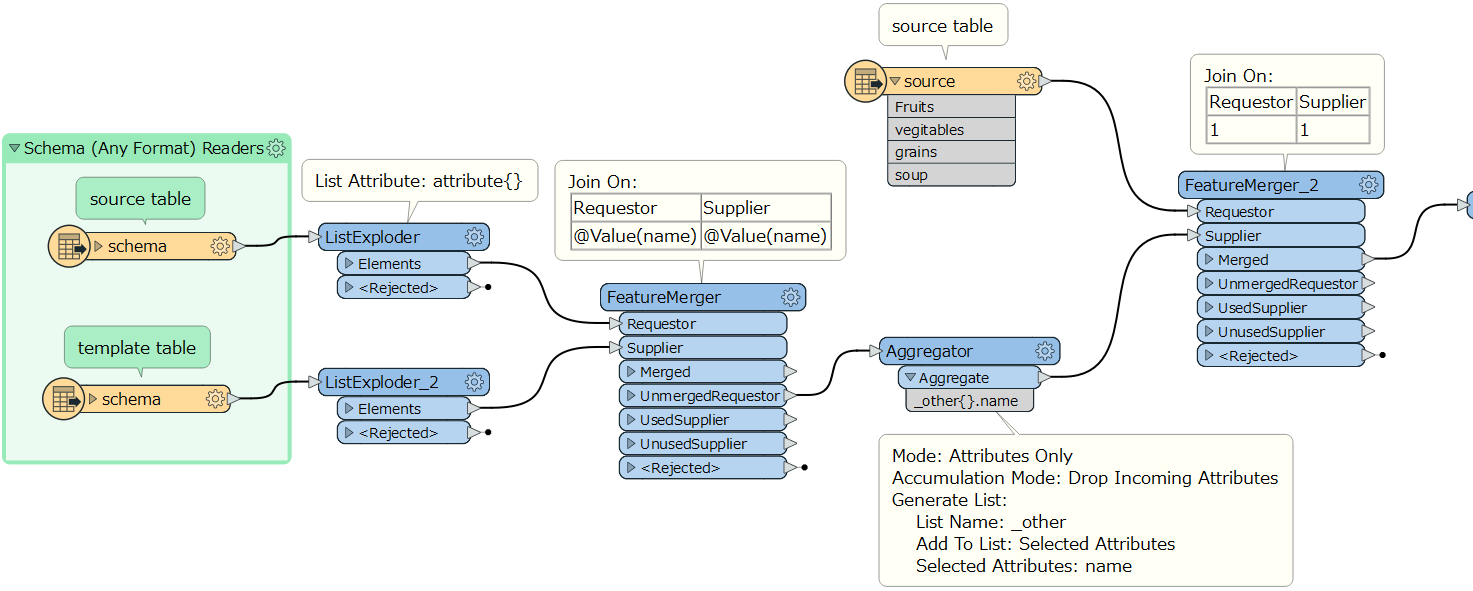
You can use the Schema Reader to read schema from the source table and the template table, create a list attribute (e.g. "_other{}.name") containing attribute names that should be aggregated into the "other" attribute, and then merge the list to every data feature unconditionally, with this workflow for example.

0684Q00000ArMkjQAF.png

After that, however, I think you will have to write a script (Python, Tcl or so) to create the "other" attribute.

PythonCaller Script Example:

def aggregateOthers(feature):
    items = []
    attrs = feature.getAttribute('_other{}.name')
    for attr in attrs:
        value = feature.getAttribute(attr)
        items.append('%s:%s' % (attr, value))
    feature.setAttribute('other', ', '.join(items))


  • Author
  • February 25, 2020

You can use the Schema Reader to read schema from the source table and the template table, create a list attribute (e.g. "_other{}.name") containing attribute names that should be aggregated into the "other" attribute, and then merge the list to every data feature unconditionally, with this workflow for example.

0684Q00000ArMkjQAF.png

After that, however, I think you will have to write a script (Python, Tcl or so) to create the "other" attribute.

PythonCaller Script Example:

def aggregateOthers(feature):
    items = []
    attrs = feature.getAttribute('_other{}.name')
    for attr in attrs:
        value = feature.getAttribute(attr)
        items.append('%s:%s' % (attr, value))
    feature.setAttribute('other', ', '.join(items))


Thank you so much Takashi, this works precisely as I hoped for! Do you per chance know how I can make it so the 'other' attribute string only contains attributes that are filled and not empty? i.e. In case 'grains' has no value, I would like it to be left out in the string. I think the solution for this lies in the python script where it needs a clause line. Unfortunately I have yet to learn python scripting. I suppose it's something along the lines of 'if attribute value has a value' -> combine.

takashi
Celebrity
  • February 25, 2020

Hi @senteria, If you know which attributes should be integrated into the "other" field, you can just create desired value with AttributeManager (or AttributeCreator or StringConcatenator), as in:

0684Q00000ArLJAQA3.png

This script combines "other" attributes except null, missing, empty, and numeric 0. If it's sure that every attribute never stores numeric 0, this script would be enough.

def aggregateOthers(feature):
    items = []
    attrs = feature.getAttribute('_other{}.name')
    for attr in attrs:
        value = feature.getAttribute(attr)
        if value:
            items.append('%s:%s' % (attr, value))
    feature.setAttribute('other', ', '.join(items))


However, if the attribute might contain numeric 0, a bit more strict conditional expression would be required, like this.

def aggregateOthers(feature):
    items = []
    attrs = feature.getAttribute('_other{}.name')
    for attr in attrs:
        value = feature.getAttribute(attr)
        if value != None and value != '':
            items.append('%s:%s' % (attr, value))
    feature.setAttribute('other', ', '.join(items))


  • Author
  • February 25, 2020

This script combines "other" attributes except null, missing, empty, and numeric 0. If it's sure that every attribute never stores numeric 0, this script would be enough.

def aggregateOthers(feature):
    items = []
    attrs = feature.getAttribute('_other{}.name')
    for attr in attrs:
        value = feature.getAttribute(attr)
        if value:
            items.append('%s:%s' % (attr, value))
    feature.setAttribute('other', ', '.join(items))


However, if the attribute might contain numeric 0, a bit more strict conditional expression would be required, like this.

def aggregateOthers(feature):
    items = []
    attrs = feature.getAttribute('_other{}.name')
    for attr in attrs:
        value = feature.getAttribute(attr)
        if value != None and value != '':
            items.append('%s:%s' % (attr, value))
    feature.setAttribute('other', ', '.join(items))


This is perfect and precisely what I was looking for. Thank you very much for your time and help. Greatly appreciated.