

Question

How to read the columns name from a file into a list?

  • June 8, 2017
  • 3 replies
  • 448 views

Forum|alt.badge.img

I need to read from a file with multiple records only the columns name that start with a prefix and convert them into a list to do some processing after with those column names. This is what I've got so far
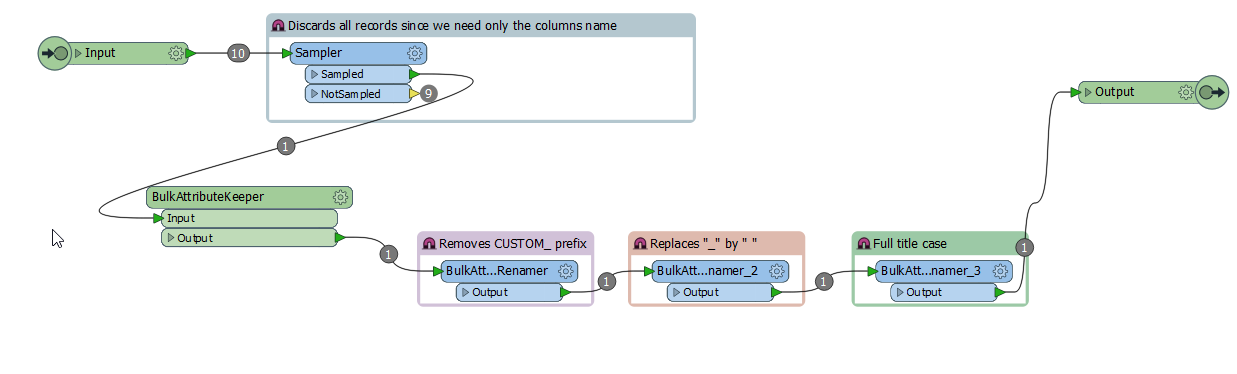
This is the output with the column names that I need. But I need to convert those into a list to do some processing for every column name. How could I achieve that?

Thanks


This post is closed to further activity.
It may be an old question, an answered question, an implemented idea, or a notification-only post.
Please check post dates before relying on any information in a question or answer.
For follow-up or related questions, please post a new question or idea.
If there is a genuine update to be made, please contact us and request that the post is reopened.

3 replies

jdh
Contributor
Forum|alt.badge.img+40
  • Contributor
  • June 8, 2017

I would probably use a pythonCaller and the getAllAttributeNames() method.


takashi
Celebrity
  • June 8, 2017

Hi @rrdlpl, other than scripting, there are two possible ways to extract attribute names.

  • Explode a data feature with the AttributeExploder.
  • or, read the schema with the Schema (Any Format) reader to get "attribute{}.name" list.

[Addition] If you read the source dataset with a FeatureReader, schema features having "attribute{}.name" list will be output for each feature type via the <Schema> port, by default. The schema features are equivalent to the schema features read by the Schema (Any Format) reader.


mark2atsafe
Safer
Forum|alt.badge.img+59

To create a list I would use a Counter to create a unique ID (if you don't have one already) and an Aggregator transformer with group-by set to the ID. Make sure the "Generate List" option is set to yes (check the box). Then you should get the list you want.

Pity it doesn't allow a regular expression to define which attributes to add - then you could have checked for your prefix and created a list, all in one.








