




Solved

How to convert ESRI's datetime to something FME can consume

  • June 24, 2026
  • 2 replies
  • 11 views

louielou1234
Contributor
Forum|alt.badge.img+5

Hi There,


I am trying to consume and Arcgis date field in Form but FME can seem to understand the datatype.  Specifically, the Date Converter transformation just errors out (please see attached).  I have tried every option from the drop down menu and have even tried using a String Convertor transformer and the Attribute Creator to (successfully) convert the field to a Datetime field in FME but the Date Converter can not read and I need to use this datatype for downstream use (I want to compare how new records have been added to the dataset by comparing this date field to the current time).  Any help would be super appreciated.  Thanks!  Louie
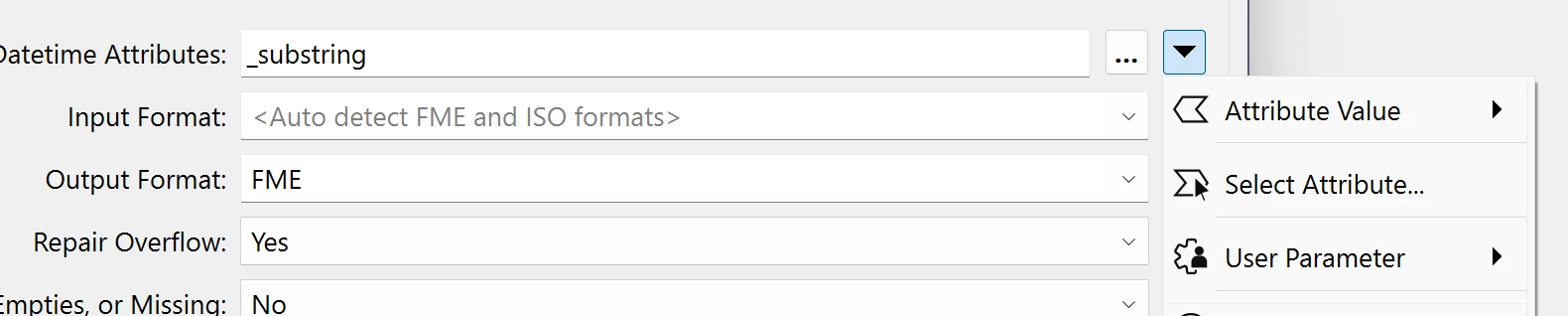
Best answer by hkingsbury

You’ve fallen into one of the ‘gotchas’ with some transformers, I’m guessing you chose ‘Attribute Value’?


the ‘@Value()’ tells FME to first parse that function to return the value of _substring, that is then used by the transformer as the attribute to look for.

The order of operations is effectively:

  1. Parse ‘@Value(_substring)’ function - returns 20230308
  2. Use 20230308 as the attribute name that contains the datetime
  3. Look for the 20230308 attribute on the feature and extract the value
  4. As that attribute doesn’t exist (<missing>), it errors

In your case, you want to use the ‘Select Attribute...’ option. That will then skip the function step and use the attribute you selected

2 replies

hkingsbury
Celebrity
Forum|alt.badge.img+73
  • Celebrity
  • Best Answer
  • June 24, 2026

You’ve fallen into one of the ‘gotchas’ with some transformers, I’m guessing you chose ‘Attribute Value’?


the ‘@Value()’ tells FME to first parse that function to return the value of _substring, that is then used by the transformer as the attribute to look for.

The order of operations is effectively:

  1. Parse ‘@Value(_substring)’ function - returns 20230308
  2. Use 20230308 as the attribute name that contains the datetime
  3. Look for the 20230308 attribute on the feature and extract the value
  4. As that attribute doesn’t exist (<missing>), it errors

In your case, you want to use the ‘Select Attribute...’ option. That will then skip the function step and use the attribute you selected


louielou1234
Contributor
Forum|alt.badge.img+5
  • Author
  • Contributor
  • June 25, 2026

YES!...that worked.  Thank you for the explanation and direction on this.  Much appreaciated!



