Question

?How do I create this output? (In a writer: have an attribute with one value / other attributes with multiple values)

  • February 12, 2018
  • 7 replies
  • 41 views

Forum|alt.badge.img

Hi all,

I'm having a hard time describing the issue I'm facing so I'll just show what output I need.

I need two writers:


The first writer contains POI_NAME and POI IDs. (unique values)


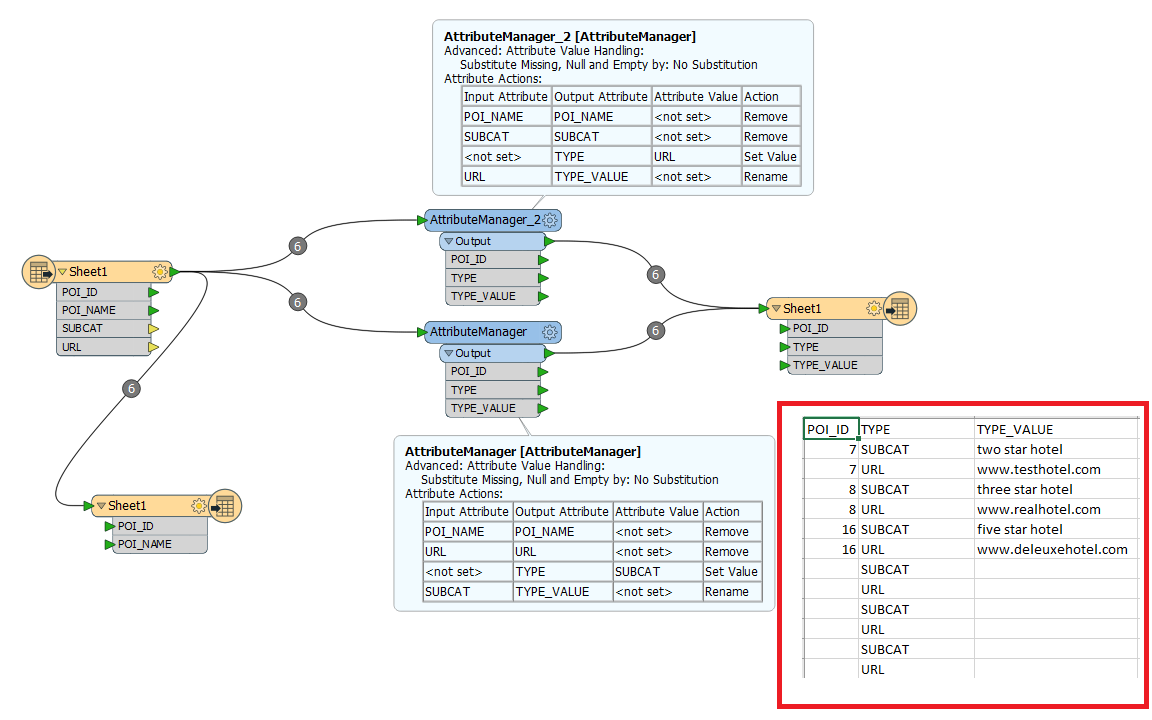
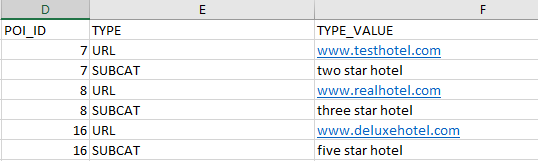
The second writer should output the POI IDs found in the first writer but with two additional attributes TYPE / TYPE_VALUE that can hold various strings.


(Basically I have no clue on how to populate POI_ID with identical values but TYPE / TYPE_VALUE with different values)

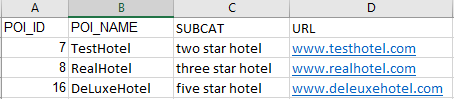
Reader:
First writer:
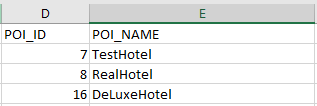
Second writer:
 

Thanks,

Ed

This post is closed to further activity.
It may be an old question, an answered question, an implemented idea, or a notification-only post.
Please check post dates before relying on any information in a question or answer.
For follow-up or related questions, please post a new question or idea.
If there is a genuine update to be made, please contact us and request that the post is reopened.

7 replies

oscard
Influencer
Forum|alt.badge.img+22
  • Influencer
  • February 12, 2018
Hi.


Could you tell us a little bit about the source data? It would be easier to help you if we knew the schema of the information you are reading.


Forum|alt.badge.img
  • Author
  • February 12, 2018
Hi.


Could you tell us a little bit about the source data? It would be easier to help you if we knew the schema of the information you are reading.


Hi @oscard ,


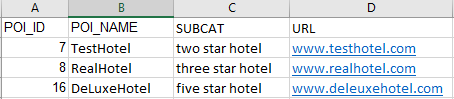
Thanks for the fast response. I can't show you the actual source data but it contains all data and the format looks like this:


In short the reader contains all data that needs to be written to two writers. Cheers,


Ed

oscard
Influencer
Forum|alt.badge.img+22
  • Influencer
  • February 12, 2018

An easy solution to get the second writer could be with two AttributeManager.

Join the reader with one of them:

- Keep POI_ID and SUBCAT.

- Create the attribute TYPE and give it the value "SUBCAT"

- Rename "SUBCAT" to "TYPE_VALUE"

Join the reader with the other one:

- Keep POI_ID and URL

- Create the attribute TYPE and give it the value "URL"

- Rename "URL" to "TYPE_VALUE"

Join both AttributeManagers with the second writer.

I think that should work.


Forum|alt.badge.img
  • Author
  • February 12, 2018

An easy solution to get the second writer could be with two AttributeManager.

Join the reader with one of them:

- Keep POI_ID and SUBCAT.

- Create the attribute TYPE and give it the value "SUBCAT"

- Rename "SUBCAT" to "TYPE_VALUE"

Join the reader with the other one:

- Keep POI_ID and URL

- Create the attribute TYPE and give it the value "URL"

- Rename "URL" to "TYPE_VALUE"

Join both AttributeManagers with the second writer.

I think that should work.

Almost - but I'm getting duplicated values in the TYPE attribute... :-(


Did I do something wrong?


oscard
Influencer
Forum|alt.badge.img+22
  • Influencer
  • February 12, 2018

Almost - but I'm getting duplicated values in the TYPE attribute... :-(


Did I do something wrong?


I guess you mean you are getting empty values for POI_ID and TYPE_VALUE in some rows.


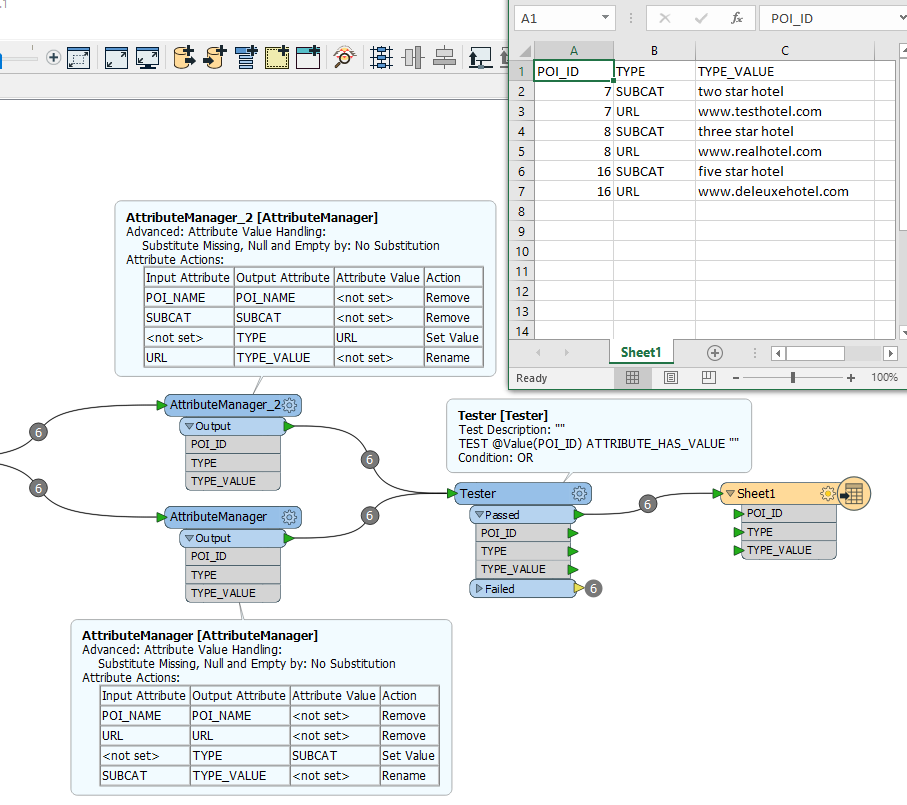
I bet the reader is reading empty rows. Add a Tester after the reader:


- If "POI_ID" has value --> Passed


- Otherwise --> Failed (do nothing with the elements of this port)


Forum|alt.badge.img
  • Author
  • February 12, 2018

The empty values are not in the reader so I've put the tester just before the writer - it works now!

Thanks for your help and fast response.

Best,

Ed


oscard
Influencer
Forum|alt.badge.img+22
  • Influencer
  • February 12, 2018

The empty values are not in the reader so I've put the tester just before the writer - it works now!

Thanks for your help and fast response.

Best,

Ed

Glad to know you could resolve it :)